Skip to content
  • Categories
  • Recent
  • Tags
  • Popular
  • Users
  • Groups
  • Search
  • Get Qt Extensions
  • Unsolved
Collapse
Brand Logo
  1. Home
  2. Qt Development
  3. Qt Creator and other tools
  4. Another "now what ?"
Qt 6.11 is out! See what's new in the release blog

Another "now what ?"

Scheduled Pinned Locked Moved Unsolved Qt Creator and other tools
4 Posts 2 Posters 625 Views 2 Watching
  • Oldest to Newest
  • Newest to Oldest
  • Most Votes
Reply
  • Reply as topic
Log in to reply
This topic has been deleted. Only users with topic management privileges can see it.
  • A Offline
    A Offline
    Anonymous_Banned275
    wrote on last edited by
    #1

    I have decided to "downgrade" from 6.0.2 back to QtCreator with operational / working Bluetooth module.

    The download of 5.15 went OK.

    Without selecting a project I ended up with displaying previously working 6.0.2. project.

    Went back to "edit" mode and made numerous fruitless attempts to build / run etc. the only currently active project ( previously working in 6.0.2 ).
    NONE OF THE STANDARD BUILD OPTIONS ARE AVAILABLE TO SELECT / EXECUTE /RUN , ALL GRAYED OUT !

    What does Options ->Kits->Kits "replacement for "desktop Qt 6.0.1 ...." telling me ?

    BTW my last working project was Qt 6.0.2 , not 6.0.1.
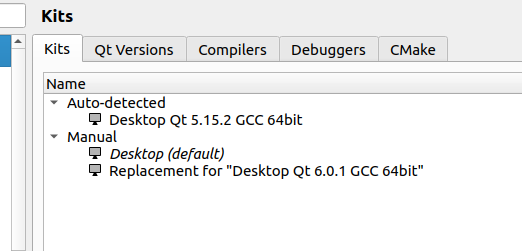
    9f0aa0ab-8641-41a7-9e7f-d3924b5cbfa7-image.png

    Any suggestion in getting my new QtCreator to ENABLE to build my formerly working project.

    PS
    I really does not matter , to me , to know why Qt numbering scheme is what it is . I need working QtCreator.

    JKSHJ 1 Reply Last reply
    0
    • A Anonymous_Banned275

      I have decided to "downgrade" from 6.0.2 back to QtCreator with operational / working Bluetooth module.

      The download of 5.15 went OK.

      Without selecting a project I ended up with displaying previously working 6.0.2. project.

      Went back to "edit" mode and made numerous fruitless attempts to build / run etc. the only currently active project ( previously working in 6.0.2 ).
      NONE OF THE STANDARD BUILD OPTIONS ARE AVAILABLE TO SELECT / EXECUTE /RUN , ALL GRAYED OUT !

      What does Options ->Kits->Kits "replacement for "desktop Qt 6.0.1 ...." telling me ?

      BTW my last working project was Qt 6.0.2 , not 6.0.1.

      9f0aa0ab-8641-41a7-9e7f-d3924b5cbfa7-image.png

      Any suggestion in getting my new QtCreator to ENABLE to build my formerly working project.

      PS
      I really does not matter , to me , to know why Qt numbering scheme is what it is . I need working QtCreator.

      JKSHJ Offline
      JKSHJ Offline
      JKSH
      Moderators
      wrote on last edited by
      #2

      @AnneRanch said in Another "now what ?":

      NONE OF THE STANDARD BUILD OPTIONS ARE AVAILABLE TO SELECT / EXECUTE /RUN , ALL GRAYED OUT !

      Tell us which kit(s) you have enabled for this project. Screenshot at https://doc.qt.io/qtcreator/creator-configuring-projects.html

      Qt Doc Search for browsers: forum.qt.io/topic/35616/web-browser-extension-for-improved-doc-searches

      A 1 Reply Last reply
      0
      • JKSHJ JKSH

        @AnneRanch said in Another "now what ?":

        NONE OF THE STANDARD BUILD OPTIONS ARE AVAILABLE TO SELECT / EXECUTE /RUN , ALL GRAYED OUT !

        Tell us which kit(s) you have enabled for this project. Screenshot at https://doc.qt.io/qtcreator/creator-configuring-projects.html

        A Offline
        A Offline
        Anonymous_Banned275
        wrote on last edited by
        #3

        @JKSH Did not I posted that in original post ?
        I do not get what else you are asking for.

        I do not have windows likes yu are referring too.

        Is Windoze and Linux really that much different to download and use ?

        Is this part of the issue ?
        Repost

        What does Options ->Kits->Kits "replacement for "desktop Qt 6.0.1 ...." telling me ?

        I have deleted "Kits "replacement for "desktop Qt 6.0.1 ...." AND NOW i CAN BUILD THE PROJECT.

        JKSHJ 1 Reply Last reply
        0
        • A Anonymous_Banned275

          @JKSH Did not I posted that in original post ?
          I do not get what else you are asking for.

          I do not have windows likes yu are referring too.

          Is Windoze and Linux really that much different to download and use ?

          Is this part of the issue ?
          Repost

          What does Options ->Kits->Kits "replacement for "desktop Qt 6.0.1 ...." telling me ?

          I have deleted "Kits "replacement for "desktop Qt 6.0.1 ...." AND NOW i CAN BUILD THE PROJECT.

          JKSHJ Offline
          JKSHJ Offline
          JKSH
          Moderators
          wrote on last edited by
          #4

          @AnneRanch said in Another "now what ?":

          Did not I posted that in original post ?

          No, you did not.

          You showed us which kits are available on your PC. You showed us that you had Qt 6.0.1 and Qt 5.15.2 installed

          However, you did not show us which kit(s) were selected for your project. Different projects can choose different kits. For example, one project can select Qt 6.0.1, while another project can select Qt 5.15.2.

          Qt Doc Search for browsers: forum.qt.io/topic/35616/web-browser-extension-for-improved-doc-searches

          1 Reply Last reply
          2

          • Login

          • Login or register to search.
          • First post
            Last post
          0
          • Categories
          • Recent
          • Tags
          • Popular
          • Users
          • Groups
          • Search
          • Get Qt Extensions
          • Unsolved