Skip to content
  • Categories
  • Recent
  • Tags
  • Popular
  • Users
  • Groups
  • Search
  • Get Qt Extensions
  • Unsolved
Collapse
Brand Logo
  1. Home
  2. Qt Development
  3. General and Desktop
  4. How can i adjust QListWidgetItem's size according to contents?
Forum Updated to NodeBB v4.3 + New Features

How can i adjust QListWidgetItem's size according to contents?

Scheduled Pinned Locked Moved Solved General and Desktop
5 Posts 3 Posters 906 Views 1 Watching
  • Oldest to Newest
  • Newest to Oldest
  • Most Votes
Reply
  • Reply as topic
Log in to reply
This topic has been deleted. Only users with topic management privileges can see it.
  • W Offline
    W Offline
    Wgxzzzzzzc
    wrote on last edited by
    #1

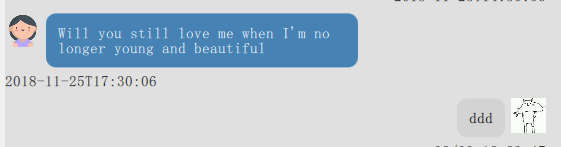
    I want finish a work that use QTextEdit to make news bubble and then i use setItemWidget(QListWidgetItem *item, QWidget *widge). I want adjust my QListWidgetItem accoding to content, therefor i use setSizeHint(QTextEdit) but i found that every item's width is similiar.
    what effect i want is shown in picture.
    捕获.PNG

    1 Reply Last reply
    0
    • W Wgxzzzzzzc

      @SGaist sorry, The message bubble is more appropriate than news bubble. this is chat room program and message bubble is a box loading user's message.
      Maybe this picture is clearer:捕获.PNG
      the reason of using QTextEdit is that i want send picture. but now problem is that i can't change QTextEdit's width or height according to its content.

      JonBJ Online
      JonBJ Online
      JonB
      wrote on last edited by
      #4

      @Wgxzzzzzzc
      Using a QTextEdit --- or other widget --- for each message leaves the list full of (editable) widgets, over time there might be a hundred widgets. This is "expensive". @SGaist is reminding you that the normal way of handling lists/tables of items is via QStyledItemDelegate, which can draw the item to look like a widget but does not consume any resources like an actual widget does.

      What picture are you wanting to send which demands a QTextEdit? I'm sure QStyledItemDelegate can draw a picture just as it draws other widgety stuff.

      W 1 Reply Last reply
      0
      • SGaistS Offline
        SGaistS Offline
        SGaist
        Lifetime Qt Champion
        wrote on last edited by
        #2

        Hi,

        How many of these News bubbles are you going to create ?

        Depending on that, you should rather move to QStyledItemDelegate.

        Interested in AI ? www.idiap.ch
        Please read the Qt Code of Conduct - https://forum.qt.io/topic/113070/qt-code-of-conduct

        W 1 Reply Last reply
        1
        • SGaistS SGaist

          Hi,

          How many of these News bubbles are you going to create ?

          Depending on that, you should rather move to QStyledItemDelegate.

          W Offline
          W Offline
          Wgxzzzzzzc
          wrote on last edited by
          #3

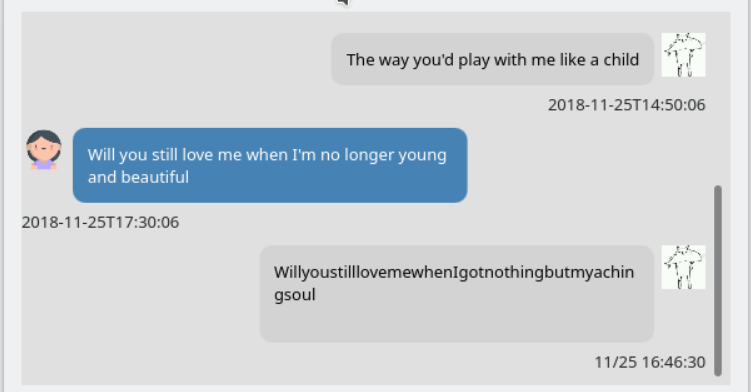
          @SGaist sorry, The message bubble is more appropriate than news bubble. this is chat room program and message bubble is a box loading user's message.
          Maybe this picture is clearer:捕获.PNG
          the reason of using QTextEdit is that i want send picture. but now problem is that i can't change QTextEdit's width or height according to its content.

          JonBJ 1 Reply Last reply
          0
          • W Wgxzzzzzzc

            @SGaist sorry, The message bubble is more appropriate than news bubble. this is chat room program and message bubble is a box loading user's message.
            Maybe this picture is clearer:捕获.PNG
            the reason of using QTextEdit is that i want send picture. but now problem is that i can't change QTextEdit's width or height according to its content.

            JonBJ Online
            JonBJ Online
            JonB
            wrote on last edited by
            #4

            @Wgxzzzzzzc
            Using a QTextEdit --- or other widget --- for each message leaves the list full of (editable) widgets, over time there might be a hundred widgets. This is "expensive". @SGaist is reminding you that the normal way of handling lists/tables of items is via QStyledItemDelegate, which can draw the item to look like a widget but does not consume any resources like an actual widget does.

            What picture are you wanting to send which demands a QTextEdit? I'm sure QStyledItemDelegate can draw a picture just as it draws other widgety stuff.

            W 1 Reply Last reply
            0
            • JonBJ JonB

              @Wgxzzzzzzc
              Using a QTextEdit --- or other widget --- for each message leaves the list full of (editable) widgets, over time there might be a hundred widgets. This is "expensive". @SGaist is reminding you that the normal way of handling lists/tables of items is via QStyledItemDelegate, which can draw the item to look like a widget but does not consume any resources like an actual widget does.

              What picture are you wanting to send which demands a QTextEdit? I'm sure QStyledItemDelegate can draw a picture just as it draws other widgety stuff.

              W Offline
              W Offline
              Wgxzzzzzzc
              wrote on last edited by
              #5

              @JonB Ok, I know your meaning and i found out where the problem is. thank your reminder.

              1 Reply Last reply
              0

              • Login

              • Login or register to search.
              • First post
                Last post
              0
              • Categories
              • Recent
              • Tags
              • Popular
              • Users
              • Groups
              • Search
              • Get Qt Extensions
              • Unsolved