Skip to content
  • Categories
  • Recent
  • Tags
  • Popular
  • Users
  • Groups
  • Search
  • Get Qt Extensions
  • Unsolved
Collapse
Brand Logo
  1. Home
  2. Qt Development
  3. Qt for Python
  4. Line up strings in QLabel

Line up strings in QLabel

Scheduled Pinned Locked Moved Solved Qt for Python
3 Posts 2 Posters 511 Views
  • Oldest to Newest
  • Newest to Oldest
  • Most Votes
Reply
  • Reply as topic
Log in to reply
This topic has been deleted. Only users with topic management privileges can see it.
  • Black CatB Offline
    Black CatB Offline
    Black Cat
    wrote on last edited by
    #1

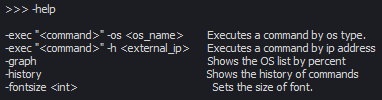
    Is possible to line up the strings in the QLabel? I've this menu help, but when I change the size of font the strings misaligned.
    5fcd6e9f-2c5a-4307-8849-610adfd7b971-image.png

    Changing the fontsize of QLabel to 20

    525b5a65-bfd5-481d-90ab-d9911fed47b7-image.png

    JonBJ 1 Reply Last reply
    0
    • Black CatB Black Cat

      Is possible to line up the strings in the QLabel? I've this menu help, but when I change the size of font the strings misaligned.

      5fcd6e9f-2c5a-4307-8849-610adfd7b971-image.png

      Changing the fontsize of QLabel to 20

      525b5a65-bfd5-481d-90ab-d9911fed47b7-image.png

      JonBJ Offline
      JonBJ Offline
      JonB
      wrote on last edited by
      #2

      @Black-Cat
      I would use a monospace font! :)

      Black CatB 1 Reply Last reply
      3
      • JonBJ JonB

        @Black-Cat
        I would use a monospace font! :)

        Black CatB Offline
        Black CatB Offline
        Black Cat
        wrote on last edited by
        #3

        @JonB said in Line up strings in QLabel:

        monospace

        Nice, ty

        1 Reply Last reply
        0

        • Login

        • Login or register to search.
        • First post
          Last post
        0
        • Categories
        • Recent
        • Tags
        • Popular
        • Users
        • Groups
        • Search
        • Get Qt Extensions
        • Unsolved