Skip to content
  • Categories
  • Recent
  • Tags
  • Popular
  • Users
  • Groups
  • Search
  • Get Qt Extensions
  • Unsolved
Collapse
Brand Logo
  1. Home
  2. Qt Development
  3. General and Desktop
  4. “Bold” style is not available for “Sans Serif” font on QT5
Forum Updated to NodeBB v4.3 + New Features

“Bold” style is not available for “Sans Serif” font on QT5

Scheduled Pinned Locked Moved Unsolved General and Desktop
1 Posts 1 Posters 176 Views
  • Oldest to Newest
  • Newest to Oldest
  • Most Votes
Reply
  • Reply as topic
Log in to reply
This topic has been deleted. Only users with topic management privileges can see it.
  • J Offline
    J Offline
    JieLiu
    wrote on last edited by
    #1

    We just moved our application from QT4 to QT5. We found the "Bold" style is not avialble for "Sans Serif" font on QT5. I can tell from the QFontDialog which looks below:
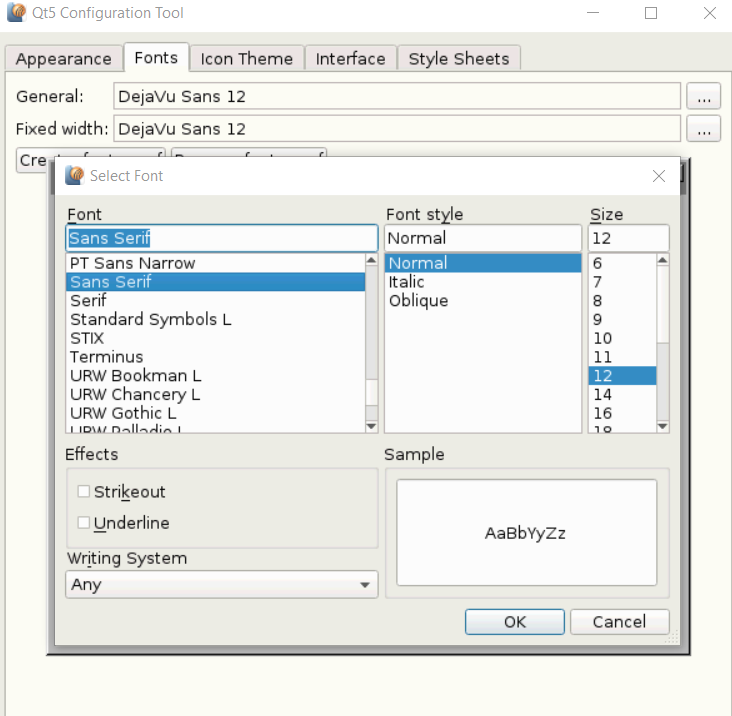
    649ea674-ca06-45bb-9c77-4746b35cb435-image.png
    I also use the following code to dump all available styles under "Sans Serif"

    QFontDatabase db;
    auto list = db.styles("Sans Serif");
    for(auto& l : list)
        std::cout << l << " ";
    

    I got the same list which is Normal, Italic and Oblique. However I can see the Bold and Bold Italic options on QT4. My question is how the mapping from font to font style is implemented. Am I able to configure something to make the "Bold" avalialble for "Sans Serif" font in QT5.

    1 Reply Last reply
    0

    • Login

    • Login or register to search.
    • First post
      Last post
    0
    • Categories
    • Recent
    • Tags
    • Popular
    • Users
    • Groups
    • Search
    • Get Qt Extensions
    • Unsolved