
Skip to content
  • Categories
  • Recent
  • Tags
  • Popular
  • Users
  • Groups
  • Search
  • Get Qt
  • Unsolved
Collapse
qtws26_logo

The Qt Event of the Year: Qt World Summit 2026

Save Your Spot >
Brand Logo
  1. Home
  2. Qt Development
  3. General and Desktop
  4. QComboBox aligment issue
Qt 6.12 LTS is out! See what's new in the release blog

QComboBox aligment issue

Scheduled Pinned Locked Moved Unsolved General and Desktop
9 Posts 3 Posters 2.7k Views
  • Oldest to Newest
  • Newest to Oldest
  • Most Votes
Reply
  • Reply as topic
Log in to reply
This topic has been deleted. Only users with topic management privileges can see it.
  • AndyBriceA Offline
    AndyBriceA Offline
    AndyBrice
    wrote on last edited by
    #1

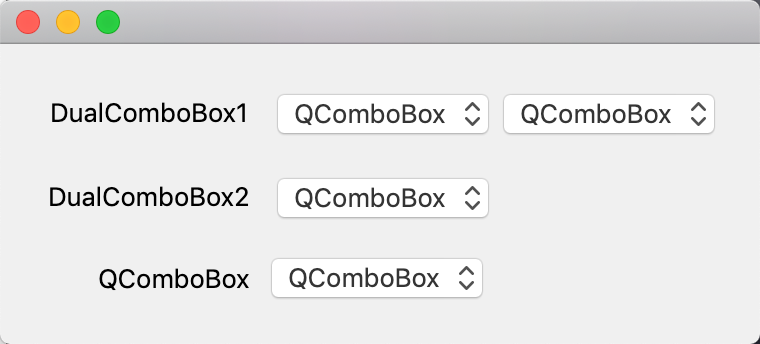
    I have a QWidget that contains a QHBoxLayout, that layout contains 2 QComboBoxes. On Mac this widget does not correctly align horizontally with another QComboBox in the same QFormLayout. Even if one of the QComboBoxes in the QWidget is hidden. It is only a few pixels out, but it looks ugly.


    vertical-alignment-issue2.png
    vertical-alignment-issue.png

    WriteModeWidget::WriteModeWidget( QWidget* parent )
    : QWidget( parent )
    {
        QSizePolicy sp = sizePolicy();
        sp.setHorizontalPolicy( QSizePolicy::Preferred );
        sp.setHorizontalStretch( 1 );
        setSizePolicy( sp );
    
        QHBoxLayout* hLayout = new QHBoxLayout( this );
        hLayout->setSpacing( 1 );
        hLayout->setContentsMargins( 0, 0, 0, 0 );
    
        m_writeModeCombo = new QComboBox( this );
        hLayout->addWidget( m_writeModeCombo );
    
        m_fileSheetComboBox = new QComboBox( this );
        hLayout->addWidget( m_fileSheetComboBox );
    }
    

    I've tried setting the QWidget margin and (using a stylesheet) padding. But that doesn't fix it. It looks fine on Windows. Any ideas?

    1 Reply Last reply
    0
    • Christian EhrlicherC Offline
      Christian EhrlicherC Offline
      Christian Ehrlicher
      Lifetime Qt Champion
      wrote on last edited by
      #2

      You have to set the margins of your WriteModeWidget to 0

      Qt Online Installer direct download: https://download.qt.io/official_releases/online_installers/
      Visit the Qt Academy at https://academy.qt.io/catalog

      1 Reply Last reply
      0
      • AndyBriceA Offline
        AndyBriceA Offline
        AndyBrice
        wrote on last edited by
        #3

        I tried calling:

        setContents( 0, 0, 0, 0 );
        

        In the WriteModeWidget constructor. But it didn't seem to make any difference.

        1 Reply Last reply
        0
        • Christian EhrlicherC Offline
          Christian EhrlicherC Offline
          Christian Ehrlicher
          Lifetime Qt Champion
          wrote on last edited by
          #4

          @AndyBrice said in QComboBox aligment issue:

          setContents( 0, 0, 0, 0 );

          QWidget has no such function.

          Maybe there is another widget involved - we can't see it. Please provide a minimal, compilable example so we can take a better look on it.

          Qt Online Installer direct download: https://download.qt.io/official_releases/online_installers/
          Visit the Qt Academy at https://academy.qt.io/catalog

          AndyBriceA 1 Reply Last reply
          0
          • Christian EhrlicherC Christian Ehrlicher

            @AndyBrice said in QComboBox aligment issue:

            setContents( 0, 0, 0, 0 );

            QWidget has no such function.

            Maybe there is another widget involved - we can't see it. Please provide a minimal, compilable example so we can take a better look on it.

            AndyBriceA Offline
            AndyBriceA Offline
            AndyBrice
            wrote on last edited by
            #5

            @Christian-Ehrlicher Sorry, I meant:

            QWidget::setContentsMargins( 0, 0, 0, 0 );

            1 Reply Last reply
            0
            • AndyBriceA Offline
              AndyBriceA Offline
              AndyBrice
              wrote on last edited by
              #6

              Here is a simplified version of the code:

              #include "mainwidget.h"
              #include <QApplication>
              int main(int argc, char *argv[])
              {
                  QApplication a(argc, argv);
                  MainWidget w( nullptr );
                  w.show();
                  return a.exec();
              }
              
              #include <QWidget>
              class MainWidget : public QWidget
              {
                  Q_OBJECT
              public:
                  MainWidget( QWidget *parent );
              };
              
              #include "mainwidget.h"
              #include <QFormLayout>
              #include <QComboBox>
              class DualComboBox : public QWidget
              {
              public:
                  DualComboBox( QWidget* parent, bool showSecondCombo );
               };
              
              DualComboBox::DualComboBox( QWidget* parent )
              : QWidget( parent )
              {
                      QHBoxLayout* hLayout = new QHBoxLayout( this );
                      hLayout->setSpacing( 1 );
                      hLayout->setContentsMargins( 0, 0, 0, 0 );
                  
                      QComboBox* combo1 = new QComboBox( this );
                      combo1->addItem( "QComboBox" );
                      hLayout->addWidget( combo1 );
                  
                      QComboBox* combo2 = new QComboBox( this );
                      combo2->addItem( "QComboBox" );
                      hLayout->addWidget( combo2 );
                  
                      if ( !showSecondCombo )
                          combo2->hide();
              }
              
              MainWidget::MainWidget( QWidget *parent )
                  : QWidget( parent )
              {
                      QFormLayout* fLaypout = new QFormLayout( this );
                      fLaypout->setFieldGrowthPolicy( QFormLayout::ExpandingFieldsGrow );
                  
                      DualComboBox* dualComboBox1 = new DualComboBox( this, true );
                      fLaypout->addRow( "DualComboBox1", dualComboBox1 );
                  
                      DualComboBox* dualComboBox2 = new DualComboBox( this, false );
                      fLaypout->addRow( "DualComboBox2", dualComboBox2 );
                  
                      QComboBox* combo = new QComboBox( this );
                      combo->addItem( "QComboBox" );
                      fLaypout->addRow( "QComboBox", combo );
              }
              

              This is what it looks like on Mac. Notice that the left alignment is not quite right.
              combo.png

              1 Reply Last reply
              0
              • Christian EhrlicherC Offline
                Christian EhrlicherC Offline
                Christian Ehrlicher
                Lifetime Qt Champion
                wrote on last edited by
                #7

                The code had a little glitch. Did you try it with a QGridLayout?
                It does work fine on Linux therefore I would suggest you to create a Qt bug entry (if possible, otherwise I can do it for you). But please try with QGridlayout first to see if it's the layout component.

                #include <QtWidgets>
                
                class DualComboBox : public QWidget
                {
                public:
                    DualComboBox( QWidget* parent, bool showSecondCombo )
                        : QWidget( parent )
                    {
                        QHBoxLayout* hLayout = new QHBoxLayout( this );
                        hLayout->setSpacing( 1 );
                        hLayout->setContentsMargins( 0, 0, 0, 0 );
                
                        QComboBox* combo1 = new QComboBox( this );
                        combo1->addItem( "QComboBox" );
                        hLayout->addWidget( combo1 );
                
                        QComboBox* combo2 = new QComboBox( this );
                        combo2->addItem( "QComboBox" );
                        hLayout->addWidget( combo2 );
                
                        if ( !showSecondCombo )
                            combo2->hide();
                    }
                };
                
                class MainWidget : public QWidget
                {
                public:
                    MainWidget( QWidget *parent )
                        : QWidget( parent )
                    {
                        QFormLayout* fLaypout = new QFormLayout( this );
                        fLaypout->setFieldGrowthPolicy( QFormLayout::ExpandingFieldsGrow );
                
                        DualComboBox* dualComboBox1 = new DualComboBox( this, true );
                        fLaypout->addRow( "DualComboBox1", dualComboBox1 );
                
                        DualComboBox* dualComboBox2 = new DualComboBox( this, false );
                        fLaypout->addRow( "DualComboBox2", dualComboBox2 );
                
                        QComboBox* combo = new QComboBox( this );
                        combo->addItem( "QComboBox" );
                        fLaypout->addRow( "QComboBox", combo );
                    }
                };
                
                
                int main(int argc, char *argv[])
                {
                    QApplication a(argc, argv);
                    MainWidget w( nullptr );
                    w.show();
                    return a.exec();
                }
                

                Qt Online Installer direct download: https://download.qt.io/official_releases/online_installers/
                Visit the Qt Academy at https://academy.qt.io/catalog

                AndyBriceA 1 Reply Last reply
                0
                • B Offline
                  B Offline
                  Bonnie
                  wrote on last edited by
                  #8

                  I've tried in MacOS.
                  QComboBox does always have some margins even you set all of the layout's content margins to 0.
                  I didn't use the OP's code, just made a similar ui by the designer, in both QGridLayout and QFormLayout.

                  1 Reply Last reply
                  0
                  • Christian EhrlicherC Christian Ehrlicher

                    The code had a little glitch. Did you try it with a QGridLayout?
                    It does work fine on Linux therefore I would suggest you to create a Qt bug entry (if possible, otherwise I can do it for you). But please try with QGridlayout first to see if it's the layout component.

                    #include <QtWidgets>
                    
                    class DualComboBox : public QWidget
                    {
                    public:
                        DualComboBox( QWidget* parent, bool showSecondCombo )
                            : QWidget( parent )
                        {
                            QHBoxLayout* hLayout = new QHBoxLayout( this );
                            hLayout->setSpacing( 1 );
                            hLayout->setContentsMargins( 0, 0, 0, 0 );
                    
                            QComboBox* combo1 = new QComboBox( this );
                            combo1->addItem( "QComboBox" );
                            hLayout->addWidget( combo1 );
                    
                            QComboBox* combo2 = new QComboBox( this );
                            combo2->addItem( "QComboBox" );
                            hLayout->addWidget( combo2 );
                    
                            if ( !showSecondCombo )
                                combo2->hide();
                        }
                    };
                    
                    class MainWidget : public QWidget
                    {
                    public:
                        MainWidget( QWidget *parent )
                            : QWidget( parent )
                        {
                            QFormLayout* fLaypout = new QFormLayout( this );
                            fLaypout->setFieldGrowthPolicy( QFormLayout::ExpandingFieldsGrow );
                    
                            DualComboBox* dualComboBox1 = new DualComboBox( this, true );
                            fLaypout->addRow( "DualComboBox1", dualComboBox1 );
                    
                            DualComboBox* dualComboBox2 = new DualComboBox( this, false );
                            fLaypout->addRow( "DualComboBox2", dualComboBox2 );
                    
                            QComboBox* combo = new QComboBox( this );
                            combo->addItem( "QComboBox" );
                            fLaypout->addRow( "QComboBox", combo );
                        }
                    };
                    
                    
                    int main(int argc, char *argv[])
                    {
                        QApplication a(argc, argv);
                        MainWidget w( nullptr );
                        w.show();
                        return a.exec();
                    }
                    
                    AndyBriceA Offline
                    AndyBriceA Offline
                    AndyBrice
                    wrote on last edited by
                    #9

                    @Christian-Ehrlicher said in QComboBox aligment issue:

                    The code had a little glitch.

                    It was 4 different files, rather than 1 file.

                    Did you try it with a QGridLayout?

                    Yes. Same issue.
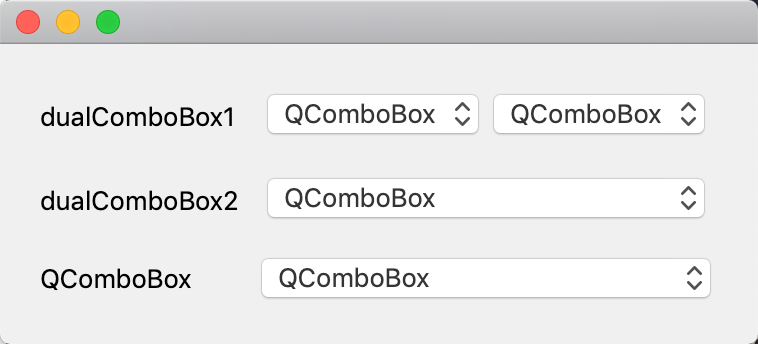
                    combos2.png

                    It does work fine on Linux

                    It is fine on Windows as well.

                    therefore I would suggest you to create a Qt bug entry

                    I will. Thx.

                    1 Reply Last reply
                    0

                    • Login

                    • Login or register to search.
                    • First post
                      Last post
                    0
                    • Categories
                    • Recent
                    • Tags
                    • Popular
                    • Users
                    • Groups
                    • Search
                    • Get Qt
                    • Unsolved