Skip to content
  • Categories
  • Recent
  • Tags
  • Popular
  • Users
  • Groups
  • Search
  • Get Qt Extensions
  • Unsolved
Collapse
Brand Logo
  1. Home
  2. Qt Development
  3. General and Desktop
  4. Latin char in QListWidget

Latin char in QListWidget

Scheduled Pinned Locked Moved Solved General and Desktop
6 Posts 3 Posters 514 Views
  • Oldest to Newest
  • Newest to Oldest
  • Most Votes
Reply
  • Reply as topic
Log in to reply
This topic has been deleted. Only users with topic management privileges can see it.
  • naaxN Offline
    naaxN Offline
    naax
    wrote on last edited by
    #1

    Hi guys.

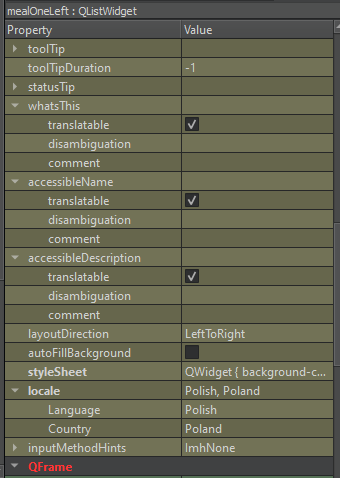
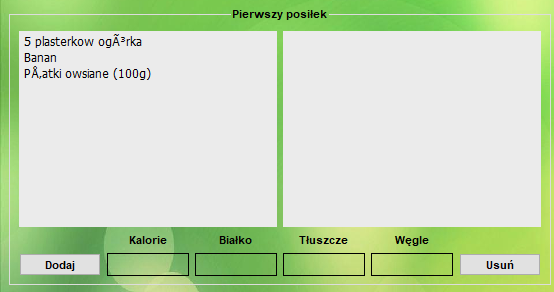
    Can you tell me why my QListWidget don't read polish characters?
    img2.png img1.png

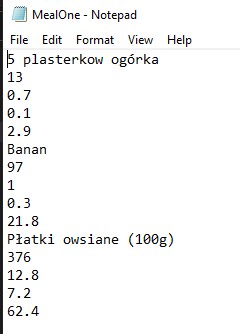
    Everywhere is that ok but only in QListWidget I have this problem. This is a QT problem or my .txt on PC? This program is reading at the start from this .txt file
    img3.png

    jsulmJ 1 Reply Last reply
    0
    • naaxN naax

      Hi guys.

      Can you tell me why my QListWidget don't read polish characters?
      img2.png img1.png

      Everywhere is that ok but only in QListWidget I have this problem. This is a QT problem or my .txt on PC? This program is reading at the start from this .txt file
      img3.png

      jsulmJ Offline
      jsulmJ Offline
      jsulm
      Lifetime Qt Champion
      wrote on last edited by
      #2

      @naax How do you enter the text? In code?

      1 Reply Last reply
      0
      • naaxN Offline
        naaxN Offline
        naax
        wrote on last edited by
        #3

        @jsulm

        In .txt file?

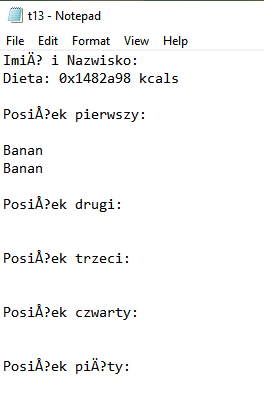
        This is my main "database" so I enter the text manually. And if I run the program my function "load" load this .txt file.

        When I'm exporting effects as .txt file I have the same problem
        img 4.png

         QString fileName = QFileDialog::getSaveFileName(
                    this,
                    tr("Save Document"),
                    QDir::currentPath(),
                    tr("Text files (*.txt)") );
        
            QFile exportDiet(fileName);
            if (exportDiet.open(QIODevice::WriteOnly | QIODevice::Text))
            {
        
                //Stream
                QTextStream stream(&exportDiet);
        
                //Print line
                QTextStream out(&exportDiet);
        
                // I tried this but not working
                QTextStream textStream(&exportDiet);
                textStream.setCodec("ISO-8859-2");
        
                out << "Imię i Nazwisko: \n";
                out << "Dieta: " << ui->showTotalKcals << " kcals\n\n";
                out << "Posiłek pierwszy:\n\n";
        
                for (int i = 0; i < ui->mealOneRight->count(); i++)
                {
                    QListWidgetItem *item = ui->mealOneRight->item(i);
                    out << item->text() <<'\n';
                }
        
                out << "\nPosiłek drugi:\n\n";
        
                for (int i = 0; i < ui->mealTwoRight->count(); i++)
                {
                    QListWidgetItem *item = ui->mealTwoRight->item(i);
                    out << item->text() <<'\n';
                }
        
                out << "\nPosiłek trzeci:\n\n";
        
                for (int i = 0; i < ui->mealThreeRight->count(); i++)
                {
                    QListWidgetItem *item = ui->mealThreeRight->item(i);
                    out << item->text() <<'\n';
                }
        
                out << "\nPosiłek czwarty:\n\n";
        
                for (int i = 0; i < ui->mealFourRight->count(); i++)
                {
                    QListWidgetItem *item = ui->mealFourRight->item(i);
                    out << item->text() <<'\n';
                }
        
                out << "\nPosiłek piąty:\n\n";
        
                for (int i = 0; i < ui->mealFiveRight->count(); i++)
                {
                    QListWidgetItem *item = ui->mealFiveRight->item(i);
                    out << item->text() <<'\n';
                }
        
                exportDiet.close();
            }


        jsulmJ 1 Reply Last reply
        0
        • Christian EhrlicherC Offline
          Christian EhrlicherC Offline
          Christian Ehrlicher
          Lifetime Qt Champion
          wrote on last edited by
          #4

          @naax said in Latin char in QListWidget:

          out << "Posiłek pierwszy:\n\n";

          This will not work, the encoding is wrong. Use a QString and convert it from the correct encoding. Even better use a QTranslator.

          Qt Online Installer direct download: https://download.qt.io/official_releases/online_installers/
          Visit the Qt Academy at https://academy.qt.io/catalog

          naaxN 1 Reply Last reply
          0
          • Christian EhrlicherC Christian Ehrlicher

            @naax said in Latin char in QListWidget:

            out << "Posiłek pierwszy:\n\n";

            This will not work, the encoding is wrong. Use a QString and convert it from the correct encoding. Even better use a QTranslator.

            naaxN Offline
            naaxN Offline
            naax
            wrote on last edited by
            #5

            @Christian-Ehrlicher

            Ok, ill try to change "out" into QString.

            QTranslator I have already but I'm not sure that works well.

            int main(int argc, char *argv[])
            {
                QApplication a(argc, argv);
                QApplication app(argc, argv);
                QTranslator myappTranslator;
                myappTranslator.load(QLocale(), QLatin1String("myapp"), QLatin1String("_"), QLatin1String(":/i18n"));
                   app.installTranslator(&myappTranslator);
                MainWindow w;
                w.show();
                return a.exec();
            }
            
            
            1 Reply Last reply
            0
            • naaxN naax

              @jsulm

              In .txt file?

              This is my main "database" so I enter the text manually. And if I run the program my function "load" load this .txt file.

              When I'm exporting effects as .txt file I have the same problem

              img 4.png

               QString fileName = QFileDialog::getSaveFileName(
                          this,
                          tr("Save Document"),
                          QDir::currentPath(),
                          tr("Text files (*.txt)") );
              
                  QFile exportDiet(fileName);
                  if (exportDiet.open(QIODevice::WriteOnly | QIODevice::Text))
                  {
              
                      //Stream
                      QTextStream stream(&exportDiet);
              
                      //Print line
                      QTextStream out(&exportDiet);
              
                      // I tried this but not working
                      QTextStream textStream(&exportDiet);
                      textStream.setCodec("ISO-8859-2");
              
                      out << "Imię i Nazwisko: \n";
                      out << "Dieta: " << ui->showTotalKcals << " kcals\n\n";
                      out << "Posiłek pierwszy:\n\n";
              
                      for (int i = 0; i < ui->mealOneRight->count(); i++)
                      {
                          QListWidgetItem *item = ui->mealOneRight->item(i);
                          out << item->text() <<'\n';
                      }
              
                      out << "\nPosiłek drugi:\n\n";
              
                      for (int i = 0; i < ui->mealTwoRight->count(); i++)
                      {
                          QListWidgetItem *item = ui->mealTwoRight->item(i);
                          out << item->text() <<'\n';
                      }
              
                      out << "\nPosiłek trzeci:\n\n";
              
                      for (int i = 0; i < ui->mealThreeRight->count(); i++)
                      {
                          QListWidgetItem *item = ui->mealThreeRight->item(i);
                          out << item->text() <<'\n';
                      }
              
                      out << "\nPosiłek czwarty:\n\n";
              
                      for (int i = 0; i < ui->mealFourRight->count(); i++)
                      {
                          QListWidgetItem *item = ui->mealFourRight->item(i);
                          out << item->text() <<'\n';
                      }
              
                      out << "\nPosiłek piąty:\n\n";
              
                      for (int i = 0; i < ui->mealFiveRight->count(); i++)
                      {
                          QListWidgetItem *item = ui->mealFiveRight->item(i);
                          out << item->text() <<'\n';
                      }
              
                      exportDiet.close();
                  }


              jsulmJ Offline
              jsulmJ Offline
              jsulm
              Lifetime Qt Champion
              wrote on last edited by
              #6
              This post is deleted!
              1 Reply Last reply
              0

              • Login

              • Login or register to search.
              • First post
                Last post
              0
              • Categories
              • Recent
              • Tags
              • Popular
              • Users
              • Groups
              • Search
              • Get Qt Extensions
              • Unsolved