Skip to content
  • Categories
  • Recent
  • Tags
  • Popular
  • Users
  • Groups
  • Search
  • Get Qt Extensions
  • Unsolved
Collapse
Brand Logo
  1. Home
  2. Qt Development
  3. QML and Qt Quick
  4. QML TextEdit selectionColor / selectedTextColor when using a QSyntaxHighlighter

QML TextEdit selectionColor / selectedTextColor when using a QSyntaxHighlighter

Scheduled Pinned Locked Moved Unsolved QML and Qt Quick
1 Posts 1 Posters 363 Views
  • Oldest to Newest
  • Newest to Oldest
  • Most Votes
Reply
  • Reply as topic
Log in to reply
This topic has been deleted. Only users with topic management privileges can see it.
  • haikuH Offline
    haikuH Offline
    haiku
    wrote on last edited by
    #1

    Hi, I am writing a simple text editor using QML with some basic syntax highlighting delivered from a custom QSyntaxHighlighter class.

    The result looks like this:
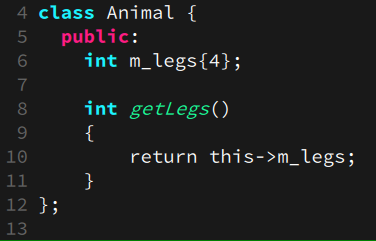
    35fbfea4-3162-4514-a8e6-50a79b4b2066-image.png

    Beautiful! However when I select some text it ends up looking like this:
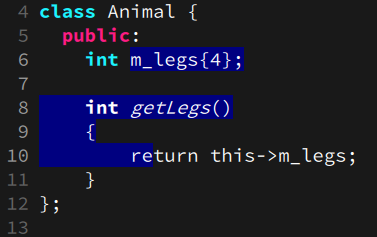
    45f6575d-5a5e-4706-b05e-176ef50b3c98-image.png

    As you can see the text all becomes white. I would like the text colour to not change and to retain my syntax highlighting colours but I'm not sure how to do this with a TextEdit.
    I know that the qml TextEdit component has properties for the selection colour (selectionColor) and the selected text color(selectedTextColor) but I see no way to have no selected text colour.

    Hopefully there's an easy way here that I'm missing.

    1 Reply Last reply
    0

    • Login

    • Login or register to search.
    • First post
      Last post
    0
    • Categories
    • Recent
    • Tags
    • Popular
    • Users
    • Groups
    • Search
    • Get Qt Extensions
    • Unsolved