Skip to content
  • Categories
  • Recent
  • Tags
  • Popular
  • Users
  • Groups
  • Search
  • Get Qt Extensions
  • Unsolved
Collapse
Brand Logo
  1. Home
  2. Qt Development
  3. General and Desktop
  4. The Ubuntu virtual machine runs the QTest pop-up terminal

The Ubuntu virtual machine runs the QTest pop-up terminal

Scheduled Pinned Locked Moved Unsolved General and Desktop
5 Posts 3 Posters 373 Views
  • Oldest to Newest
  • Newest to Oldest
  • Most Votes
Reply
  • Reply as topic
Log in to reply
This topic has been deleted. Only users with topic management privileges can see it.
  • D Offline
    D Offline
    dilipa
    wrote on last edited by dilipa
    #1

    Run in the virtual machine:
    934f5002-f04d-4f34-b10e-3a037eb45098-image.png
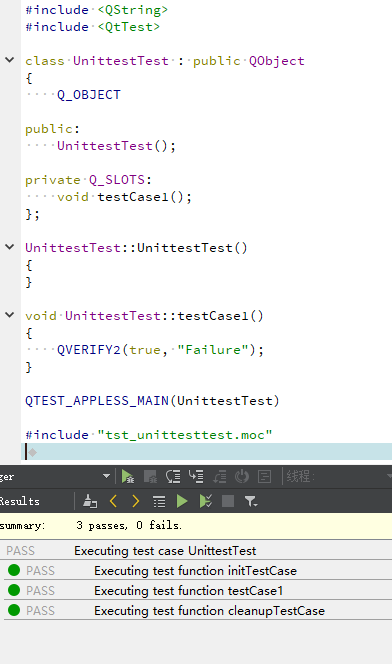
    The same program that does not run on the virtual machine results as follows:
    4e9ece75-ca47-4487-adfa-1fae17e7f6ae-image.png
    Why does this happen and how to solve it???

    1 Reply Last reply
    0
    • B Offline
      B Offline
      Bonnie
      wrote on last edited by Bonnie
      #2

      Please don't write Chinese in this category, use English please.

      D 1 Reply Last reply
      0
      • B Bonnie

        Please don't write Chinese in this category, use English please.

        D Offline
        D Offline
        dilipa
        wrote on last edited by
        #3

        @Bonnie Ok, it has been changed

        jsulmJ B 2 Replies Last reply
        0
        • D dilipa

          @Bonnie Ok, it has been changed

          jsulmJ Offline
          jsulmJ Offline
          jsulm
          Lifetime Qt Champion
          wrote on last edited by
          #4

          @dilipa I'm not sure what your question is.
          Do you want to know why your get a terminal when executing the tests?

          https://forum.qt.io/topic/113070/qt-code-of-conduct

          1 Reply Last reply
          2
          • D dilipa

            @Bonnie Ok, it has been changed

            B Offline
            B Offline
            Bonnie
            wrote on last edited by
            #5

            @dilipa
            Go to "Run settings" page and see if you have "Run in terminal" option checked.

            1 Reply Last reply
            3

            • Login

            • Login or register to search.
            • First post
              Last post
            0
            • Categories
            • Recent
            • Tags
            • Popular
            • Users
            • Groups
            • Search
            • Get Qt Extensions
            • Unsolved