Skip to content
  • Categories
  • Recent
  • Tags
  • Popular
  • Users
  • Groups
  • Search
  • Get Qt Extensions
  • Unsolved
Collapse
Brand Logo
  1. Home
  2. Qt Development
  3. QML and Qt Quick
  4. Changing the row colour depending on a bool value
Qt 6.11 is out! See what's new in the release blog

Changing the row colour depending on a bool value

Scheduled Pinned Locked Moved Solved QML and Qt Quick
11 Posts 4 Posters 1.9k Views 2 Watching
  • Oldest to Newest
  • Newest to Oldest
  • Most Votes
Reply
  • Reply as topic
Log in to reply
This topic has been deleted. Only users with topic management privileges can see it.
  • P Offline
    P Offline
    Paulus_rin
    wrote on last edited by
    #1

    I have a QTable and each row gets a bool value. Each row with the value "true" should be highlighted. The value depends on the users input.
    Can anyone help me? Thank in advance

    1 Reply Last reply
    0
    • sierdzioS Offline
      sierdzioS Offline
      sierdzio
      Moderators
      wrote on last edited by
      #4

      Hint: don't code in German ;-) Or in any non-English language. All programming languages are in English, so when variables, classes and methods are in different language it is very hard to read. Plus, in global economy, there are high chances that your code will be read / modified by people from other countries.

      Anyway, back to your problem: the best solution is to return proper colour for Qt::ItemDataRole::Background role. But as a temporary hack, this should do the trick:

      auto lastItem = new QTableWidgetItem(favorit);
      lastItem->setBackground(QColor("#ffff00"));
      ui->tblLebensmittel->setItem(ui->tblLebensmittel->rowCount()-1, 5, lastItem);
      

      (Z(:^

      P 1 Reply Last reply
      4
      • sierdzioS Offline
        sierdzioS Offline
        sierdzio
        Moderators
        wrote on last edited by
        #2

        You have posted it in QML forum but mention "QTable"... are you using QtWidgets or QtQuick? Are you using a subclass of QAbstractItemModel to prepare your data?

        (Z(:^

        P 1 Reply Last reply
        1
        • sierdzioS sierdzio

          You have posted it in QML forum but mention "QTable"... are you using QtWidgets or QtQuick? Are you using a subclass of QAbstractItemModel to prepare your data?

          P Offline
          P Offline
          Paulus_rin
          wrote on last edited by
          #3

          @sierdzio oh yes sorry. Im using QTWidgets, still new to programming.

            ui->tblLebensmittel->insertRow(ui->tblLebensmittel->rowCount());
                  ui->tblLebensmittel->setItem(ui->tblLebensmittel->rowCount()-1, 0, new QTableWidgetItem(lebensmittel.mName));
                  ui->tblLebensmittel->setItem(ui->tblLebensmittel->rowCount()-1, 1, new QTableWidgetItem(enumToString(lebensmittel.mKategorie)));
                  ui->tblLebensmittel->setItem(ui->tblLebensmittel->rowCount()-1, 2, new QTableWidgetItem(enumToString(lebensmittel.mEinheit)));
                  ui->tblLebensmittel->setItem(ui->tblLebensmittel->rowCount()-1, 3, new QTableWidgetItem(menge));
                  ui->tblLebensmittel->setItem(ui->tblLebensmittel->rowCount()-1, 4, new QTableWidgetItem(vorrat));
                  ui->tblLebensmittel->setItem(ui->tblLebensmittel->rowCount()-1, 5, new QTableWidgetItem(favorit));
          
                  if(favorit== "1")
                  {
                      ui->tblLebensmittel->setStyleSheet("QTableWidget::item {background-color: yellow}");
                  }
                  else
                  {
                      return;
                  }
              }
          }
          

          In the last row i have "favorit" and this item has a bool value.
          Right now the whole tablewidget is yellow. Thats not quite what I initially wanted;)

          1 Reply Last reply
          0
          • sierdzioS Offline
            sierdzioS Offline
            sierdzio
            Moderators
            wrote on last edited by
            #4

            Hint: don't code in German ;-) Or in any non-English language. All programming languages are in English, so when variables, classes and methods are in different language it is very hard to read. Plus, in global economy, there are high chances that your code will be read / modified by people from other countries.

            Anyway, back to your problem: the best solution is to return proper colour for Qt::ItemDataRole::Background role. But as a temporary hack, this should do the trick:

            auto lastItem = new QTableWidgetItem(favorit);
            lastItem->setBackground(QColor("#ffff00"));
            ui->tblLebensmittel->setItem(ui->tblLebensmittel->rowCount()-1, 5, lastItem);
            

            (Z(:^

            P 1 Reply Last reply
            4
            • mrjjM Offline
              mrjjM Offline
              mrjj
              Lifetime Qt Champion
              wrote on last edited by
              #5

              Hi
              Just as a note. we also had a look at coloring rows over here
              https://forum.qt.io/topic/116882/how-to-update-qtablewidget-row-color-as-per-row-index-value-in-c

              1 Reply Last reply
              2
              • sierdzioS sierdzio

                Hint: don't code in German ;-) Or in any non-English language. All programming languages are in English, so when variables, classes and methods are in different language it is very hard to read. Plus, in global economy, there are high chances that your code will be read / modified by people from other countries.

                Anyway, back to your problem: the best solution is to return proper colour for Qt::ItemDataRole::Background role. But as a temporary hack, this should do the trick:

                auto lastItem = new QTableWidgetItem(favorit);
                lastItem->setBackground(QColor("#ffff00"));
                ui->tblLebensmittel->setItem(ui->tblLebensmittel->rowCount()-1, 5, lastItem);
                
                P Offline
                P Offline
                Paulus_rin
                wrote on last edited by
                #6

                @sierdzio yeah good point i guess. Next time, but thank you.
                Your code works, but right now the column favorit is coloured. The idea was to colour the row in which the bool value is true. The description may was a litte missleadiing.
                7876708b-719a-4c3a-b0c7-6564d13c6299-image.png

                @mrjj thanks, i will look it through

                sierdzioS 1 Reply Last reply
                0
                • P Paulus_rin

                  @sierdzio yeah good point i guess. Next time, but thank you.
                  Your code works, but right now the column favorit is coloured. The idea was to colour the row in which the bool value is true. The description may was a litte missleadiing.
                  7876708b-719a-4c3a-b0c7-6564d13c6299-image.png

                  @mrjj thanks, i will look it through

                  sierdzioS Offline
                  sierdzioS Offline
                  sierdzio
                  Moderators
                  wrote on last edited by
                  #7

                  @Paulus_rin said in Changing the row colour depending on a bool value:

                  Your code works, but right now the column favorit is coloured. The idea was to colour the row in which the bool value is true. The description may was a litte missleadiing.

                  Ah. Then you need to apply the same logic for the whole row and set / not set the background based on the row you are currently filling in.

                  (Z(:^

                  P 1 Reply Last reply
                  3
                  • sierdzioS sierdzio

                    @Paulus_rin said in Changing the row colour depending on a bool value:

                    Your code works, but right now the column favorit is coloured. The idea was to colour the row in which the bool value is true. The description may was a litte missleadiing.

                    Ah. Then you need to apply the same logic for the whole row and set / not set the background based on the row you are currently filling in.

                    P Offline
                    P Offline
                    Paulus_rin
                    wrote on last edited by
                    #8

                    @sierdzio
                    Thanks. Now I just have to make it work that the whole row is yellow, not just the "favorit" row.
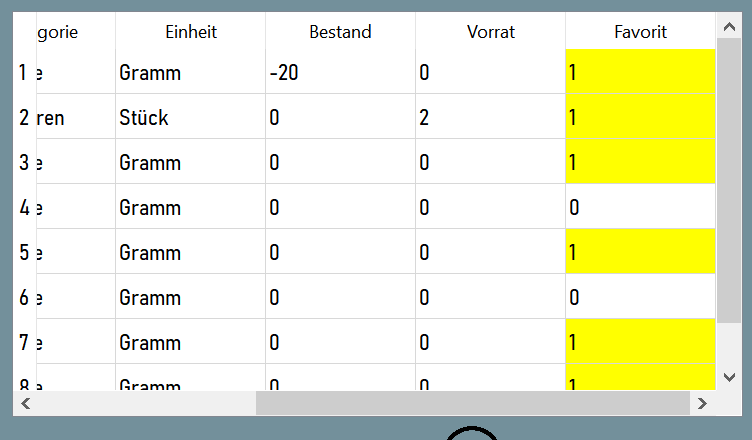
                    d2064dd7-89fb-47e7-8afb-fbd928076a15-image.png

                    mrjjM 1 Reply Last reply
                    0
                    • P Paulus_rin

                      @sierdzio
                      Thanks. Now I just have to make it work that the whole row is yellow, not just the "favorit" row.

                      d2064dd7-89fb-47e7-8afb-fbd928076a15-image.png

                      mrjjM Offline
                      mrjjM Offline
                      mrjj
                      Lifetime Qt Champion
                      wrote on last edited by mrjj
                      #9

                      @Paulus_rin
                      Hi
                      If you variable favorit is true then just loop over the items and set its color

                      pseudo code.

                      for(int col =0; col < ui->tblLebensmittel->colCount(); col++ ) {
                      QTableWidgetItem *item = ui->tblLebensmittel->item( ui->tblLebensmittel->rowCount()-1, col);
                      item->setBackground(QColor("#ffff00"));
                      }

                      1 Reply Last reply
                      2
                      • I Offline
                        I Offline
                        imbachb
                        wrote on last edited by imbachb
                        #10

                        The user can change the favorit value? If so, as mentioned before, I'd do this in your TableModel using the BackgroundRole.

                        Something like this:

                        QVariant YourTableModel::data(const QModelIndex& index, int role) const
                        {
                        	if (role == Qt::BackgroundRole) {
                        		return QBrush(calcRowColour(index.row()));
                        	}
                        
                        	return QVariant();
                        }
                        
                        QColor
                        YourTableModel::calcRowColour(int row) const
                        {
                        	if (m_things.at(row).isFavourite) {
                        		return QColor(255, 255, 153);
                        	} else {
                        		return QColor(255, 255, 255);
                        	}
                        }
                        

                        This will set the whole row to yellow wherever isFavourite == true.
                        Wherever you change the isFavourite value you have to emit the dataChanged signal with the BackgroundRole so that your view requests the new data.

                        emit dataChanged(index(row, 0), index(row, 0), {Qt::BackgroundRole});
                        
                        1 Reply Last reply
                        4
                        • P Offline
                          P Offline
                          Paulus_rin
                          wrote on last edited by
                          #11

                          Thanks, now its working like i initially wanted it to.

                          1 Reply Last reply
                          0

                          • Login

                          • Login or register to search.
                          • First post
                            Last post
                          0
                          • Categories
                          • Recent
                          • Tags
                          • Popular
                          • Users
                          • Groups
                          • Search
                          • Get Qt Extensions
                          • Unsolved