Skip to content
  • Categories
  • Recent
  • Tags
  • Popular
  • Users
  • Groups
  • Search
  • Get Qt Extensions
  • Unsolved
Collapse
Brand Logo
  1. Home
  2. Qt Development
  3. General and Desktop
  4. How to link signal and slot when i change the font in the dialog
Qt 6.11 is out! See what's new in the release blog

How to link signal and slot when i change the font in the dialog

Scheduled Pinned Locked Moved Solved General and Desktop
9 Posts 2 Posters 1.4k Views
  • Oldest to Newest
  • Newest to Oldest
  • Most Votes
Reply
  • Reply as topic
Log in to reply
This topic has been deleted. Only users with topic management privileges can see it.
  • S Offline
    S Offline
    summit
    wrote on last edited by
    #1

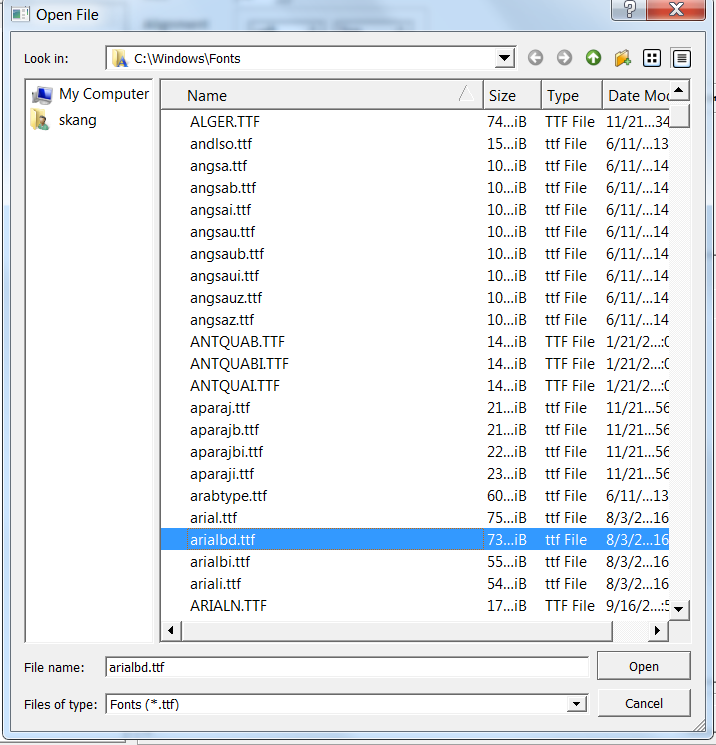
    This is how i am currently choosing the font in my application.

    ![7f1b3861-0298-4d5d-9a6f-952a0bf84303-image.png]FontPreview.png
    The application uses this code to open the font diaglog

    void FontChange()
    {
    
    	QString filePath = QFileDialog::getOpenFileName(NULL, tr("Open File"),
    		QStandardPaths::standardLocations(QStandardPaths::FontsLocation)[0],
    		tr("Fonts (*.ttf);;Everything (*.*)"), nullptr,
    		QFileDialog::DontUseNativeDialog);
    
    	if (filePath.isEmpty())
    		return;
    
    	QlineEditSetFont->setText(filePath);
    	stdstrLocation = filePath.toStdString();
    	this->isChanged = true; // this executes the function
    }
    I want to execute a function whenever i change my selection in the Dialog , currently i  have to choose a font and than click on open to execute the function
    
    1 Reply Last reply
    0
    • B Offline
      B Offline
      Bonnie
      wrote on last edited by
      #2

      Hi, excuse me, but why don't you use QFontDialog to choose font?

      S 2 Replies Last reply
      2
      • B Bonnie

        Hi, excuse me, but why don't you use QFontDialog to choose font?

        S Offline
        S Offline
        summit
        wrote on last edited by
        #3

        @Bonnie said in How to link signal and slot when i change the font in the dialog:

        QFontDialog

        @Bonnie i am having a look into this option.

        1 Reply Last reply
        0
        • B Bonnie

          Hi, excuse me, but why don't you use QFontDialog to choose font?

          S Offline
          S Offline
          summit
          wrote on last edited by
          #4

          @Bonnie It does not work for me as i need to use this font for opengl rendering and i need the path of the font along with its actual name.

          1 Reply Last reply
          0
          • B Offline
            B Offline
            Bonnie
            wrote on last edited by Bonnie
            #5

            And what you need is something like a "live dialog".
            So you cannot use the QFontDialog ::getFont static function because it is modal.
            I would suggest doing something like:

            QFontDialog *fd = new QFontDialog(this);
            fd->setAttribute(Qt::WA_DeleteOnClose);
            fd->setOption(QFontDialog::NoButtons);
            fd->show();
            connect(fd, &QFontDialog::currentFontChanged, [=](const QFont &font){
                qDebug() << font;
            });
            

            [ADDED]
            Even though you cannot use QFontDialog, but the theory is the same.
            You cannot use the static function.
            You need to create a dialog, and connect the current*Changed signal.

            S 2 Replies Last reply
            1
            • B Bonnie

              And what you need is something like a "live dialog".
              So you cannot use the QFontDialog ::getFont static function because it is modal.
              I would suggest doing something like:

              QFontDialog *fd = new QFontDialog(this);
              fd->setAttribute(Qt::WA_DeleteOnClose);
              fd->setOption(QFontDialog::NoButtons);
              fd->show();
              connect(fd, &QFontDialog::currentFontChanged, [=](const QFont &font){
                  qDebug() << font;
              });
              

              [ADDED]
              Even though you cannot use QFontDialog, but the theory is the same.
              You cannot use the static function.
              You need to create a dialog, and connect the current*Changed signal.

              S Offline
              S Offline
              summit
              wrote on last edited by
              #6

              @Bonnie said in How to link signal and slot when i change the font in the dialog:

              QFontDialog *fd = new QFontDialog(this);
              fd->setAttribute(Qt::WA_DeleteOnClose);
              fd->setOption(QFontDialog::NoButtons);
              fd->show();
              connect(fd, &QFontDialog::currentFontChanged, [=](const QFont &font){
              qDebug() << font;
              });

              @Bonnie thank you , i get your point and will try to use file open with a object.

              1 Reply Last reply
              0
              • B Bonnie

                And what you need is something like a "live dialog".
                So you cannot use the QFontDialog ::getFont static function because it is modal.
                I would suggest doing something like:

                QFontDialog *fd = new QFontDialog(this);
                fd->setAttribute(Qt::WA_DeleteOnClose);
                fd->setOption(QFontDialog::NoButtons);
                fd->show();
                connect(fd, &QFontDialog::currentFontChanged, [=](const QFont &font){
                    qDebug() << font;
                });
                

                [ADDED]
                Even though you cannot use QFontDialog, but the theory is the same.
                You cannot use the static function.
                You need to create a dialog, and connect the current*Changed signal.

                S Offline
                S Offline
                summit
                wrote on last edited by
                #7

                @Bonnie said in How to link signal and slot when i change the font in the dialog:

                modal

                @Bonnie how can i print the file path in this code

                QFileDialog* dialog = new QFileDialog();	
                dialog->setAttribute(Qt::WA_DeleteOnClose);
                dialog->setNameFilter("TTF (*.ttf)");
                dialog->setOption(QFileDialog::DontUseNativeDialog);
                dialog->setDirectory("C:\\Windows\\Fonts");
                dialog->show();
                	
                QObject::connect(dialog, &QFileDialog::currentChanged, [=]() {
                		qDebug() << "Changed" << // print the current path; });
                
                B 1 Reply Last reply
                0
                • S summit

                  @Bonnie said in How to link signal and slot when i change the font in the dialog:

                  modal

                  @Bonnie how can i print the file path in this code

                  QFileDialog* dialog = new QFileDialog();	
                  dialog->setAttribute(Qt::WA_DeleteOnClose);
                  dialog->setNameFilter("TTF (*.ttf)");
                  dialog->setOption(QFileDialog::DontUseNativeDialog);
                  dialog->setDirectory("C:\\Windows\\Fonts");
                  dialog->show();
                  	
                  QObject::connect(dialog, &QFileDialog::currentChanged, [=]() {
                  		qDebug() << "Changed" << // print the current path; });
                  
                  B Offline
                  B Offline
                  Bonnie
                  wrote on last edited by Bonnie
                  #8

                  @summit

                  QObject::connect(dialog, &QFileDialog::currentChanged, [=](const QString &path) {
                      qDebug() << path;
                  });
                  

                  And i've thought about this again, a modal dialog is also usable.

                  QFileDialog dialog;
                  dialog.setNameFilter("TTF (*.ttf)");
                  dialog.setOption(QFileDialog::DontUseNativeDialog);
                  dialog.setDirectory("C:\\Windows\\Fonts");
                  //if using a modal dialog, the "connect" should be placed before "exec()"
                  QObject::connect(&dialog, &QFileDialog::currentChanged, [=](const QString &path) {
                      qDebug() << path;
                  });
                  dialog.exec();
                  

                  So it is up to you whether you would like a modal or modaless one.

                  S 1 Reply Last reply
                  2
                  • B Bonnie

                    @summit

                    QObject::connect(dialog, &QFileDialog::currentChanged, [=](const QString &path) {
                        qDebug() << path;
                    });
                    

                    And i've thought about this again, a modal dialog is also usable.

                    QFileDialog dialog;
                    dialog.setNameFilter("TTF (*.ttf)");
                    dialog.setOption(QFileDialog::DontUseNativeDialog);
                    dialog.setDirectory("C:\\Windows\\Fonts");
                    //if using a modal dialog, the "connect" should be placed before "exec()"
                    QObject::connect(&dialog, &QFileDialog::currentChanged, [=](const QString &path) {
                        qDebug() << path;
                    });
                    dialog.exec();
                    

                    So it is up to you whether you would like a modal or modaless one.

                    S Offline
                    S Offline
                    summit
                    wrote on last edited by
                    #9

                    @Bonnie said in How to link signal and slot when i change the font in the dialog:

                    QObject::connect(&dialog, &QFileDialog::currentChanged, [=](const QString &path) {
                    qDebug() << path;
                    });

                    @Bonnie Thank you very much this is what i need.

                    1 Reply Last reply
                    0

                    • Login

                    • Login or register to search.
                    • First post
                      Last post
                    0
                    • Categories
                    • Recent
                    • Tags
                    • Popular
                    • Users
                    • Groups
                    • Search
                    • Get Qt Extensions
                    • Unsolved