Unsolved Custom QTableView delegate with word wrap
-
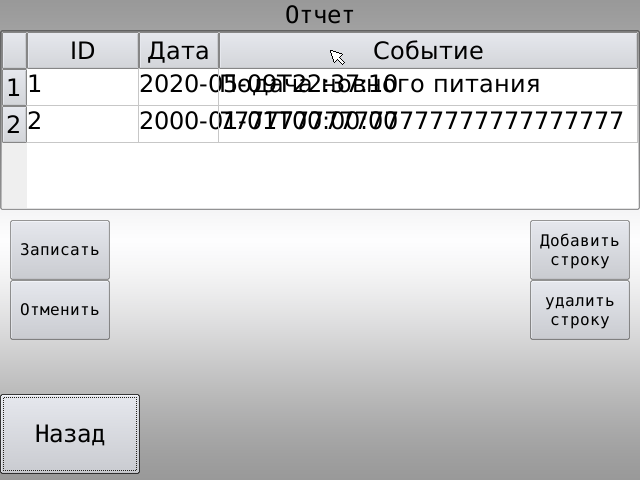
I want make word wrap in cell table, when size text more size cell. As understand for this necessary user QStyledItemDelegate. Read documentation on QStyledItemDelegate and add methods paint and sizeHint. But when run project, word not wrap.
I did:
ui->tableView->setModel(model);
ui->tableView->setItemDelegate(new TableViewColumnDelegate(this));
ui->tableView->setWordWrap(true);
ui->tableView->setTextElideMode(Qt::ElideNone);
ui->tableView->setFont(font);
ui->tableView->resizeColumnToContents(0);
ui->tableView->resizeColumnToContents(1);
ui->tableView->horizontalHeader()->setResizeMode(0, QHeaderView::Fixed);
ui->tableView->horizontalHeader()->setResizeMode(1, QHeaderView::Fixed);
ui->tableView->horizontalHeader()->setResizeMode(2, QHeaderView::Stretch);
delegate:
void TableViewColumnDelegate::paint(QPainter *painter, const QStyleOptionViewItem &option, const QModelIndex &index) const
{
    if(!index.isValid())
           return;
       painter->save();

       if (option.state & QStyle::State_Selected){
           painter->fillRect(option.rect, option.palette.highlight());
       }
       QString Text = index.data().toString();
       QFont Font = QApplication::font();
       QFontMetrics Fm(Font);
       QRect Rect = Fm.boundingRect(option.rect.left(), option.rect.top() ,
                                     option.rect.width(),  option.rect.height(),
                                     Qt::AlignLeft|Qt::AlignTop|Qt::TextWordWrap,
                                     Text);
       painter->setPen(Qt::black);
       painter->setFont(Font);
       painter->drawText(Rect, Qt::AlignLeft|Qt::AlignTop|Qt::TextWordWrap, Text);
       painter->restore();
}

QSize TableViewColumnDelegate::sizeHint(const QStyleOptionViewItem &option, const QModelIndex &index) const
{
    if(!index.isValid())
        return QSize();
    QString Text = index.data().toString();
    QFont Font = QApplication::font();
    QFontMetrics Fm(Font);
    QRect Rect = Fm.boundingRect(0, 0, option.rect.width(), 0,
                                             Qt::AlignLeft|Qt::AlignTop|Qt::TextWordWrap,
                                             Text);
    QSize size(option.rect.width(), Rect.height());
    return size;
}
-
Hey, do you set the width of the table column anywhere? If not, then that might be the problem, as you need to define where it should wrap by defining parent width.
-
I don't know how set width of the table column. How I may set width of the table column?
-
@Alexey_Golubev ok..
The cell should have word wrap enabled by default according to docs.. So it should be because the text currently has enough room..
wordWrap : bool
This property holds the item text word-wrapping policy

If this property is true then the item text is wrapped where necessary at word-breaks; otherwise it is not wrapped at all.
This property is true by default.

Note that even of wrapping is enabled, the cell will not be expanded to fit all text. Ellipsis will be inserted according to the current textElideMode.

This property was introduced in Qt 4.3.

Access functions:

bool	wordWrap() const
void	setWordWrap(bool on)
Also from the docs,
void QTableView::setColumnWidth(int column, int width)
Sets the width of the given column to be width.

This function was introduced in Qt 4.1.

See also columnWidth().
So using yourtableref.setColumnWidth(columnIndex,desired_width);
should work.. -
I added in code setColumnWidth():
    ui->tableView->setModel(model);
    ui->tableView->setItemDelegate(new TableViewColumnDelegate(this));
    ui->tableView->setWordWrap(true);
    ui->tableView->setTextElideMode(Qt::ElideNone);
    ui->tableView->setFont(font);
    **ui->tableView->setColumnWidth(0,64);
    ui->tableView->setColumnWidth(1,250);
    ui->tableView->setColumnWidth(2,250);**
Word wrap not working. Delegate didn't change.
