Unsolved Confused by QApplication::setFont(font, classname)
-
I'm trying to set up my app so that certain widget types have very specific font sizes, but the widgets I create after setting the application font sizes using the widget-class-specific version of QApplication::setFont() doesn't seem to work for creating widgets later on.
So, for example, I'll set the size of the font for QToolButton's as follows:
QFont toolFont = QApplication::font("QToolButton");
size = toolFont.pointSizeF() * 0.5;
toolFont.setPointSizeF(size);
QApplication::setFont(toolFont, "QToolButton");
this should be making it so any QToolButtons I create have a font which is half the point size of the default. But what I see is that while the QApplication instance has the new font size value, newly created QToolButtons are still using the default value:
qApp->font("QToolButton").pointSizeF() ==> has the half-size value I set
QApplication::font("QToolButton").pointSizeF() ==> has the half-size value I set
QToolButton->font().pointSizeF() ==> has original default size
The example below is contrived and simplified, but shows what's causing my confusion. My app itself is a subclass of QApplication, and in the constructor for it I call a static function to do some font manipulation global to the whole application:
App::App (int& argc, char **argv) :
    QApplication (argc, argv)
{
    // set the default fonts
    this->setApplicationFonts();

    // test the fonts
    QMenu* menu = new QMenu();
    std::cout << "menu font after set: " << menu->font().pointSizeF() << "\n";
    std::cout << "menu font from app: " << this->font("QMenu").pointSizeF() << "\n";
    std::cout << "menu font static: " << QApplication::font("QMenu").pointSizeF() << "\n";

    QToolButton* tool = new QToolButton();
    std::cout << "tool font after set: " << tool->font().pointSizeF() << "\n";
    std::cout << "tool font from app: " << this->font("QToolButton").pointSizeF() << "\n";
    std::cout << "tool font static: " << QApplication::font("QToolButton").pointSizeF() << "\n";
}
where setApplicationFonts() is defined as follows:
void
ZenoStyle::setApplicationFonts()
{
    QFont toolFont = QApplication::font("QToolButton");
    size = toolFont.pointSizeF() * 0.5;
    toolFont.setPointSizeF(size);
    QApplication::setFont(toolFont, "QToolButton");

    QFont menuFont = QApplication::font("QMenu");
    size = menuFont.pointSizeF() * 0.5f;
    menuFont.setPointSizeF(size);
    QApplication::setFont(menuFont, "QMenu");

    QFont menubarFont = QApplication::font("QMenuBar");
    size = menubarFont.pointSizeF() * 0.5f;
    menubarFont.setPointSizeF(size);
    QApplication::setFont(menubarFont, "QMenuBar");

    QFont menuitemFont = QApplication::font("QMenuItem");
    size = menuitemFont.pointSizeF() * 0.5f;
    menuitemFont.setPointSizeF(size);
    QApplication::setFont(menuitemFont, "QMenuItem");
}
what am I missing here? In the end all I want is for all widgets of those specific types that I create in my app to have the font size I set via QApplication::setFont(), but I can't seem to get it to work.
-
Have you tried running your test code outside of QApplication's constructor, in some method called later? That's the only possible issue I see here (but in general it should work; the behavior you see looks like a bug in Qt to me).
Or perhaps you're using stylesheets as well? That will cause custom font settings to be overridden.
-
I will try running the code that sets the fonts out side the constructor...though I am unclear why that would be causing any issue.
I am definitely not using stylesheets, or any other form of font/style setting except this. Especially in the contrived example.
@sierdzio are you able to get the right results if you do something similar to what I am doing?
-
Running it outside the constructor didn't fix it. But as an experiment I whipped up some qt for python code to do a very basic test, and it actually seems to be mostly working...the only strange thing I see there is that newly created QMenus still have the wrong font size value, though the items they display are drawn correctly.
You should just be able to run this directly in python2.7
from Qt import QtCore, QtGui, QtWidgets class App(QtWidgets.QApplication): def __init__(self, *args): super(App, self).__init__(*args) self.setApplicationFonts() def setApplicationFonts(self): defaultFont = self.defaultFont() #size = defaultFont.pointSizeF() #QtWidgets.QApplication.setFont(defaultFont) toolFont = QtWidgets.QApplication.font("QToolButton") size = toolFont.pointSizeF() * 0.5 print "app tool font: ", toolFont.toString() print ".. original size: ", toolFont.pointSizeF() print ".. new size: ", size toolFont.setPointSizeF(size) QtWidgets.QApplication.setFont(toolFont, "QToolButton") menuFont = QtWidgets.QApplication.font("QMenu") size = menuFont.pointSizeF() * 0.5 print "app menu font: ", menuFont.toString() print ".. original size: ", menuFont.pointSizeF() print ".. new size: ", size menuFont.setPointSizeF(size) QtWidgets.QApplication.setFont(menuFont, "QMenu") def defaultFont(self): size = self.dpiScaled(9) f = QtGui.QFont ("Sans Serif") f.setPointSizeF(size) print "scaled font: ", size return f def printFontInfo(app, toolbutton): #### print the current app font info f = app.font() print "app default font:",f.pointSizeF() #### app tool button specific font size f = app.font("QToolButton") print "app tool font:",f.pointSizeF() #### actual existing tool button font size f = toolbutton.font() print "tool font:",f.pointSizeF() f = app.font("QMenu") print "app menu font:",f.pointSizeF() #### newly created QMenu font size m = QtWidgets.QMenu() f = m.font() print "new menu font:",f.pointSizeF() m = QtWidgets.QMenu() m.addAction("Action A") m.addAction("Action B") m.addAction("Action C") toolbutton.setMenu(m) app._m = m #### newly created QToolButton font size b = QtWidgets.QToolButton() b.setText("Button") app._layout.addWidget(b) print "new tool button font:",b.font().pointSizeF() app = App([]) w = QtWidgets.QWidget() w.setLayout(QtWidgets.QVBoxLayout()) app._layout = w.layout() t = QtWidgets.QToolButton() t.setText("Tool Popup") t.clicked.connect(lambda: printFontInfo(app,t)) m = QtWidgets.QMenu(t) m.addAction("Action 1") m.addAction("Action 2") m.addAction("Action Three") t.setMenu(m) w.layout().addWidget(t) w.show() app.exec_() -
I don't quite have time to test it on my side. But if it's working in Python but not working in C++... that's very, very weird. Behind the scenes, both use the same Qt libs after all!
-
Hi
Tested on Win 10. Qt 5.14.1, c++Both QLabel an QPushButton/Toolbutton worked for me, running the test code in
Mainwins ctor.
They would use the new font. and also for new instances.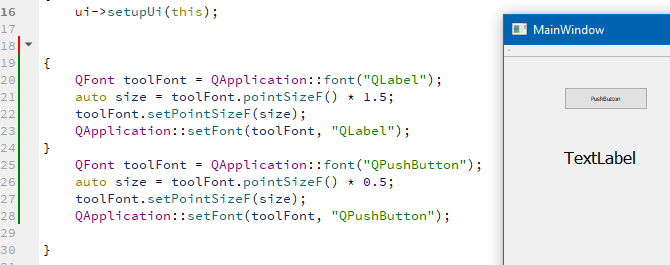
So what Qt version/platform are you seeing its not working ?
-
I think the fact that it's basically working in Python for me was an indicator something fishy was happening in my C++ code. What I'm seeing gives me the sinking feeling that I somehow have two separate active App instances somehow.
Does anyone know if that's even possible?
-
@Shiny
Hi
You mean like you app is run twice ? -
Ok, so the root of my problem is not understanding that any time you set the QApplication::style it resets the fonts to the defaults from the system.
This meant that, since my style was actually being set to a default style, then the font modifications were being done, and then the style was set to a preferred style, that the font changes I was making were being wiped out. So that clarifies that...sorry for the red herring. It wasn't somehow having two app instances, just the ordering of some code.
-
@Shiny
ahh you change QStyle after you setup the custom fonts ?
and that would reset to default values.
I can see how that looks odd. Also i didnt know it would reset. -
@mrjj yeah...I should've realized something was more basically out-of-whack. I do think that setting the style should leave the fonts alone...it seems odd that it resets them, since fonts are not directly related to the style itself.
Anyway, it is working as I expect now...with the exception of QMenu instances still being created with the default font and not the application setFont() for "QMenu", although even then, QMenus seem to draw with the correct font, so shrug.
-
Following up on this one more time, now that I have a much more complete understanding of how things are working.
There is definitely one piece of how Qt5 handles the widget font choice which to me feels a little unintuitive and inconsistent: certain widgets will inherit the system settings font, regardless of whether that system setting is the default, and regardless of how the font is set in the widget hierarchy.
The best way to illustrate this is to (in my case on centos7 using KDE) set the system font settings for "toolbar" to something different from the default. Then create a QApplication, and place a QToolButton with no explicit font set, under a parent widget which does explicitly set its font to something different from that toolbar font, and also a QLabel with no explicit font under that same parent widget.
Run that code under Qt4 and Qt5 and you'll see that in Qt4, the QToolButton takes on the font size set in its parent via the inheritance, and in Qt5 it takes on the font size set in the system settings. The QLabel, on the other hand, always takes on the font from its parent widget.
This chunk of Qt5 python illustrates the issue:
from PySide2 import QtCore, QtGui, QtWidgets

class App(QtWidgets.QApplication):
    def __init__(self, *args):
        super(App, self).__init__(*args)

app = App([])

w = QtWidgets.QWidget()
w.setMinimumSize(200, 100)
f = QtGui.QFont("Sans Serif")
f.setPointSizeF(9)
w.setFont(f)
w.setLayout(QtWidgets.QVBoxLayout())

l = QtWidgets.QLabel(w)
l.setText("Label")
w.layout().addWidget(l)

t = QtWidgets.QToolButton(w)
t.setText("Tool Button")
w.layout().addWidget(t)
w.show()
app.exec_()
Set the system font size for toolbars to, say, an 18 point font, and run the above (with changes to the imports for PyQt4) under Qt4 and then under Qt5 and you'll see the difference in how the QToolButton font behaves, vs. the QLabel.
-
@Shiny Were you able to get the menubar/menu update their font when setting the QApplication::font()?

