Skip to content
  • Categories
  • Recent
  • Tags
  • Popular
  • Users
  • Groups
  • Search
  • Get Qt Extensions
  • Unsolved
Collapse
Brand Logo
  1. Home
  2. Qt Development
  3. Qt for Python
  4. Why setHorizontalSpacing() is not working?

Why setHorizontalSpacing() is not working?

Scheduled Pinned Locked Moved Solved Qt for Python
4 Posts 4 Posters 1.1k Views
  • Oldest to Newest
  • Newest to Oldest
  • Most Votes
Reply
  • Reply as topic
Log in to reply
This topic has been deleted. Only users with topic management privileges can see it.
  • Abhay SalviA Offline
    Abhay SalviA Offline
    Abhay Salvi
    wrote on last edited by Abhay Salvi
    #1

    I have a QT Application that uses a GridLayout. I want to decrease the spacing between the widgets but it doesn't. If I set glay1.setHorizontalSpacing() to 60 then it increases the space, but if I want to decrease it then it's not working :(

    Here is the code below:

        right = QtWidgets.QWidget(label)
        right.setStyleSheet("""border: none;""")
        right.setContentsMargins(16, 16, 0, 0)
    
        glay1 = QtWidgets.QGridLayout(right)
        glay1.setSpacing(18)
        glay1.addWidget(vtext, 0, 0)         # the SERVICE text
        glay1.addWidget(vtext1, 1, 0)        # the home icon 
        glay1.setHorizontalSpacing(0)
        glay1.addWidget(butt1, 1, 1)         # the Home text
    

    The following code will give the output:
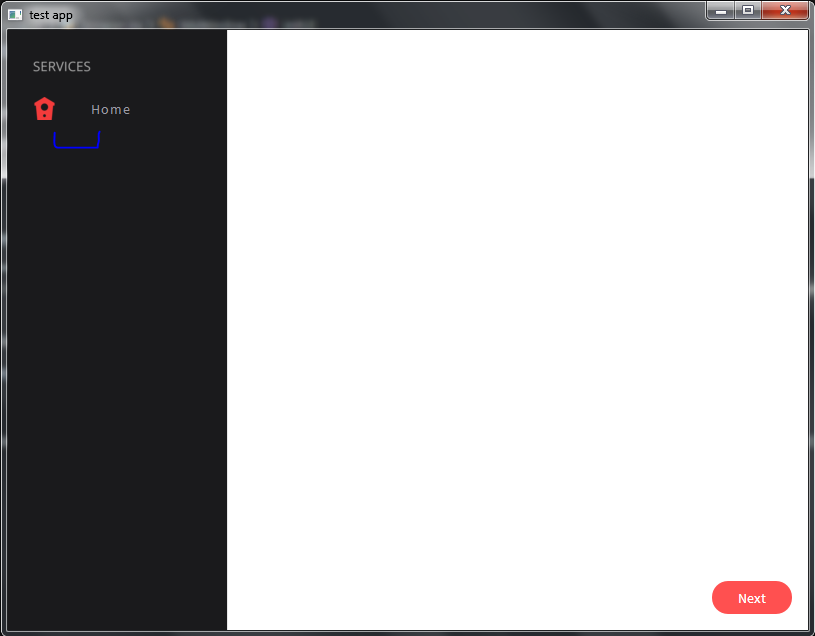
    Capture.PNG

    I want to decrease the space between the home icon and button. What I am doing wrong here?

    jsulmJ JonBJ 2 Replies Last reply
    0
    • Abhay SalviA Abhay Salvi

      I have a QT Application that uses a GridLayout. I want to decrease the spacing between the widgets but it doesn't. If I set glay1.setHorizontalSpacing() to 60 then it increases the space, but if I want to decrease it then it's not working :(

      Here is the code below:

          right = QtWidgets.QWidget(label)
          right.setStyleSheet("""border: none;""")
          right.setContentsMargins(16, 16, 0, 0)
      
          glay1 = QtWidgets.QGridLayout(right)
          glay1.setSpacing(18)
          glay1.addWidget(vtext, 0, 0)         # the SERVICE text
          glay1.addWidget(vtext1, 1, 0)        # the home icon 
          glay1.setHorizontalSpacing(0)
          glay1.addWidget(butt1, 1, 1)         # the Home text
      

      The following code will give the output:

      Capture.PNG

      I want to decrease the space between the home icon and button. What I am doing wrong here?

      JonBJ Offline
      JonBJ Offline
      JonB
      wrote on last edited by JonB
      #3

      @Abhay-Salvi
      Further to my learned colleague @jsulm 's remark. Have a look at overload void QGridLayout::addWidget(QWidget *widget, int fromRow, int fromColumn, int rowSpan, int columnSpan, Qt::Alignment alignment = Qt::Alignment()), https://doc.qt.io/qt-5/qgridlayout.html#addWidget-2, which would allow you to span the SERVICES label across two columns so that the HOME text can move closer to its label.

      A separate matter is whether you need a grid layout here for what you are going to do with further items. A list of items with icons, or even a menu with icons, might be more appropriate.

      1 Reply Last reply
      3
      • Abhay SalviA Abhay Salvi

        I have a QT Application that uses a GridLayout. I want to decrease the spacing between the widgets but it doesn't. If I set glay1.setHorizontalSpacing() to 60 then it increases the space, but if I want to decrease it then it's not working :(

        Here is the code below:

            right = QtWidgets.QWidget(label)
            right.setStyleSheet("""border: none;""")
            right.setContentsMargins(16, 16, 0, 0)
        
            glay1 = QtWidgets.QGridLayout(right)
            glay1.setSpacing(18)
            glay1.addWidget(vtext, 0, 0)         # the SERVICE text
            glay1.addWidget(vtext1, 1, 0)        # the home icon 
            glay1.setHorizontalSpacing(0)
            glay1.addWidget(butt1, 1, 1)         # the Home text
        

        The following code will give the output:

        Capture.PNG

        I want to decrease the space between the home icon and button. What I am doing wrong here?

        jsulmJ Offline
        jsulmJ Offline
        jsulm
        Lifetime Qt Champion
        wrote on last edited by
        #2

        @Abhay-Salvi This is because of the SERVICE label which takes some space, so first column has a minimum width of SERVICES label.

        https://forum.qt.io/topic/113070/qt-code-of-conduct

        1 Reply Last reply
        3
        • Abhay SalviA Abhay Salvi

          I have a QT Application that uses a GridLayout. I want to decrease the spacing between the widgets but it doesn't. If I set glay1.setHorizontalSpacing() to 60 then it increases the space, but if I want to decrease it then it's not working :(

          Here is the code below:

              right = QtWidgets.QWidget(label)
              right.setStyleSheet("""border: none;""")
              right.setContentsMargins(16, 16, 0, 0)
          
              glay1 = QtWidgets.QGridLayout(right)
              glay1.setSpacing(18)
              glay1.addWidget(vtext, 0, 0)         # the SERVICE text
              glay1.addWidget(vtext1, 1, 0)        # the home icon 
              glay1.setHorizontalSpacing(0)
              glay1.addWidget(butt1, 1, 1)         # the Home text
          

          The following code will give the output:

          Capture.PNG

          I want to decrease the space between the home icon and button. What I am doing wrong here?

          JonBJ Offline
          JonBJ Offline
          JonB
          wrote on last edited by JonB
          #3

          @Abhay-Salvi
          Further to my learned colleague @jsulm 's remark. Have a look at overload void QGridLayout::addWidget(QWidget *widget, int fromRow, int fromColumn, int rowSpan, int columnSpan, Qt::Alignment alignment = Qt::Alignment()), https://doc.qt.io/qt-5/qgridlayout.html#addWidget-2, which would allow you to span the SERVICES label across two columns so that the HOME text can move closer to its label.

          A separate matter is whether you need a grid layout here for what you are going to do with further items. A list of items with icons, or even a menu with icons, might be more appropriate.

          1 Reply Last reply
          3
          • Abhay SalviA Offline
            Abhay SalviA Offline
            Abhay Salvi
            wrote on last edited by
            #4

            @Denni-0 Thanks for your answer :) I got it

            1 Reply Last reply
            0

            • Login

            • Login or register to search.
            • First post
              Last post
            0
            • Categories
            • Recent
            • Tags
            • Popular
            • Users
            • Groups
            • Search
            • Get Qt Extensions
            • Unsolved