Solved tumbler doesnot fit rectangle when rotation -90 is given.
-
I am running following example code, output does not fit in entire window as it does with vertical view.
- Is tumbler can not be used for horizontal visualization?
- Can I use SwipeView on the same and also I want wrapping.
Thanks in advance.
import QtQuick 2.12
import QtQuick.Controls 2.12Tumbler {
id: control
model: 15
width: 200
height: 100
rotation: -90
background: Item {
Rectangle {
opacity: control.enabled ? 0.2 : 0.1
border.color: "#000000"
width: parent.width
height: 1
anchors.top: parent.top
}Rectangle { opacity: control.enabled ? 0.2 : 0.1 border.color: "#000000" width: parent.width height: 1 anchors.bottom: parent.bottom } } delegate: Text { text: qsTr("Item %1").arg(modelData + 1) font: control.font horizontalAlignment: Text.AlignHCenter verticalAlignment: Text.AlignVCenter opacity: 1.0 - Math.abs(Tumbler.displacement) / (control.visibleItemCount / 2) } Rectangle { anchors.horizontalCenter: control.horizontalCenter y: control.height * 0.4 width: 40 height: 1 color: "#21be2b" } Rectangle { anchors.horizontalCenter: control.horizontalCenter y: control.height * 0.6 width: 40 height: 1 color: "#21be2b" }}
-
I have no idea about SwipeView in this scenario, but you can certainly use Tumbler in horizontal view by adding Rotation to your Text;
import QtQuick 2.12
import QtQuick.Window 2.12
import QtQuick.Controls 2.12

Window {
    visible: true
    width: 200
    height: 200
    title: qsTr("Hello World")

    Tumbler {
        id: control
        model: 15
        width: 200
        height: 200
        rotation: -90
        anchors.fill: parent
        background: Item {
            Rectangle {
                opacity: control.enabled ? 0.2 : 0.1
                border.color: "#000000"
                width: parent.width
                height: 1
                anchors.top: parent.top
            }

            Rectangle {
                opacity: control.enabled ? 0.2 : 0.1
                border.color: "#000000"
                width: parent.width
                height: 1
                anchors.bottom: parent.bottom
            }
        }

        delegate: Text {
            rotation: 90
            text: qsTr("Item %1").arg(modelData + 1)
            font: control.font
            horizontalAlignment: Text.AlignHCenter
            verticalAlignment: Text.AlignVCenter
            opacity: 1.0 - Math.abs(Tumbler.displacement) / (control.visibleItemCount / 2)
        }

        Rectangle {
            anchors.horizontalCenter: control.horizontalCenter
            y: control.height * 0.4
            width: 40
            height: 1
            color: "#21be2b"
        }

        Rectangle {
            anchors.horizontalCenter: control.horizontalCenter
            y: control.height * 0.6
            width: 40
            height: 1
            color: "#21be2b"
        }
    }
}
-
@dsba said in tumbler doesnot fit rectangle when rotation -90 is given.:
Thanks for the reply.
Kindly expand the window, you will see Tumbler that does not fit completely. I want It to fit completely in below mentioned Width and Height.
width: 200
height: 100 -
@dsba said in tumbler doesnot fit rectangle when rotation -90 is given.:
@dsba said in tumbler doesnot fit rectangle when rotation -90 is given.:
Thanks for the reply.
Kindly expand the window, you will see Tumbler that does not fit completely. I want It to fit completely in below mentioned Width and Height.
width: 200
height: 100yes, I noticed that when I first ran your code, it is because rotation is performed on the x axis not from the centre of the object.
Look at my code, the Tumbler is anchored to fill the main window. The main window is set to accommodate a maximum height or width of 200 allowing tumbler to fit when rotated.
-
I copied your code and executing, I still have same issue. I am using ubuntu 18.04.
Do you still get completely filled if you increase width to 500?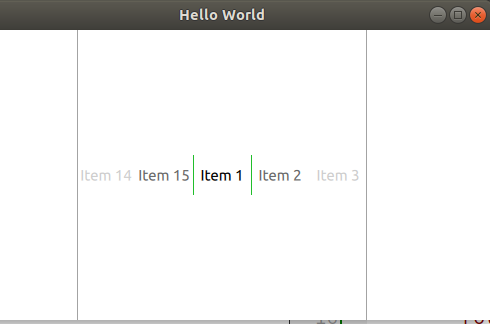
-
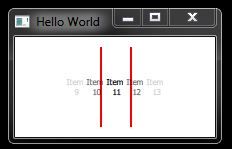
Try pasting the following code. You should now get the size you want with some tweaking to make the text readable;
import QtQuick 2.12
import QtQuick.Window 2.12
import QtQuick.Controls 2.12

ApplicationWindow {
    visible: true
    width: 200
    height: 100
    title: qsTr("Hello World")

    Tumbler {
        id: control
        model: 15
        width: 200
        height: 100
        rotation: -90
        anchors.fill: parent
        opacity: 1.0 - Math.abs(Tumbler.displacement) / (control.visibleItemCount / 2)
        delegate: Text {
            rotation: 90
            text: qsTr("Item\n %1").arg(modelData + 1)
            font.pixelSize: 8
            horizontalAlignment: Text.AlignHCenter
            verticalAlignment: Text.AlignVCenter
            opacity: 1.0 - Math.abs(Tumbler.displacement) / (control.visibleItemCount / 2)
        }
        Rectangle {
            anchors.horizontalCenter: control.horizontalCenter
            y: control.height * 0.35
            width: 80
            height: 2
            color: "red"
        }
        Rectangle {
            anchors.horizontalCenter: control.horizontalCenter
            y: control.height * 0.65
            width: 80
            height: 2
            color: "red"
        }
    }
}
-
Thanks for the help.
Maybe my question is not explained properly I believe.
Tumbler does not get fit inside window completely. I have highlighted tumbler color so that it could be explained well for your kind reference.
ApplicationWindow {
visible: true
width: 200
height: 100
title: qsTr("Hello World")Tumbler { id: control model: 15 width: 200 height: 100 background: Rectangle { anchors.fill: control color: "lightblue" } rotation: -90 anchors.fill: parent delegate: Text { rotation: 90 text: qsTr("Item\n %1").arg(modelData + 1) font.pixelSize: 8 horizontalAlignment: Text.AlignHCenter verticalAlignment: Text.AlignVCenter } }}

-
Yeah, I got the feeling I wasn't understanding you correctly, I may still have this wrong but here goes.
We can maintain the size of the main window (width: 200; height: 100) but to fill the window with Tumbler, increase the height of Tumbler from '150' to '200' and change 'anchors.fill: parent' to 'anchors.centerIn: parent'
    Tumbler {
        id: control
        model: 15
        width: 200
        height: 200
        rotation: -90
        anchors.centerIn: parent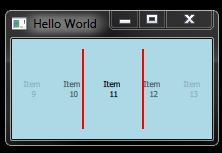
Do I still misunderstand @dsba ?.....or are we getting somewhere?
-
@Markkyboy said in tumbler doesnot fit rectangle when rotation -90 is given.:
anchors.centerIn: parent
Thanks @Markkyboy .
During Horizontal representation of tumbler, parent.width becomes height of the Tumbler and parent.height to be width of the Tumbler. Hence, this seems to be working for the width and height that I was required with.
Tumbler {
id: tumbler
width: parent.height
height: parent.width
rotation: -90 // <---- Rotate there
anchors.centerIn: parent
