Skip to content
  • Categories
  • Recent
  • Tags
  • Popular
  • Users
  • Groups
  • Search
  • Get Qt Extensions
  • Unsolved
Collapse
Brand Logo
  1. Home
  2. Qt Development
  3. General and Desktop
  4. GCC Desktop Kit yellow mark on Linux

GCC Desktop Kit yellow mark on Linux

Scheduled Pinned Locked Moved Solved General and Desktop
25 Posts 5 Posters 3.1k Views 3 Watching
  • Oldest to Newest
  • Newest to Oldest
  • Most Votes
Reply
  • Reply as topic
Log in to reply
This topic has been deleted. Only users with topic management privileges can see it.
  • Q Offline
    Q Offline
    qcoderpro
    wrote on last edited by
    #1

    Hi,

    Just installed Linux and about to use Qt on it, but I have this problem:

    Screenshot from 2020-05-11 13-55-50.png

    How fix ix this please?

    1 Reply Last reply
    0
    • Q qcoderpro

      @J-Hilk

      I added the files "after" configuring the compiler. And now I have not added the files and the IDE doesn't show them either. It's only the .pro and main.cpp. Yet I run it and now I get this error.

      Screenshot from 2020-05-12 09-11-30.png

      I created an empty project "Test_1" and the IDE showed the same errors as above for this one too, so probably it's the source of the issue.

      Screenshot from 2020-05-12 09-12-20.png

      jsulmJ Offline
      jsulmJ Offline
      jsulm
      Lifetime Qt Champion
      wrote on last edited by
      #24

      @qcoderpro Take a look at https://doc.qt.io/qt-5/linux.html and install libgl1-mesa-dev package as shown there

      https://forum.qt.io/topic/113070/qt-code-of-conduct

      Q 1 Reply Last reply
      1
      • SGaistS Offline
        SGaistS Offline
        SGaist
        Lifetime Qt Champion
        wrote on last edited by
        #2

        Hi,

        If you hover your cursor above the yellow mark you will have the information about what is going on.

        Interested in AI ? www.idiap.ch
        Please read the Qt Code of Conduct - https://forum.qt.io/topic/113070/qt-code-of-conduct

        Q 1 Reply Last reply
        1
        • SGaistS SGaist

          Hi,

          If you hover your cursor above the yellow mark you will have the information about what is going on.

          Q Offline
          Q Offline
          qcoderpro
          wrote on last edited by qcoderpro
          #3

          @SGaist

          yes, but how to add a C++ compiler to it, please?

          Screenshot from 2020-05-11 14-03-13.png

          1 Reply Last reply
          0
          • SGaistS Offline
            SGaistS Offline
            SGaist
            Lifetime Qt Champion
            wrote on last edited by
            #4

            What Linux distribution are you using ?

            Interested in AI ? www.idiap.ch
            Please read the Qt Code of Conduct - https://forum.qt.io/topic/113070/qt-code-of-conduct

            Q 1 Reply Last reply
            0
            • SGaistS SGaist

              What Linux distribution are you using ?

              Q Offline
              Q Offline
              qcoderpro
              wrote on last edited by
              #5

              @SGaist

              Ubuntu 20.04 LTS

              1 Reply Last reply
              0
              • SGaistS Offline
                SGaistS Offline
                SGaist
                Lifetime Qt Champion
                wrote on last edited by
                #6

                Then install the "build-essential" package.

                Interested in AI ? www.idiap.ch
                Please read the Qt Code of Conduct - https://forum.qt.io/topic/113070/qt-code-of-conduct

                Q 1 Reply Last reply
                1
                • SGaistS SGaist

                  Then install the "build-essential" package.

                  Q Offline
                  Q Offline
                  qcoderpro
                  wrote on last edited by
                  #7

                  @SGaist

                  Is it a package I can install by Terminal?

                  1 Reply Last reply
                  0
                  • SGaistS Offline
                    SGaistS Offline
                    SGaist
                    Lifetime Qt Champion
                    wrote on last edited by
                    #8

                    You know that if you have just search either in your terminal or whatever GUI Ubuntu provides for package management you would already have the installation running ?

                    Interested in AI ? www.idiap.ch
                    Please read the Qt Code of Conduct - https://forum.qt.io/topic/113070/qt-code-of-conduct

                    Q 1 Reply Last reply
                    0
                    • SGaistS SGaist

                      You know that if you have just search either in your terminal or whatever GUI Ubuntu provides for package management you would already have the installation running ?

                      Q Offline
                      Q Offline
                      qcoderpro
                      wrote on last edited by
                      #9

                      @SGaist

                      I installed it, thanks.

                      What changes are needed to be made when we want to open a Qt project on Linux that we have already created and built using Windows?

                      1 Reply Last reply
                      0
                      • SGaistS Offline
                        SGaistS Offline
                        SGaist
                        Lifetime Qt Champion
                        wrote on last edited by
                        #10

                        Well, unless you used Windows specific APIs, nothing. If you used external libraries, you'll have to use scopes to properly handle paths to them.

                        Interested in AI ? www.idiap.ch
                        Please read the Qt Code of Conduct - https://forum.qt.io/topic/113070/qt-code-of-conduct

                        Q 1 Reply Last reply
                        2
                        • SGaistS SGaist

                          Well, unless you used Windows specific APIs, nothing. If you used external libraries, you'll have to use scopes to properly handle paths to them.

                          Q Offline
                          Q Offline
                          qcoderpro
                          wrote on last edited by
                          #11

                          @SGaist

                          I don't know "Windows specific APIs" unfortunately. Is there a list of them to see please?

                          Here's my project on Windows:

                          "DialogTest. pro"

                          QT       += core gui
                          
                          greaterThan(QT_MAJOR_VERSION, 4): QT += widgets
                          
                          CONFIG += c++11
                          
                          # The following define makes your compiler emit warnings if you use
                          # any Qt feature that has been marked deprecated (the exact warnings
                          # depend on your compiler). Please consult the documentation of the
                          # deprecated API in order to know how to port your code away from it.
                          DEFINES += QT_DEPRECATED_WARNINGS
                          
                          # You can also make your code fail to compile if it uses deprecated APIs.
                          # In order to do so, uncomment the following line.
                          # You can also select to disable deprecated APIs only up to a certain version of Qt.
                          #DEFINES += QT_DISABLE_DEPRECATED_BEFORE=0x060000    # disables all the APIs deprecated before Qt 6.0.0
                          
                          SOURCES += \
                              main.cpp \
                              dialogtest.cpp
                          
                          HEADERS += \
                              dialogtest.h
                          
                          # Default rules for deployment.
                          qnx: target.path = /tmp/$${TARGET}/bin
                          else: unix:!android: target.path = /opt/$${TARGET}/bin
                          !isEmpty(target.path): INSTALLS += target
                          

                          The heaser:

                          #ifndef DIALOGTEST_H
                          #define DIALOGTEST_H
                          
                          #include <QDialog>
                          
                          class QPushButton;
                          class QComboBox;
                          class QVBoxLayout;
                          class QHBoxLayout;
                          class QLabel;
                          
                          class DialogTest : public QDialog
                          {
                              Q_OBJECT
                          
                          public:
                              DialogTest(QWidget *parent = nullptr);
                          
                          private slots:
                              void itemChanged(int);
                              void saveBtnClicked();
                              void init();
                              void load();
                          
                          private:
                              QComboBox* cboBox = nullptr;
                          
                              QHBoxLayout* topHLayout = nullptr;
                              QHBoxLayout* middleHLayout = nullptr;
                              QHBoxLayout* bottomHLayout = nullptr;
                              QVBoxLayout* mainLayout = nullptr;
                          
                              QLabel* select = nullptr;
                              QLabel* ItemSelected = nullptr;
                              QPushButton* save = nullptr;
                          };
                          #endif // DIALOGTEST_H
                          

                          The C++ file:

                          #include "DialogTest.h"
                          #include <QPushButton>
                          #include <QComboBox>
                          #include <QHBoxLayout>
                          #include <QVBoxLayout>
                          #include <QMessageBox>
                          #include <QSettings>
                          #include <QLabel>
                          #include <QDebug>
                          
                          DialogTest::DialogTest(QWidget *parent)
                              : QDialog(parent)
                          {
                              select = new QLabel(tr("Select an Item"));
                              cboBox = new QComboBox;
                              ItemSelected = new QLabel(tr("Selected Item"));
                              save = new QPushButton(tr("&Save"));
                          
                              topHLayout = new QHBoxLayout;
                              topHLayout->addWidget(select);
                              topHLayout->addWidget(cboBox);
                          
                              middleHLayout = new QHBoxLayout;
                              middleHLayout->addWidget(ItemSelected);
                              middleHLayout->addStretch();
                          
                              bottomHLayout = new QHBoxLayout;
                              bottomHLayout->addStretch();
                              bottomHLayout->addWidget(save);
                          
                              mainLayout = new QVBoxLayout;
                              mainLayout->addLayout(topHLayout);
                              mainLayout->addLayout(middleHLayout);
                              mainLayout->addLayout(bottomHLayout);
                          
                              setLayout(mainLayout);
                          
                              init();
                              load();
                          
                              connect(cboBox, SIGNAL(currentIndexChanged(int)), this, SLOT(itemChanged(int)));
                              connect(save, &QPushButton::clicked, this, &DialogTest::saveBtnClicked);
                          }
                          
                          void DialogTest::itemChanged(int index)
                          {
                            ItemSelected->setText(QString::number(index) + " = " + cboBox->currentText());
                          }
                          
                          void DialogTest::saveBtnClicked()
                          {
                             QSettings settings("MySoft", "Star Runner");
                             settings.setValue("settings", cboBox->currentIndex());
                             QMessageBox::information(this, "Save", "Your item is saved, Please re-open the application");
                          }
                          
                          void DialogTest::init()
                          {
                              cboBox->clear();
                          
                              for (int i=0; i<10; i++)
                                  cboBox->addItem("Item number " + QString::number(i));
                          }
                          
                          void DialogTest::load()
                          {
                             QSettings settings("MySoft", "Star Runner");
                             QVariant value = settings.value("settings",0);
                          
                             bool ok;
                             int index = value.toInt(&ok);
                          
                             if(!ok)
                             {
                                 QMessageBox::critical(this, "Error", "Error in loading the file");
                                 return;
                             }
                          
                             if(index < cboBox->count())
                              cboBox->setCurrentIndex(index);
                          
                             else
                              cboBox->setCurrentIndex(0);
                          }
                          

                          And on the Linux machine, lost of errors turned up:

                          Screenshot from 2020-05-11 14-30-25.png

                          1 Reply Last reply
                          0
                          • SGaistS Offline
                            SGaistS Offline
                            SGaist
                            Lifetime Qt Champion
                            wrote on last edited by
                            #12

                            That's strange, I would nuke the build folder and re-build from scratch.

                            Interested in AI ? www.idiap.ch
                            Please read the Qt Code of Conduct - https://forum.qt.io/topic/113070/qt-code-of-conduct

                            Q 1 Reply Last reply
                            0
                            • SGaistS SGaist

                              That's strange, I would nuke the build folder and re-build from scratch.

                              Q Offline
                              Q Offline
                              qcoderpro
                              wrote on last edited by qcoderpro
                              #13

                              @SGaist

                              I did, although I'm not an expert on military tasks!
                              Now there is only the project's directory on Desktop including 4 files: DialogTest.cpp, DialogTest.h, DialogTest .pro and main.cpp.

                              I open the .pro file by the IDE and configure the project using the GCC kit and run it. Sadly the errors above all come up! :(

                              jsulmJ 1 Reply Last reply
                              0
                              • Q qcoderpro

                                @SGaist

                                I did, although I'm not an expert on military tasks!
                                Now there is only the project's directory on Desktop including 4 files: DialogTest.cpp, DialogTest.h, DialogTest .pro and main.cpp.

                                I open the .pro file by the IDE and configure the project using the GCC kit and run it. Sadly the errors above all come up! :(

                                jsulmJ Offline
                                jsulmJ Offline
                                jsulm
                                Lifetime Qt Champion
                                wrote on last edited by
                                #14

                                @qcoderpro Can you upload this project to somewhere so we can test?

                                https://forum.qt.io/topic/113070/qt-code-of-conduct

                                Q 1 Reply Last reply
                                0
                                • jsulmJ jsulm

                                  @qcoderpro Can you upload this project to somewhere so we can test?

                                  Q Offline
                                  Q Offline
                                  qcoderpro
                                  wrote on last edited by
                                  #15

                                  @jsulm
                                  Yes, I uploaded it here: https://www.dropbox.com/s/xuji3ghpbvsy5u8/DialogTest.7z?dl=0

                                  jsulmJ 1 Reply Last reply
                                  0
                                  • Q qcoderpro

                                    @jsulm
                                    Yes, I uploaded it here: https://www.dropbox.com/s/xuji3ghpbvsy5u8/DialogTest.7z?dl=0

                                    jsulmJ Offline
                                    jsulmJ Offline
                                    jsulm
                                    Lifetime Qt Champion
                                    wrote on last edited by
                                    #16

                                    @qcoderpro I can build it on Linux without any issues.
                                    Did you delete the DialogTest.pro.user file after copying to Linux?

                                    https://forum.qt.io/topic/113070/qt-code-of-conduct

                                    Q 1 Reply Last reply
                                    2
                                    • jsulmJ jsulm

                                      @qcoderpro I can build it on Linux without any issues.
                                      Did you delete the DialogTest.pro.user file after copying to Linux?

                                      Q Offline
                                      Q Offline
                                      qcoderpro
                                      wrote on last edited by
                                      #17

                                      @jsulm
                                      yes.
                                      Now how to recover it or anything to fix the issue please?

                                      jsulmJ 1 Reply Last reply
                                      0
                                      • Q qcoderpro

                                        @jsulm
                                        yes.
                                        Now how to recover it or anything to fix the issue please?

                                        jsulmJ Offline
                                        jsulmJ Offline
                                        jsulm
                                        Lifetime Qt Champion
                                        wrote on last edited by
                                        #18

                                        @qcoderpro On which file system is the project located?
                                        Do you have any old build artefacts in the project or build folder?

                                        https://forum.qt.io/topic/113070/qt-code-of-conduct

                                        Q 1 Reply Last reply
                                        0
                                        • jsulmJ jsulm

                                          @qcoderpro On which file system is the project located?
                                          Do you have any old build artefacts in the project or build folder?

                                          Q Offline
                                          Q Offline
                                          qcoderpro
                                          wrote on last edited by
                                          #19

                                          @jsulm

                                          The project is made and working properly on Windows. Now what should I do to test it on Linux?

                                          I transferred the project to Linux:
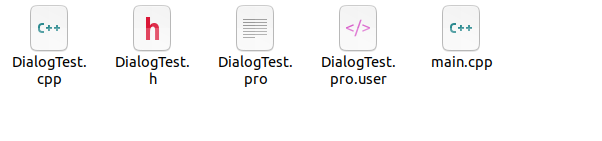
                                          Screenshot from 2020-05-12 08-44-24.png

                                          Now I open the IDE (Qt Creator) and open the .pro file. Then I configure the project. But there is only the .pro and main.cpp files on the list!
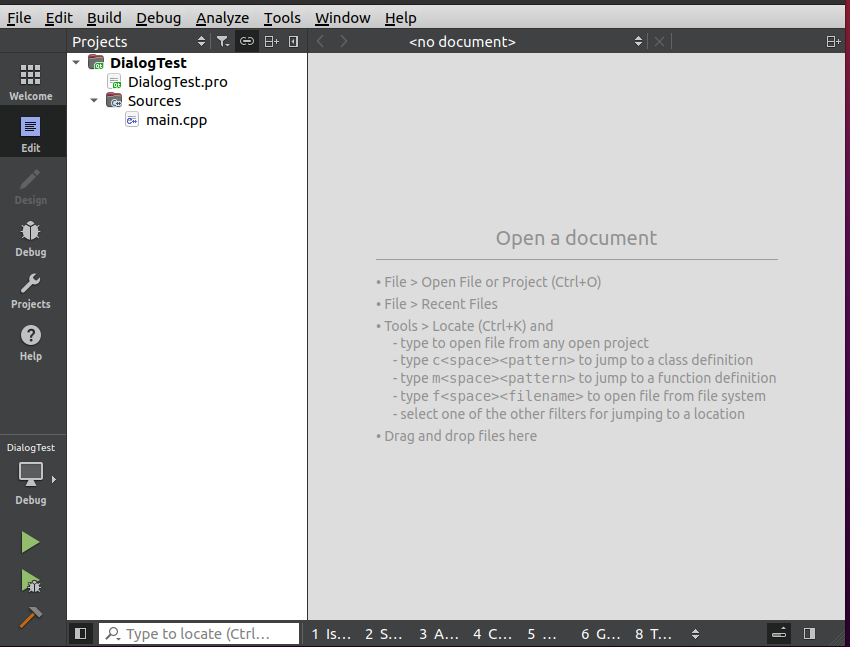
                                          Screenshot from 2020-05-12 08-50-19.png

                                          So I add DialodTest.cpp and DialogTest.h files to the project.
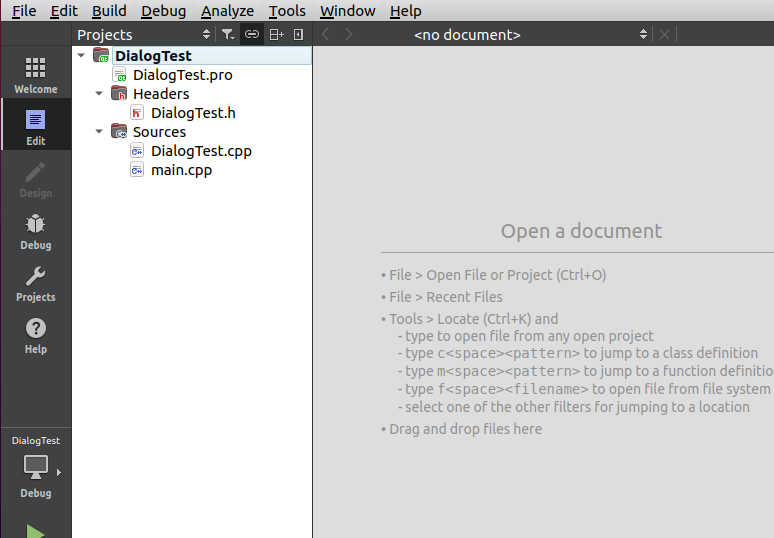
                                          Screenshot from 2020-05-12 08-52-42.png

                                          And then run it.
                                          And suddenly all those errors come up.

                                          The problem is either with my Qt or Linux! But how to know and fix it?

                                          jsulmJ J.HilkJ 2 Replies Last reply
                                          0
                                          • Q qcoderpro

                                            @jsulm

                                            The project is made and working properly on Windows. Now what should I do to test it on Linux?

                                            I transferred the project to Linux:

                                            Screenshot from 2020-05-12 08-44-24.png

                                            Now I open the IDE (Qt Creator) and open the .pro file. Then I configure the project. But there is only the .pro and main.cpp files on the list!

                                            Screenshot from 2020-05-12 08-50-19.png

                                            So I add DialodTest.cpp and DialogTest.h files to the project.

                                            Screenshot from 2020-05-12 08-52-42.png

                                            And then run it.
                                            And suddenly all those errors come up.

                                            The problem is either with my Qt or Linux! But how to know and fix it?

                                            jsulmJ Offline
                                            jsulmJ Offline
                                            jsulm
                                            Lifetime Qt Champion
                                            wrote on last edited by jsulm
                                            #20

                                            @qcoderpro There is nothing special to do.
                                            I downloaded your archive, extracted it, deleted DialogTest.pro.user file, open the pro file in QtCreator and built. That's it.
                                            So, again: did you delete DialogTest.pro.user before opening project in QtCreator?

                                            I guess you now added the files twice to the pro file? That would explain the errors you get...

                                            https://forum.qt.io/topic/113070/qt-code-of-conduct

                                            1 Reply Last reply
                                            2

                                            • Login

                                            • Login or register to search.
                                            • First post
                                              Last post
                                            0
                                            • Categories
                                            • Recent
                                            • Tags
                                            • Popular
                                            • Users
                                            • Groups
                                            • Search
                                            • Get Qt Extensions
                                            • Unsolved