Skip to content
  • Categories
  • Recent
  • Tags
  • Popular
  • Users
  • Groups
  • Search
  • Get Qt Extensions
  • Unsolved
Collapse
Brand Logo
  1. Home
  2. Qt Development
  3. General and Desktop
  4. DrawLine using QPaintedItem is not proper
Qt 6.11 is out! See what's new in the release blog

DrawLine using QPaintedItem is not proper

Scheduled Pinned Locked Moved Unsolved General and Desktop
6 Posts 2 Posters 554 Views 1 Watching
  • Oldest to Newest
  • Newest to Oldest
  • Most Votes
Reply
  • Reply as topic
Log in to reply
This topic has been deleted. Only users with topic management privileges can see it.
  • A Offline
    A Offline
    Ajay Krishna
    wrote on last edited by Ajay Krishna
    #1

    Hi ,
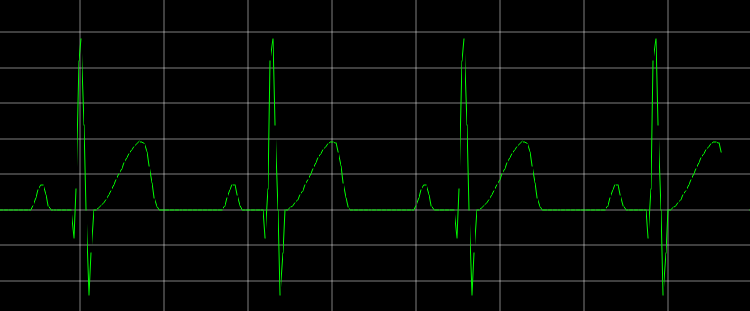
    I am trying to draw wave forms using QPaintedItem with drawLine .
    When i try to draw continuous line with real time data i can see some pixels are getting missed .

    With same data if i draw using charview (lineseries,valueAxis) drawing is perfect.

    can somebody help what can be issue ? Should i set anything before drawing ?

    I am using QPen to draw right now .

    Thanks in advance .
    548aaaf4-dcec-47a3-a1bc-ba97819e937d-image.png

    1 Reply Last reply
    0
    • mrjjM Offline
      mrjjM Offline
      mrjj
      Lifetime Qt Champion
      wrote on last edited by
      #2

      Hi
      Its hard to guess at with no code but
      maybe its due to double to int capping and not doing rounding.

      Can you show your draw code ?

      1 Reply Last reply
      1
      • A Offline
        A Offline
        Ajay Krishna
        wrote on last edited by
        #3

        void DrawGraph::updateGraph(qreal x, qreal y)
        {
        QPointF newpoint(xPlotPosition,yPlotPosition);
        line = QLineF(lastPoint, newpoint);
        lastPoint = newpoint;

        rect.setRect(newpoint.x()-2,yGraphStartPixel,30,this->height());
        update(rect);
        

        }

        void DrawGraph::paint(QPainter *painter)
        {
        this->drawGraph(painter);
        }

        void DrawGraph::drawGraph(QPainter *painter)
        {
        painter->setPen(QPen(Qt::green,2));

        painter->drawLine(line); // QLineF line;
        

        }

        1 Reply Last reply
        0
        • mrjjM Offline
          mrjjM Offline
          mrjj
          Lifetime Qt Champion
          wrote on last edited by
          #4

          Hi
          Seems fine
          what types are xPlotPosition,yPlotPosition ?

          1 Reply Last reply
          0
          • A Offline
            A Offline
            Ajay Krishna
            wrote on last edited by
            #5

            xPlotPosition and yPlotPosition are qreal type

            mrjjM 1 Reply Last reply
            0
            • A Ajay Krishna

              xPlotPosition and yPlotPosition are qreal type

              mrjjM Offline
              mrjjM Offline
              mrjj
              Lifetime Qt Champion
              wrote on last edited by
              #6

              @Ajay-Krishna

              I would inspect newpoint.x() and see how much its truncated
              comapred to the xPlotPosition

              Also maybe turn on antialiasing for QPainter

              but it really looks like it get truncated.

              1 Reply Last reply
              0

              • Login

              • Login or register to search.
              • First post
                Last post
              0
              • Categories
              • Recent
              • Tags
              • Popular
              • Users
              • Groups
              • Search
              • Get Qt Extensions
              • Unsolved