Skip to content
  • Categories
  • Recent
  • Tags
  • Popular
  • Users
  • Groups
  • Search
  • Get Qt Extensions
  • Unsolved
Collapse
Brand Logo
  1. Home
  2. Qt Development
  3. Qt for Python
  4. PySide2 cannot display image
Forum Updated to NodeBB v4.3 + New Features

PySide2 cannot display image

Scheduled Pinned Locked Moved Unsolved Qt for Python
11 Posts 3 Posters 1.8k Views 1 Watching
  • Oldest to Newest
  • Newest to Oldest
  • Most Votes
Reply
  • Reply as topic
Log in to reply
This topic has been deleted. Only users with topic management privileges can see it.
  • W Offline
    W Offline
    weida_wang
    wrote on last edited by
    #1

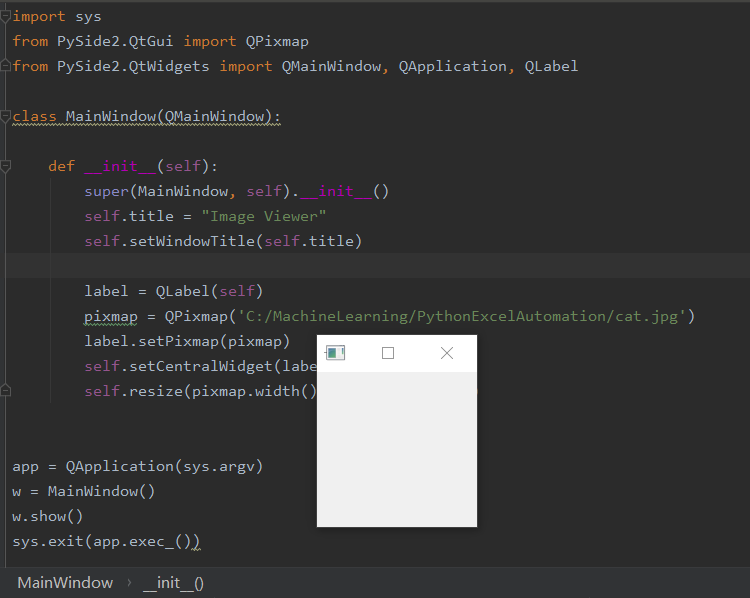
    I also asked this question at stackoverflow, i hope to be inspired by as many people as possible, Thanks ~

    1 Reply Last reply
    0
    • SGaistS Offline
      SGaistS Offline
      SGaist
      Lifetime Qt Champion
      wrote on last edited by
      #2

      Hi and welcome to devnet,

      Unless cat.jpg is in the same folder as where you start your python script, that won't work.

      Interested in AI ? www.idiap.ch
      Please read the Qt Code of Conduct - https://forum.qt.io/topic/113070/qt-code-of-conduct

      W 1 Reply Last reply
      0
      • SGaistS SGaist

        Hi and welcome to devnet,

        Unless cat.jpg is in the same folder as where you start your python script, that won't work.

        W Offline
        W Offline
        weida_wang
        wrote on last edited by
        #3

        @SGaist Thanks for your greeting ! Yes, i put the py script and cat.jpg in the same folder, even though i pass the full path of cat.jpg, the window is still empty, please see the sreenshot (i.postimg.cc/ZqGW6xpz/image.png)

        JonBJ 1 Reply Last reply
        0
        • W weida_wang

          @SGaist Thanks for your greeting ! Yes, i put the py script and cat.jpg in the same folder, even though i pass the full path of cat.jpg, the window is still empty, please see the sreenshot (i.postimg.cc/ZqGW6xpz/image.png)

          JonBJ Offline
          JonBJ Offline
          JonB
          wrote on last edited by JonB
          #4

          @weida_wang
          FWIW: Try changing that guy's code so that you keep the original QMainWindow::centralWidget(), add a Q[HV]BoxLayout onto it, and add your QLabel onto that; and maybe put in some explicit sizes while you sort it out. It's just possible you have a layout issue. Also try label.setScaledContents(True). I'm not sure why it works from PyQt but not from PySide2.

          W 1 Reply Last reply
          0
          • JonBJ JonB

            @weida_wang
            FWIW: Try changing that guy's code so that you keep the original QMainWindow::centralWidget(), add a Q[HV]BoxLayout onto it, and add your QLabel onto that; and maybe put in some explicit sizes while you sort it out. It's just possible you have a layout issue. Also try label.setScaledContents(True). I'm not sure why it works from PyQt but not from PySide2.

            W Offline
            W Offline
            weida_wang
            wrote on last edited by
            #5

            @JonB emm, it seems not the layout issue, because print(pixmap.isNull()) outputs True , looks like something is wrong here

            JonBJ 1 Reply Last reply
            0
            • W weida_wang

              @JonB emm, it seems not the layout issue, because print(pixmap.isNull()) outputs True , looks like something is wrong here

              JonBJ Offline
              JonBJ Offline
              JonB
              wrote on last edited by
              #6

              @weida_wang
              Then it really does sound like it's having trouble finding the file. And I still don't get why that differ from PyQt, unless you are running the PySide from a different folder.

              1 Reply Last reply
              0
              • SGaistS Offline
                SGaistS Offline
                SGaist
                Lifetime Qt Champion
                wrote on last edited by
                #7

                Did you check that the file is in fact a valid jpeg image ?

                Interested in AI ? www.idiap.ch
                Please read the Qt Code of Conduct - https://forum.qt.io/topic/113070/qt-code-of-conduct

                JonBJ 1 Reply Last reply
                0
                • SGaistS SGaist

                  Did you check that the file is in fact a valid jpeg image ?

                  JonBJ Offline
                  JonBJ Offline
                  JonB
                  wrote on last edited by JonB
                  #8

                  @SGaist
                  The OP claims on stackoverflow (better to have copied the post here than just reference it):

                  If the imported package is PyQt5, it can work ! But if i replace PyQt5 with PySide2, it can't work again

                  :)

                  Which is why I want to verify he is running both from the same directory....

                  W 1 Reply Last reply
                  0
                  • JonBJ JonB

                    @SGaist
                    The OP claims on stackoverflow (better to have copied the post here than just reference it):

                    If the imported package is PyQt5, it can work ! But if i replace PyQt5 with PySide2, it can't work again

                    :)

                    Which is why I want to verify he is running both from the same directory....

                    W Offline
                    W Offline
                    weida_wang
                    wrote on last edited by
                    #9

                    @JonB @SGaist Hi, Guys, i find the correct solution here : https://stackoverflow.com/questions/24346038/pyside-qpixmap-not-working.
                    Thanks for everyone's discussion !

                    JonBJ 1 Reply Last reply
                    0
                    • W weida_wang

                      @JonB @SGaist Hi, Guys, i find the correct solution here : https://stackoverflow.com/questions/24346038/pyside-qpixmap-not-working.
                      Thanks for everyone's discussion !

                      JonBJ Offline
                      JonBJ Offline
                      JonB
                      wrote on last edited by
                      #10

                      @weida_wang
                      These links are from several years ago, for old PySide rather than new PySide2. I am surprised it is still the case: is this a bug, has it been reported on the Qt bugs site to the PySide2 people?

                      1 Reply Last reply
                      0
                      • SGaistS Offline
                        SGaistS Offline
                        SGaist
                        Lifetime Qt Champion
                        wrote on last edited by
                        #11

                        Do you need to do that for a completely new installation of PySide2 ?

                        Interested in AI ? www.idiap.ch
                        Please read the Qt Code of Conduct - https://forum.qt.io/topic/113070/qt-code-of-conduct

                        1 Reply Last reply
                        0

                        • Login

                        • Login or register to search.
                        • First post
                          Last post
                        0
                        • Categories
                        • Recent
                        • Tags
                        • Popular
                        • Users
                        • Groups
                        • Search
                        • Get Qt Extensions
                        • Unsolved