Skip to content
  • Categories
  • Recent
  • Tags
  • Popular
  • Users
  • Groups
  • Search
  • Get Qt Extensions
  • Unsolved
Collapse
Brand Logo
  1. Home
  2. Qt Development
  3. General and Desktop
  4. shrinking large image into smaller QLabel
Qt 6.11 is out! See what's new in the release blog

shrinking large image into smaller QLabel

Scheduled Pinned Locked Moved Solved General and Desktop
17 Posts 4 Posters 4.5k Views 3 Watching
  • Oldest to Newest
  • Newest to Oldest
  • Most Votes
Reply
  • Reply as topic
Log in to reply
This topic has been deleted. Only users with topic management privileges can see it.
  • mzimmersM Offline
    mzimmersM Offline
    mzimmers
    wrote on last edited by
    #1

    Hi all -

    I've been asked to put the company logo into the main window of my app. The logo (a banner really) is considerably larger than the default size of the QLabel. I want it to expand proportionately if/as the user grows the window. Changing the size of the QLabel doesn't preserve the size when I add it to a horizontal layout (the label reverts to the image size). How do I go about handling this?

    Thanks...

    1 Reply Last reply
    0
    • mrjjM Offline
      mrjjM Offline
      mrjj
      Lifetime Qt Champion
      wrote on last edited by
      #2

      Hi
      I assume alt text
      is not good enough as you want it to keep the aspect ratio ?

      1 Reply Last reply
      0
      • mzimmersM Offline
        mzimmersM Offline
        mzimmers
        wrote on last edited by
        #3

        Here's the top of my widget in Designer before I attempt a layout:
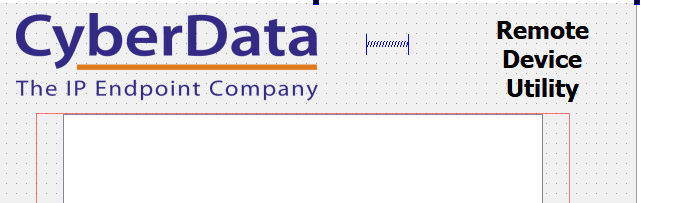
        before.PNG
        Admittedly not great, but tolerable.
        Here's what happens when I try to join the logo, the spacer and the title horizontally:
        after.PNG

        J.HilkJ 1 Reply Last reply
        0
        • mzimmersM mzimmers

          Here's the top of my widget in Designer before I attempt a layout:
          before.PNG
          Admittedly not great, but tolerable.
          Here's what happens when I try to join the logo, the spacer and the title horizontally:
          after.PNG

          J.HilkJ Offline
          J.HilkJ Offline
          J.Hilk
          Moderators
          wrote on last edited by
          #4

          @mzimmers
          From my past experience, it is possible to do it with scaled content and spacers and size policies, but it never worked quite like I wanted it to, so I usually ended up subclassing the QLabel and drawing the banner by hand.

          it's like 4 lines of code and you do not need to rely on autogenerated code 🤷‍♂️


          Be aware of the Qt Code of Conduct, when posting : https://forum.qt.io/topic/113070/qt-code-of-conduct


          Q: What's that?
          A: It's blue light.
          Q: What does it do?
          A: It turns blue.

          mzimmersM 1 Reply Last reply
          1
          • J.HilkJ J.Hilk

            @mzimmers
            From my past experience, it is possible to do it with scaled content and spacers and size policies, but it never worked quite like I wanted it to, so I usually ended up subclassing the QLabel and drawing the banner by hand.

            it's like 4 lines of code and you do not need to rely on autogenerated code 🤷‍♂️

            mzimmersM Offline
            mzimmersM Offline
            mzimmers
            wrote on last edited by
            #5

            @J-Hilk I'm more than happy to take a different approach. But, what is the purpose of subclassing QLabel?

            J.HilkJ 1 Reply Last reply
            0
            • mzimmersM mzimmers

              @J-Hilk I'm more than happy to take a different approach. But, what is the purpose of subclassing QLabel?

              J.HilkJ Offline
              J.HilkJ Offline
              J.Hilk
              Moderators
              wrote on last edited by
              #6

              @mzimmers so that you can override the paintEvent and use the provided QPainter to paint your image (scaled) onto the Label 😉


              Be aware of the Qt Code of Conduct, when posting : https://forum.qt.io/topic/113070/qt-code-of-conduct


              Q: What's that?
              A: It's blue light.
              Q: What does it do?
              A: It turns blue.

              mzimmersM 1 Reply Last reply
              0
              • J.HilkJ J.Hilk

                @mzimmers so that you can override the paintEvent and use the provided QPainter to paint your image (scaled) onto the Label 😉

                mzimmersM Offline
                mzimmersM Offline
                mzimmers
                wrote on last edited by
                #7

                @J-Hilk OK, I don't have all the details figured out, but I think I get the general sense:

                • load the banner into a QImage
                • use QPainter::drawImage to display the image
                • use the overridden paintEvent to invoke the QPainter
                • rely on the settings on the QLabel for resizing

                Is that about it?

                J.HilkJ 1 Reply Last reply
                1
                • mzimmersM mzimmers

                  @J-Hilk OK, I don't have all the details figured out, but I think I get the general sense:

                  • load the banner into a QImage
                  • use QPainter::drawImage to display the image
                  • use the overridden paintEvent to invoke the QPainter
                  • rely on the settings on the QLabel for resizing

                  Is that about it?

                  J.HilkJ Offline
                  J.HilkJ Offline
                  J.Hilk
                  Moderators
                  wrote on last edited by
                  #8

                  @mzimmers

                  in essence yes, but you can only draw on the widget, if the QPainter(this) is created from the paintEvent or from functions that are called from within the paintEvent. You can't really do it outside of it ;)


                  Be aware of the Qt Code of Conduct, when posting : https://forum.qt.io/topic/113070/qt-code-of-conduct


                  Q: What's that?
                  A: It's blue light.
                  Q: What does it do?
                  A: It turns blue.

                  mzimmersM 1 Reply Last reply
                  0
                  • J.HilkJ J.Hilk

                    @mzimmers

                    in essence yes, but you can only draw on the widget, if the QPainter(this) is created from the paintEvent or from functions that are called from within the paintEvent. You can't really do it outside of it ;)

                    mzimmersM Offline
                    mzimmersM Offline
                    mzimmers
                    wrote on last edited by
                    #9

                    @J-Hilk so:

                    • subclass QLabel
                    • override paintEvent
                    • create a QImage and QPainter within the paintEvent
                    • programmatically apply the subclassed label to my main widget
                    • manage sizing through the size policies

                    Better?

                    And...I'm going to accomplish this in 4 lines of code?

                    Thanks...

                    J.HilkJ 1 Reply Last reply
                    0
                    • mzimmersM mzimmers

                      @J-Hilk so:

                      • subclass QLabel
                      • override paintEvent
                      • create a QImage and QPainter within the paintEvent
                      • programmatically apply the subclassed label to my main widget
                      • manage sizing through the size policies

                      Better?

                      And...I'm going to accomplish this in 4 lines of code?

                      Thanks...

                      J.HilkJ Offline
                      J.HilkJ Offline
                      J.Hilk
                      Moderators
                      wrote on last edited by
                      #10

                      @mzimmers said in shrinking large image into smaller QLabel:

                      Better?
                      And...I'm going to accomplish this in 4 lines of code?
                      Thanks...

                      jup for example:

                      #ifndef MYLABEL_H
                      #define MYLABEL_H
                      
                      #include <QLabel>
                      #include <QPainter>
                      
                      class MyLabel : public QLabel
                      {
                          Q_OBJECT
                      public:
                          explicit MyLabel(QWidget *parent = nullptr) : QLabel(parent)
                          {
                              
                          }
                      
                      signals:
                      
                      public slots:
                      
                      protected:
                          void paintEvent(QPaintEvent *event) override
                          {
                              Q_UNUSED(event)
                              QPainter p(this);
                              p.drawPixmap(rect(),pixmap()->scaled(size(),Qt::KeepAspectRatio,Qt::SmoothTransformation));
                          }
                      };
                      
                      #endif // MYLABEL_H
                      

                      Be aware of the Qt Code of Conduct, when posting : https://forum.qt.io/topic/113070/qt-code-of-conduct


                      Q: What's that?
                      A: It's blue light.
                      Q: What does it do?
                      A: It turns blue.

                      1 Reply Last reply
                      1
                      • mzimmersM Offline
                        mzimmersM Offline
                        mzimmers
                        wrote on last edited by
                        #11

                        Nice. So, I create a QPixmap, apply my image to it and use that as the second argument to drawPixmap?

                        BTW: I don't see an overload to drawPixmap that 1) takes a rect as the first argument, and 2) takes 4 arguments. What am I missing?

                        Thanks...

                        1 Reply Last reply
                        0
                        • SGaistS Offline
                          SGaistS Offline
                          SGaist
                          Lifetime Qt Champion
                          wrote on last edited by
                          #12

                          Hi,

                          No, you just load MyLabel like you would with a normal QLabel using setPixmap. Nothing more to do.

                          In this case, drawPixamp only uses two arguments, all the rest are used by the scaled call.

                          Interested in AI ? www.idiap.ch
                          Please read the Qt Code of Conduct - https://forum.qt.io/topic/113070/qt-code-of-conduct

                          mzimmersM 1 Reply Last reply
                          2
                          • SGaistS SGaist

                            Hi,

                            No, you just load MyLabel like you would with a normal QLabel using setPixmap. Nothing more to do.

                            In this case, drawPixamp only uses two arguments, all the rest are used by the scaled call.

                            mzimmersM Offline
                            mzimmersM Offline
                            mzimmers
                            wrote on last edited by mzimmers
                            #13

                            @SGaist ah, I didn't read the call to drawPixmap carefully enough; thanks.

                            Here's what I thought I should do:

                            void LogoLabel::paintEvent(QPaintEvent *event)
                            {
                                Q_UNUSED(event)
                                QPainter p(this);
                                const QString filename(":/CYBERDATA_IP_ENDPOINT_CO.png");
                                m_pixmap.load(filename);
                                p.drawPixmap(rect(), pixmap()->scaled(size(), Qt::KeepAspectRatio, Qt::SmoothTransformation));
                            }
                            

                            Do I also need a setPixmap call from the main widget?

                            EDIT:

                            Oh, I think I see now:

                            void LogoLabel::paintEvent(QPaintEvent *event)
                            {
                                Q_UNUSED(event)
                                QPainter p(this);
                                const QString filename(":/CYBERDATA_IP_ENDPOINT_CO.png");
                                bool rc;
                            
                                rc = m_pixmap.load(filename);
                                if (rc)
                                {
                                    setPixmap(m_pixmap);
                                    p.drawPixmap(rect(), pixmap()->scaled(size(), Qt::KeepAspectRatio, Qt::SmoothTransformation));
                                }
                            }
                            

                            How does this look?

                            BTW: It seems like this routine gets called every time I add something to the QTableView in the main widget; is this to be expected, or have I done something unfortunate in my code?

                            Thanks...

                            1 Reply Last reply
                            0
                            • SGaistS Offline
                              SGaistS Offline
                              SGaist
                              Lifetime Qt Champion
                              wrote on last edited by
                              #14

                              You are over-engineering things here. Just use the code provided by @J-Hilk as is.

                              In your application:

                              logoLabel = new LogoLabel;
                              logoLabel->setPixmap(QPixmap(":/CYBERDATA_IP_ENDPOINT_CO.png"));
                              

                              And you are good to go.

                              Paint events might get called for various reasons. Adding stuff to your table might trigger some resizing or appearing of the scrollbars etc.

                              Interested in AI ? www.idiap.ch
                              Please read the Qt Code of Conduct - https://forum.qt.io/topic/113070/qt-code-of-conduct

                              1 Reply Last reply
                              1
                              • mzimmersM Offline
                                mzimmersM Offline
                                mzimmers
                                wrote on last edited by mzimmers
                                #15

                                @SGaist OK, I could do it the say you and J-Hilk suggested.

                                In Designer, I'm experiencing some weird behavior when I try to add it to a horizontal layout. Basically it disappears. When I select everything I want to add to the layout, it looks like this:
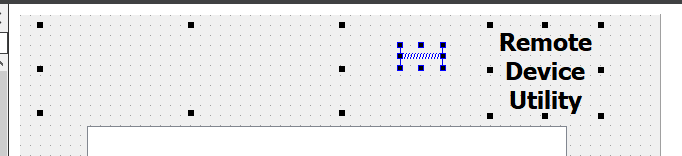
                                before.PNG
                                Then when I press the layout button, it looks like this:
                                after.PNG
                                Is there something about using QLabels in layouts that I don't know?

                                EDIT: it appears (and I admit I'm not at all sure) that it's not enough to specify a size, and fixed sizePolicy. To get this to display properly (though with no scaling), I had to set both the minimumSize and the maximumSize to the desired size.

                                This just underscores how much better I need to understand the whole Qt sizePolicy stuff. Can anyone recommend a good page that explains this?

                                Thanks...

                                J.HilkJ 1 Reply Last reply
                                0
                                • mzimmersM mzimmers

                                  @SGaist OK, I could do it the say you and J-Hilk suggested.

                                  In Designer, I'm experiencing some weird behavior when I try to add it to a horizontal layout. Basically it disappears. When I select everything I want to add to the layout, it looks like this:
                                  before.PNG
                                  Then when I press the layout button, it looks like this:
                                  after.PNG
                                  Is there something about using QLabels in layouts that I don't know?

                                  EDIT: it appears (and I admit I'm not at all sure) that it's not enough to specify a size, and fixed sizePolicy. To get this to display properly (though with no scaling), I had to set both the minimumSize and the maximumSize to the desired size.

                                  This just underscores how much better I need to understand the whole Qt sizePolicy stuff. Can anyone recommend a good page that explains this?

                                  Thanks...

                                  J.HilkJ Offline
                                  J.HilkJ Offline
                                  J.Hilk
                                  Moderators
                                  wrote on last edited by
                                  #16

                                  @mzimmers said in shrinking large image into smaller QLabel:

                                  Is there something about using QLabels in layouts that I don't know?
                                  EDIT: it appears (and I admit I'm not at all sure) that it's not enough to specify a size, and fixed sizePolicy. To get this to display properly (though with no scaling), I had to set both the minimumSize and the maximumSize to the desired size.

                                  that behavior may also depend on the other sizepoliciey and min/max sizes of the other widgets in the layout. No easy way to say, what's going on 🤷‍♂️

                                  This just underscores how much better I need to understand the whole Qt sizePolicy stuff. Can anyone recommend a good page that explains this?

                                  Sorry I can't, it's something I always struggle with myself 🙈


                                  Be aware of the Qt Code of Conduct, when posting : https://forum.qt.io/topic/113070/qt-code-of-conduct


                                  Q: What's that?
                                  A: It's blue light.
                                  Q: What does it do?
                                  A: It turns blue.

                                  1 Reply Last reply
                                  1
                                  • mzimmersM Offline
                                    mzimmersM Offline
                                    mzimmers
                                    wrote on last edited by
                                    #17

                                    Just realized I hadn't marked this as solved. Thanks to all who helped.

                                    A footnote: I didn't mention anywhere above that when I created the QLabel in Designer, I had to promote it to my LogoLabel...took me a few minutes to figure this out when migrating this to a new project...

                                    1 Reply Last reply
                                    0

                                    • Login

                                    • Login or register to search.
                                    • First post
                                      Last post
                                    0
                                    • Categories
                                    • Recent
                                    • Tags
                                    • Popular
                                    • Users
                                    • Groups
                                    • Search
                                    • Get Qt Extensions
                                    • Unsolved