Skip to content
  • Categories
  • Recent
  • Tags
  • Popular
  • Users
  • Groups
  • Search
  • Get Qt Extensions
  • Unsolved
Collapse
Brand Logo
  1. Home
  2. Qt Development
  3. General and Desktop
  4. QSplitter::handle:pressed not working on external stylesheet

QSplitter::handle:pressed not working on external stylesheet

Scheduled Pinned Locked Moved Unsolved General and Desktop
17 Posts 2 Posters 2.3k Views 1 Watching
  • Oldest to Newest
  • Newest to Oldest
  • Most Votes
Reply
  • Reply as topic
Log in to reply
This topic has been deleted. Only users with topic management privileges can see it.
  • R Offline
    R Offline
    Robert Sanson
    wrote on last edited by
    #1

    I am trying to change the background color when the user clicks and drags a QSplitter to adjust the size of a panel.
    This style is in an external qss style sheet:

    
    QSplitter::handle:pressed {
        background: rgb(0, 176, 240);
        border: 2px solid rgb(0, 112, 192);
    }
    

    This doesn't seem to work, nor has any variation that I have tried.

    1 Reply Last reply
    0
    • mrjjM Offline
      mrjjM Offline
      mrjj
      Lifetime Qt Champion
      wrote on last edited by
      #2

      Hi and welcome to the forums

      I fast tried your style and it seems to work on Windows.
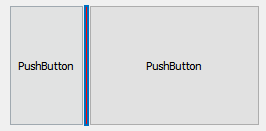
      alt text

      What platform are you on ?

      1 Reply Last reply
      0
      • R Offline
        R Offline
        Robert Sanson
        wrote on last edited by
        #3

        I'm on a VirtualBox RHEL 7 VM

        mrjjM 1 Reply Last reply
        0
        • R Robert Sanson

          I'm on a VirtualBox RHEL 7 VM

          mrjjM Offline
          mrjjM Offline
          mrjj
          Lifetime Qt Champion
          wrote on last edited by
          #4

          @Robert-Sanson
          So on Red hat 7, no effect is seen on the splitter?

          I assume it already uses fusion but depending on Qt version, could also be the gtk plugin.

          Could you try
          qApp->setStyle(QStyleFactory::create("Fusion"));
          in main.cpp ?

          and see if that changes anything,

          It can be that on linux, the QStyle used, does not support styling for that element.

          R 1 Reply Last reply
          0
          • mrjjM mrjj

            @Robert-Sanson
            So on Red hat 7, no effect is seen on the splitter?

            I assume it already uses fusion but depending on Qt version, could also be the gtk plugin.

            Could you try
            qApp->setStyle(QStyleFactory::create("Fusion"));
            in main.cpp ?

            and see if that changes anything,

            It can be that on linux, the QStyle used, does not support styling for that element.

            R Offline
            R Offline
            Robert Sanson
            wrote on last edited by
            #5

            @mrjj said in QSplitter::handle:pressed not working on external stylesheet:

            qApp->setStyle(QStyleFactory::create("Fusion"));

            I just tried that but it didn't make a difference. What is weird is that my other QSplitter styles seem to work, just not the ::handle:pressed one.

            QSplitter {
                margin: 0;
                padding: 0;
                min-height: 6px;
                border: 1px solid rgb(210, 215, 211);
            }
            
            QSplitter:hover {
                margin: 0;
                padding: 0;
                min-height: 6px;
                border: 2px solid rgb(0, 176, 240);
            }
            
            QSplitter::handle:pressed {
                background-color: rgb(0, 176, 240);
                border: 2px solid rgb(0, 112, 192);
            }
            
            1 Reply Last reply
            0
            • mrjjM Offline
              mrjjM Offline
              mrjj
              Lifetime Qt Champion
              wrote on last edited by
              #6

              Hi
              I just tried in a Linux Mint and it also would color it when pressed.
              What Qt are you using ?
              Could be a bug in that version and RHEL 7.

              R 1 Reply Last reply
              0
              • mrjjM mrjj

                Hi
                I just tried in a Linux Mint and it also would color it when pressed.
                What Qt are you using ?
                Could be a bug in that version and RHEL 7.

                R Offline
                R Offline
                Robert Sanson
                wrote on last edited by
                #7

                @mrjj RHEL version is 7.7 and Qt version is 5.14.1

                mrjjM 1 Reply Last reply
                0
                • R Robert Sanson

                  @mrjj RHEL version is 7.7 and Qt version is 5.14.1

                  mrjjM Offline
                  mrjjM Offline
                  mrjj
                  Lifetime Qt Champion
                  wrote on last edited by mrjj
                  #8

                  @Robert-Sanson
                  Ok so not due being old version :)
                  I tried and older ubuntu and a mint and both worked.
                  But its using XFCE4

                  REL 7 is using gnome or ?
                  sorry for my blondness but mostly used debian based linuxes. :)

                  Would you say CentOS 7.7 would be the same ? ( to test on )

                  R 1 Reply Last reply
                  0
                  • mrjjM mrjj

                    @Robert-Sanson
                    Ok so not due being old version :)
                    I tried and older ubuntu and a mint and both worked.
                    But its using XFCE4

                    REL 7 is using gnome or ?
                    sorry for my blondness but mostly used debian based linuxes. :)

                    Would you say CentOS 7.7 would be the same ? ( to test on )

                    R Offline
                    R Offline
                    Robert Sanson
                    wrote on last edited by
                    #9

                    @mrjj Yea, I'm not sure. From searching it looks like CentOS would be similar.

                    mrjjM 1 Reply Last reply
                    0
                    • R Robert Sanson

                      @mrjj Yea, I'm not sure. From searching it looks like CentOS would be similar.

                      mrjjM Offline
                      mrjjM Offline
                      mrjj
                      Lifetime Qt Champion
                      wrote on last edited by
                      #10

                      @Robert-Sanson
                      yeah i also read it as very close to RHEL, at least from a system perspective.

                      Btw could you try to tell me what

                      qDebug() << QApplication::style()->metaObject()->className();
                      (in main.cpp after QApplication is created)
                      says ?

                      R 1 Reply Last reply
                      0
                      • mrjjM mrjj

                        @Robert-Sanson
                        yeah i also read it as very close to RHEL, at least from a system perspective.

                        Btw could you try to tell me what

                        qDebug() << QApplication::style()->metaObject()->className();
                        (in main.cpp after QApplication is created)
                        says ?

                        R Offline
                        R Offline
                        Robert Sanson
                        wrote on last edited by
                        #11

                        @mrjj said in QSplitter::handle:pressed not working on external stylesheet:

                        qDebug() << QApplication::style()->metaObject()->className();

                        Looks like it says QFusionStyle (without the previous code for setting it to that).

                        mrjjM 1 Reply Last reply
                        0
                        • R Robert Sanson

                          @mrjj said in QSplitter::handle:pressed not working on external stylesheet:

                          qDebug() << QApplication::style()->metaObject()->className();

                          Looks like it says QFusionStyle (without the previous code for setting it to that).

                          mrjjM Offline
                          mrjjM Offline
                          mrjj
                          Lifetime Qt Champion
                          wrote on last edited by
                          #12

                          @Robert-Sanson
                          Ok that very odd then
                          as same style on the Mint Linux where it does color it.

                          So can we talk about
                          "external stylesheet"

                          in what way extern ?
                          im just setting it on the splitter with right click.

                          Did you try in clean project ?
                          Just new default GUI project and place 2 buttons on MainWindow, then select both and right click and layout menu and apply splitter
                          then right click splitter (in widget tree to teh right) and Change stylesheet.

                          1 Reply Last reply
                          0
                          • mrjjM Offline
                            mrjjM Offline
                            mrjj
                            Lifetime Qt Champion
                            wrote on last edited by mrjj
                            #13

                            Hi
                            Installed a CentOs and Qt but seems the gcc i get is 4.8.5
                            and i cant run anything. ( no c++ 11 it seems)
                            So didnt really found out more.

                            Update.
                            I compiled a new GCC (7.3) and made it run.

                            Oddly enough your stylesheet does work. !
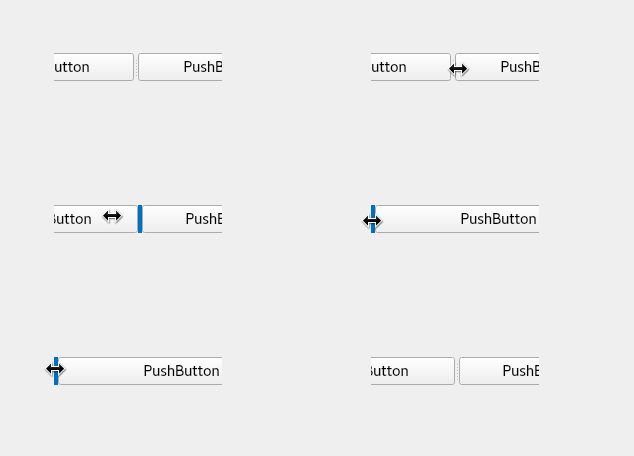
                            alt text

                            1 Reply Last reply
                            0
                            • R Offline
                              R Offline
                              Robert Sanson
                              wrote on last edited by
                              #14

                              I'm guessing it has something to do with my code instead of the style sheet (even though I find it weird that the hover works). Maybe its because I have overridden the mouse events.

                              What I mean about the external stylesheet is that the style sheet is in a file called MyStyleSheet.qss and gets read in by the program.

                              Thanks for the help.

                              mrjjM 1 Reply Last reply
                              0
                              • R Robert Sanson

                                I'm guessing it has something to do with my code instead of the style sheet (even though I find it weird that the hover works). Maybe its because I have overridden the mouse events.

                                What I mean about the external stylesheet is that the style sheet is in a file called MyStyleSheet.qss and gets read in by the program.

                                Thanks for the help.

                                mrjjM Offline
                                mrjjM Offline
                                mrjj
                                Lifetime Qt Champion
                                wrote on last edited by
                                #15

                                @Robert-Sanson
                                Hi
                                loading it from file should really not matter.

                                So yes, i think it mus tbe somthing in the code. But that easy to test with clean default GUI project :)

                                1 Reply Last reply
                                0
                                • R Offline
                                  R Offline
                                  Robert Sanson
                                  wrote on last edited by
                                  #16

                                  I've decided to sub class the QSplitterHandle and have overridden the mousePressEvent, mouseMoveEvent and mouseReleaseEvent. I did have the ::handle:pressed stylesheet pseudo-state working but now it has stopped working since I have overridden these functions. My assumption is that I need to set this pseudo-state of pressed to true, but I'm not sure how to get this working again. How would I go about doing this?

                                  mrjjM 1 Reply Last reply
                                  0
                                  • R Robert Sanson

                                    I've decided to sub class the QSplitterHandle and have overridden the mousePressEvent, mouseMoveEvent and mouseReleaseEvent. I did have the ::handle:pressed stylesheet pseudo-state working but now it has stopped working since I have overridden these functions. My assumption is that I need to set this pseudo-state of pressed to true, but I'm not sure how to get this working again. How would I go about doing this?

                                    mrjjM Offline
                                    mrjjM Offline
                                    mrjj
                                    Lifetime Qt Champion
                                    wrote on last edited by
                                    #17

                                    @Robert-Sanson
                                    Hi
                                    You must call base class version of mousePressEvent etc so
                                    it can do its normal handling too.

                                    1 Reply Last reply
                                    2

                                    • Login

                                    • Login or register to search.
                                    • First post
                                      Last post
                                    0
                                    • Categories
                                    • Recent
                                    • Tags
                                    • Popular
                                    • Users
                                    • Groups
                                    • Search
                                    • Get Qt Extensions
                                    • Unsolved