Skip to content
  • Categories
  • Recent
  • Tags
  • Popular
  • Users
  • Groups
  • Search
  • Get Qt Extensions
  • Unsolved
Collapse
Brand Logo
  1. Home
  2. Qt Development
  3. General and Desktop
  4. QlineEdit password not apply
Forum Updated to NodeBB v4.3 + New Features

QlineEdit password not apply

Scheduled Pinned Locked Moved Solved General and Desktop
15 Posts 4 Posters 2.1k Views 2 Watching
  • Oldest to Newest
  • Newest to Oldest
  • Most Votes
Reply
  • Reply as topic
Log in to reply
This topic has been deleted. Only users with topic management privileges can see it.
  • saulosS Offline
    saulosS Offline
    saulos
    wrote on last edited by mrjj
    #1

    Hi,
    I made a dialogbox to get username and password but the mask for the password don't apply so the text entered is always visible, nay suggestion is welcome
    Thanks

       mU = new QLineEdit(this) ;
       mP = new QLineEdit(this) ;
       lU = new QLabel(this);
       lU->setText("Utente");
       lP = new QLabel(this);
       lP->setText("Password");
       QVBoxLayout *lay = new QVBoxLayout(this);
       lay->addWidget(lU);
       lay->addWidget(mU);
       lay->addWidget(lP);
       lay->addWidget(mP);
       lay->addWidget(buttonBox);
    
       connect(mU, &QLineEdit::textChanged, this, &loginV::setNome);
       connect(mP, &QLineEdit::textChanged, this, &loginV::setPassword);
       mP->setEchoMode(QLineEdit::Password);
    

    added code tags: mrJJ

    1 Reply Last reply
    0
    • Christian EhrlicherC Offline
      Christian EhrlicherC Offline
      Christian Ehrlicher
      Lifetime Qt Champion
      wrote on last edited by
      #2

      @saulos said in QlineEdit password not apply:

      but the mask for the password

      Which mask? I don't see where you set the echo mode...

      Qt Online Installer direct download: https://download.qt.io/official_releases/online_installers/
      Visit the Qt Academy at https://academy.qt.io/catalog

      1 Reply Last reply
      0
      • saulosS Offline
        saulosS Offline
        saulos
        wrote on last edited by
        #3

        @saulos said in QlineEdit password not apply:

        mP->setEchoMode(QLineEdit::Password);

        Hi Christian,
        no mask
        only echomode
        mP->setEchoMode(QLineEdit::Password);

        Lats line
        Thanks

        Christian EhrlicherC 1 Reply Last reply
        0
        • mrjjM Offline
          mrjjM Offline
          mrjj
          Lifetime Qt Champion
          wrote on last edited by
          #4

          Hi
          What Qt version and platform ?
          Seems to work fine here 5.14.2 win

          alt text

          1 Reply Last reply
          2
          • saulosS saulos

            @saulos said in QlineEdit password not apply:

            mP->setEchoMode(QLineEdit::Password);

            Hi Christian,
            no mask
            only echomode
            mP->setEchoMode(QLineEdit::Password);

            Lats line
            Thanks

            Christian EhrlicherC Offline
            Christian EhrlicherC Offline
            Christian Ehrlicher
            Lifetime Qt Champion
            wrote on last edited by Christian Ehrlicher
            #5

            @saulos said in QlineEdit password not apply:

            Lats line

            I've overlooked this since your strange / unreadable font and style. Please use the code tags for code. Also we don't know what you're doing around so please provide an example where it does not work. This works fine for me:

            int main(int argc, char **argv)
            {
              QApplication app(argc, argv);
              QLineEdit le;
              le.setEchoMode(QLineEdit::Password);
              le.show();
              return app.exec();
            }
            

            Qt Online Installer direct download: https://download.qt.io/official_releases/online_installers/
            Visit the Qt Academy at https://academy.qt.io/catalog

            1 Reply Last reply
            2
            • saulosS Offline
              saulosS Offline
              saulos
              wrote on last edited by
              #6

              Thabks to all, I'm in manjaro 5.14.2
              this is main

              #include "mainwindow.h"
              #include "loginV.h"
              #include "database.h"

              #include <QtSql/QSql>
              #include <QtSql/QSqlDatabase>
              #include <QtSql/QSqlQuery>

              #include <QApplication>

              int main(int argc, char *argv[])
              {
              QApplication a(argc, argv);

              loginV accesso;
              if(accesso.exec() == loginV::Accepted)
              {
               /*   if (!database().createConnection())
                     {
                      qDebug() << "NON COnnesso";
                  }
                       else
                               {
                      qDebug() << "Connesso";
                  }
                  */
                  QSqlDatabase db ;
                  QSqlQuery query;
                  QString username = accesso.Nome();
                  QString password = accesso.Password();
                  qDebug() << username << password;
                  QString command = "SELECT * FROM user WHERE username ='"+username +"' AND password = '"+ password + "' AND status = 0";
                  db = QSqlDatabase::addDatabase("QMYSQL");
                  db.setHostName("192.168.1.25");
                  db.setPort(3306);
                  db.setDatabaseName(("test"));
                  db.setUserName("paolol61");
                  db.setPassword("19_Silvana_60");
                  if(db.open())
                  QSqlQuery query(db);
                  if (query.exec(command))
                  {
                      if(query.size()>0)
                      {
                         qDebug() << "login OK";
                      }
                      else {
                         qDebug() << "login Fallito";
                      }
                  }
                  qDebug() << "login OK";
              } else
              {
                  qDebug() << "Chiudo";
              }
              
              MainWindow w;
              w.show();
              return a.exec();
              

              }

              --
              This is the dialog box

              #ifndef LOGINV_H
              #define LOGINV_H

              #include <QDialog>
              #include <QDialogButtonBox>
              #include <QFormLayout>
              #include <QLineEdit>
              #include <QVBoxLayout>
              #include <QLabel>

              class loginV : public QDialog {
              Q_OBJECT
              private:
              QDialogButtonBox *buttonBox;
              QLineEdit *mU;
              QLineEdit *mP;
              QLabel *lU;
              QLabel *lP;
              QString mNome;
              QString mPass;

              public:
              loginV(QWidget *parent = 0) : QDialog(parent) {
              this->setWindowTitle("Login Program");
              buttonBox = new QDialogButtonBox(
              QDialogButtonBox::Ok | QDialogButtonBox::Cancel, Qt::Horizontal, this);

              connect(buttonBox, &QDialogButtonBox::accepted, this, &QDialog::accept);
              connect(buttonBox, &QDialogButtonBox::rejected, this, &QDialog::reject);
              

              mU = new QLineEdit(this) ;
              mP = new QLineEdit(this) ;

              lU = new QLabel(this);
              lU->setText("Utente");
              lP = new QLabel(this);
              lP->setText("Password");
              QVBoxLayout *lay = new QVBoxLayout(this);
              lay->addWidget(lU);
              lay->addWidget(mU);
              lay->addWidget(lP);
              lay->addWidget(mP);
              lay->addWidget(buttonBox);

              connect(mU, &QLineEdit::textChanged, this, &loginV::setNome);
              connect(mP, &QLineEdit::textChanged, this, &loginV::setPassword);
              mP->setEchoMode(QLineEdit::Password);
              }
              ~loginV() {}
              QString Nome() const {return mNome;}
              QString Password() const {return mPass;}

              void setNome(const QString &Nome) {mNome = Nome;}
              void setPassword(const QString &Password) {mPass = Password;}

              };
              #endif // LOGINV_H

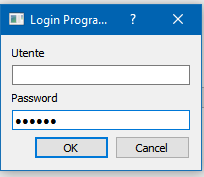
              this is the Dialog Box when it run :(

              dialogBox.png

              1 Reply Last reply
              0
              • Christian EhrlicherC Offline
                Christian EhrlicherC Offline
                Christian Ehrlicher
                Lifetime Qt Champion
                wrote on last edited by
                #7

                Did you try my example? If it works for your then modify/reduce your code until you find the reason why it does not work. This is the life of a programmer...

                Qt Online Installer direct download: https://download.qt.io/official_releases/online_installers/
                Visit the Qt Academy at https://academy.qt.io/catalog

                1 Reply Last reply
                2
                • mrjjM Offline
                  mrjjM Offline
                  mrjj
                  Lifetime Qt Champion
                  wrote on last edited by
                  #8

                  Hi
                  I tried your dialog.
                  And on windows, Qt 5.14

                  it does show as expected

                  alt text

                  1 Reply Last reply
                  0
                  • saulosS Offline
                    saulosS Offline
                    saulos
                    wrote on last edited by
                    #9

                    Thanks I will try to find the bug.

                    to @Christian-Ehrlicher yes it works , thanks.

                    1 Reply Last reply
                    0
                    • saulosS Offline
                      saulosS Offline
                      saulos
                      wrote on last edited by
                      #10

                      I find the bug, so if this happen to others I post the solution, I had to create the MainWindow first and then the logon box, don't know why but it works.
                      Again thanks to all.


                      QApplication a(argc, argv);
                      MainWindow w;
                      loginV accesso;
                      

                      Pablo J. RoginaP 1 Reply Last reply
                      1
                      • saulosS saulos

                        I find the bug, so if this happen to others I post the solution, I had to create the MainWindow first and then the logon box, don't know why but it works.
                        Again thanks to all.


                        QApplication a(argc, argv);
                        MainWindow w;
                        loginV accesso;
                        

                        Pablo J. RoginaP Offline
                        Pablo J. RoginaP Offline
                        Pablo J. Rogina
                        wrote on last edited by
                        #11

                        @saulos just a slightly off-topic, but a security issue here:

                        String command = "SELECT * FROM user WHERE username ='"+username +"' AND password = '"+ password + "' AND status = 0";
                        

                        you don´t want to store the passwords in the DB, right?
                        you store a hash of the password instead

                        Upvote the answer(s) that helped you solve the issue
                        Use "Topic Tools" button to mark your post as Solved
                        Add screenshots via postimage.org
                        Don't ask support requests via chat/PM. Please use the forum so others can benefit from the solution in the future

                        saulosS 1 Reply Last reply
                        1
                        • Pablo J. RoginaP Pablo J. Rogina

                          @saulos just a slightly off-topic, but a security issue here:

                          String command = "SELECT * FROM user WHERE username ='"+username +"' AND password = '"+ password + "' AND status = 0";
                          

                          you don´t want to store the passwords in the DB, right?
                          you store a hash of the password instead

                          saulosS Offline
                          saulosS Offline
                          saulos
                          wrote on last edited by
                          #12

                          Hi @Pablo-J-Rogina thanks for care.
                          Don't worry I'm just learning the QT is not code for any of my customers :)
                          For work I encrypt password before sending to DB and use SP on server side :)

                          Pablo J. RoginaP 1 Reply Last reply
                          0
                          • saulosS saulos

                            Hi @Pablo-J-Rogina thanks for care.
                            Don't worry I'm just learning the QT is not code for any of my customers :)
                            For work I encrypt password before sending to DB and use SP on server side :)

                            Pablo J. RoginaP Offline
                            Pablo J. RoginaP Offline
                            Pablo J. Rogina
                            wrote on last edited by
                            #13

                            @saulos said in QlineEdit password not apply:

                            For work I encrypt password before sending to DB and use SP on server side :)

                            Are you using symmetric encryption?
                            How are you storing the passwords in the DB?
                            It still seems not a good security approach.

                            Upvote the answer(s) that helped you solve the issue
                            Use "Topic Tools" button to mark your post as Solved
                            Add screenshots via postimage.org
                            Don't ask support requests via chat/PM. Please use the forum so others can benefit from the solution in the future

                            saulosS 1 Reply Last reply
                            0
                            • Pablo J. RoginaP Pablo J. Rogina

                              @saulos said in QlineEdit password not apply:

                              For work I encrypt password before sending to DB and use SP on server side :)

                              Are you using symmetric encryption?
                              How are you storing the passwords in the DB?
                              It still seems not a good security approach.

                              saulosS Offline
                              saulosS Offline
                              saulos
                              wrote on last edited by
                              #14

                              @Pablo-J-Rogina
                              I store the encrypted password , is this not good ?
                              Thanks

                              Pablo J. RoginaP 1 Reply Last reply
                              0
                              • saulosS saulos

                                @Pablo-J-Rogina
                                I store the encrypted password , is this not good ?
                                Thanks

                                Pablo J. RoginaP Offline
                                Pablo J. RoginaP Offline
                                Pablo J. Rogina
                                wrote on last edited by
                                #15

                                @saulos said in QlineEdit password not apply:

                                I store the encrypted password , is this not good ?

                                As mentioned before, a preferred approach is to store a hash of the password. See this article for more details about the topic.

                                Upvote the answer(s) that helped you solve the issue
                                Use "Topic Tools" button to mark your post as Solved
                                Add screenshots via postimage.org
                                Don't ask support requests via chat/PM. Please use the forum so others can benefit from the solution in the future

                                1 Reply Last reply
                                1

                                • Login

                                • Login or register to search.
                                • First post
                                  Last post
                                0
                                • Categories
                                • Recent
                                • Tags
                                • Popular
                                • Users
                                • Groups
                                • Search
                                • Get Qt Extensions
                                • Unsolved