Skip to content
  • Categories
  • Recent
  • Tags
  • Popular
  • Users
  • Groups
  • Search
  • Get Qt Extensions
  • Unsolved
Collapse
Brand Logo
  1. Home
  2. Qt Development
  3. General and Desktop
  4. QJSEngine, error #2 (Problem after Qt update)
Forum Updated to NodeBB v4.3 + New Features

QJSEngine, error #2 (Problem after Qt update)

Scheduled Pinned Locked Moved Unsolved General and Desktop
16 Posts 2 Posters 1.4k Views 2 Watching
  • Oldest to Newest
  • Newest to Oldest
  • Most Votes
Reply
  • Reply as topic
Log in to reply
This topic has been deleted. Only users with topic management privileges can see it.
  • SPlattenS Offline
    SPlattenS Offline
    SPlatten
    wrote on last edited by SPlatten
    #1

    I am using Qt Creator:

    Qt Creator 4.11.2
    Based on Qt 5.14.2 (Clang 10.0 (Apple), 64 bit)
    Built on Mar 27 2020 02:24:45
    From revision 699407b4ba
    

    The project is built for:

    Desktop Qt 5.14.2 clang 64 bit
    

    I am using QJSEngine, here is my access method from my helper class:

        QJSEngine* clsScriptHelper::pobjGetScriptEng() {
            if ( clsScriptHelper::mspobjJSeng == nullptr ) {
                clsScriptHelper::mspobjJSeng = new QJSEngine();
        
                if ( clsScriptHelper::mspobjJSeng != nullptr ) {
                    clsScriptHelper::mspobjJSeng->installExtensions(QJSEngine::AllExtensions);
    
        //Added the tests below to illustrate it doesn't work, both error with 2
                    QJSValue err;
                    err = clsScriptHelper::mspobjJSeng->evaluate("(print(1 + 2);)");
    
                    if ( err.isError() ) {
                        qDebug() << err.EvalError;
                    }
                    err = clsScriptHelper::mspobjJSeng->evaluate("(console.log(1 + 2);)");
    
                    if ( err.isError() ) {
                        qDebug() << err.EvalError;
                    }
        //End of example tests proving it doesn't work!
                }
            }
            Q_ASSERT_X(clsScriptHelper::mspobjJSeng!=nullptr, "clsScriptHelper::pobjGetScriptEnd", "mspobjJSeng is NULL!");
            return clsScriptHelper::mspobjJSeng;
        }
    

    I've checked using the debugger and the call to InstallExtensions is getting called. However when I call evaluate on a script to be processed I get error number 2 returned.

    According to the documentation this:

       Indicates that console functions (console.log(), for example) should be installed.
    

    Why am I getting this, doesn't QJSEngine::AllExtensions include QJSEngine::ConsoleExtension ?

    Even if I add QJSEngine::ConsoleExtension to the InstallExtensions call I still get the same error.

    From: https://doc.qt.io/qt-5.9/qjsengine.html

    QJSEngine::ConsoleExtension 0x2 Indicates that console functions (console.log(), for example) should be installed.

    Kind Regards,
    Sy

    1 Reply Last reply
    0
    • SPlattenS Offline
      SPlattenS Offline
      SPlatten
      wrote on last edited by SPlatten
      #2

      Anyone ?

      The annoying thing about this and other issues I've experienced recently is that this code all worked before updating to the latest revision of Qt.

      I've also had to wrap scripts in brackets, something I didn't have to do before the later revisions.

      So I can only hope that someone on the development team will see this, test an fix this soon...

      Kind Regards,
      Sy

      1 Reply Last reply
      0
      • SPlattenS Offline
        SPlattenS Offline
        SPlatten
        wrote on last edited by
        #3

        Can anyone with the same version of Qt and if you have the MAC variant even better, please please test and verify my findings?

        Kind Regards,
        Sy

        1 Reply Last reply
        0
        • mrjjM Offline
          mrjjM Offline
          mrjj
          Lifetime Qt Champion
          wrote on last edited by
          #4

          @SPlatten said in QJSEngine, error #2 (Problem after Qt update):

          So I can only hope that someone on the development team will see this, test an fix this soon...

          Hi
          This is a user forum. it's unlikely that any Qt dev will see this.

          If you are leaning towards its being a Qt bug/regression then
          make a minimal compilable project that can just be run and post on
          https://bugreports.qt.io/secure/Dashboard.jspa

          1 Reply Last reply
          0
          • SPlattenS Offline
            SPlattenS Offline
            SPlatten
            wrote on last edited by
            #5

            @mrjj said in QJSEngine, error #2 (Problem after Qt update):

            https://bugreports.qt.io/secure/Dashboard.jspa

            Thank you, I will create a post now. Although I was hoping someone else would try it and see if its just me or its repeatable?

            Kind Regards,
            Sy

            mrjjM 1 Reply Last reply
            0
            • SPlattenS SPlatten

              @mrjj said in QJSEngine, error #2 (Problem after Qt update):

              https://bugreports.qt.io/secure/Dashboard.jspa

              Thank you, I will create a post now. Although I was hoping someone else would try it and see if its just me or its repeatable?

              mrjjM Offline
              mrjjM Offline
              mrjj
              Lifetime Qt Champion
              wrote on last edited by
              #6

              @SPlatten
              hi
              Is that code enough to see the issue ?
              I have only Windows Os. Have you also seen it there ?

              1 Reply Last reply
              0
              • SPlattenS Offline
                SPlattenS Offline
                SPlatten
                wrote on last edited by SPlatten
                #7

                @mrjj, I don't have a machine running Windows anymore. That source should be enough for any reasonable coder to use the same and reproduce.

                https://bugreports.qt.io/browse/QTBUG-83432

                Kind Regards,
                Sy

                mrjjM 1 Reply Last reply
                0
                • SPlattenS SPlatten

                  @mrjj, I don't have a machine running Windows anymore. That source should be enough for any reasonable coder to use the same and reproduce.

                  https://bugreports.qt.io/browse/QTBUG-83432

                  mrjjM Offline
                  mrjjM Offline
                  mrjj
                  Lifetime Qt Champion
                  wrote on last edited by
                  #8

                  @SPlatten
                  Ok super.

                  Sure but it lowers the number of people testing it as
                  one must make a project, alter the code a lot to make it compile
                  since its a member function.
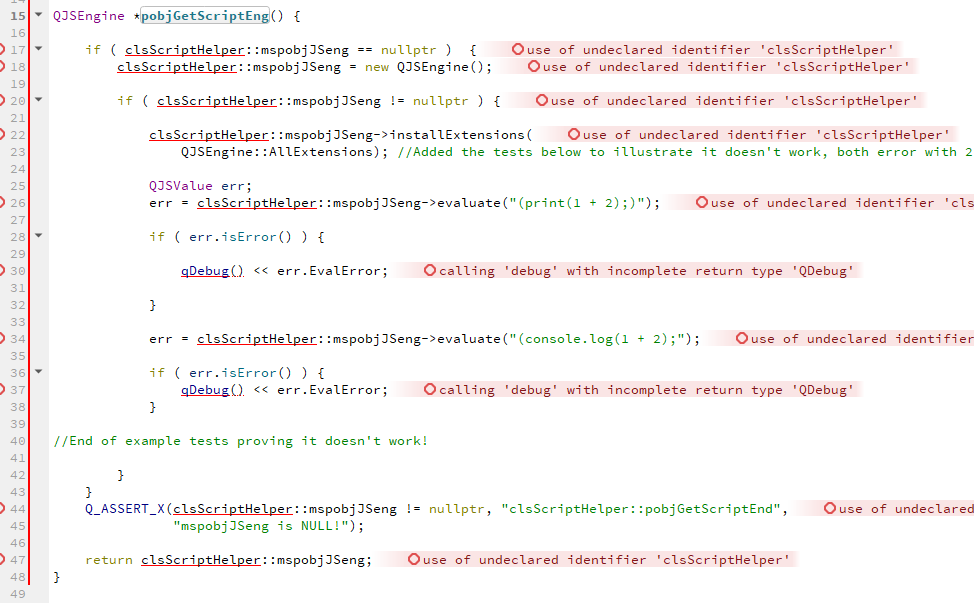
                  alt text

                  when we have to change the code a lot to make it run , there is a chance we introduce other errors
                  or simply not test the same.

                  anyway, would you say this test it ?

                  void Test()
                  {
                      QJSEngine *mspobjJSeng = new class QJSEngine();
                  
                      mspobjJSeng->installExtensions(
                          QJSEngine::AllExtensions); //Added the tests below to illustrate it doesn't work, both error with 2
                  
                      QJSValue err;
                      err = mspobjJSeng->evaluate("(print(1 + 2);)");
                  
                      if ( err.isError() ) {
                          qDebug() << err.EvalError;
                      }
                  
                      err = mspobjJSeng->evaluate("(console.log(1 + 2);");
                  
                      if ( err.isError() ) {
                          qDebug() << err.EvalError;
                      }
                  }


                  1 Reply Last reply
                  0
                  • SPlattenS Offline
                    SPlattenS Offline
                    SPlatten
                    wrote on last edited by
                    #9

                    Sorry, I should have uploaded the example application I created when I posted the bug on the official site...

                        #include <QGuiApplication>
                        #include <QQmlApplicationEngine>
                        #include <QDebug>
                    
                        int main(int argc, char *argv[]) {
                            QCoreApplication::setAttribute(Qt::AA_EnableHighDpiScaling);
                            QGuiApplication app(argc, argv);
                            QJSEngine test;
                            test.installExtensions(QJSEngine::AllExtensions);
                            QJSValue result = test.evaluate("(console.info(\"Hello World\");)");
                            qDebug() << result.EvalError;
                            return 0;
                        }
                    

                    Kind Regards,
                    Sy

                    mrjjM 1 Reply Last reply
                    0
                    • SPlattenS SPlatten

                      Sorry, I should have uploaded the example application I created when I posted the bug on the official site...

                          #include <QGuiApplication>
                          #include <QQmlApplicationEngine>
                          #include <QDebug>
                      
                          int main(int argc, char *argv[]) {
                              QCoreApplication::setAttribute(Qt::AA_EnableHighDpiScaling);
                              QGuiApplication app(argc, argv);
                              QJSEngine test;
                              test.installExtensions(QJSEngine::AllExtensions);
                              QJSValue result = test.evaluate("(console.info(\"Hello World\");)");
                              qDebug() << result.EvalError;
                              return 0;
                          }
                      
                      mrjjM Offline
                      mrjjM Offline
                      mrjj
                      Lifetime Qt Champion
                      wrote on last edited by
                      #10

                      Hi
                      Ah, yes that was easier to test with.
                      Anyway, i also got error 2 for both examples on windows using
                      Qt 5.14.1

                      So this did use to work in other version or ?

                      1 Reply Last reply
                      0
                      • mrjjM Offline
                        mrjjM Offline
                        mrjj
                        Lifetime Qt Champion
                        wrote on last edited by
                        #11

                        Hi
                        Tested some more.
                        i dont get the
                        " Indicates that console functions (console.log(), for example) should be installed."
                        error.

                        so the error 2 comes from not being a value i guess.

                         auto text = R"(
                                            function f(a, b) {
                                              console.log("a is ", a, "b is ", b);
                                            }
                                            f(10,10);
                                            )";
                                QJSValue result = test.evaluate(text);


                        console seems to work.

                        js: a is  10 b is  10
                        2
                        

                        so it does work for me on Win. No error about console.

                        1 Reply Last reply
                        0
                        • SPlattenS Offline
                          SPlattenS Offline
                          SPlatten
                          wrote on last edited by SPlatten
                          #12

                          My usage is similar I use console.info in a function and its not working, yes it was working in previous versions of Qt.

                          In my example even Hello World just a string doesn't work.

                          Kind Regards,
                          Sy

                          mrjjM 1 Reply Last reply
                          0
                          • SPlattenS SPlatten

                            My usage is similar I use console.info in a function and its not working, yes it was working in previous versions of Qt.

                            In my example even Hello World just a string doesn't work.

                            mrjjM Offline
                            mrjjM Offline
                            mrjj
                            Lifetime Qt Champion
                            wrote on last edited by
                            #13

                            @SPlatten

                            so it broke going from 5-14-1 to 5-14-2 ?
                            or what was your old version ?
                            Seems to work in 5.14.1 here on win.

                            1 Reply Last reply
                            0
                            • SPlattenS Offline
                              SPlattenS Offline
                              SPlatten
                              wrote on last edited by SPlatten
                              #14

                              Sorry I really can't answer that, here is an update, just tried this:

                                  #include <QGuiApplication>
                                  #include <QQmlApplicationEngine>
                                  #include <QDebug>
                              
                                  int main(int argc, char *argv[]) {
                                      QCoreApplication::setAttribute(Qt::AA_EnableHighDpiScaling);
                                      QGuiApplication app(argc, argv);
                                      QJSEngine test;
                                      test.installExtensions(QJSEngine::AllExtensions);
                                      QJSValue result;
                                      result = test.evaluate("console.log(123);");
                                      qDebug() << result.EvalError;
                                      result = test.evaluate("(console.log(456);)");
                                      qDebug() << result.EvalError;
                                      result = test.evaluate("(console.log(\"Hello World\");)");
                                      qDebug() << result.EvalError;
                                      return 0;
                                  }
                              

                              The output from this was:

                                  QML debugging is enabled. Only use this in a safe environment.
                                  2020-04-10 13:15:53.563312+0100 scriptExample[1089:16542] QML Debugger: Waiting for connection on port 49396...
                                  2020-04-10 13:15:54.515935+0100 scriptExample[1089:16432] [js] 123
                                  2020-04-10 13:15:54.515978+0100 scriptExample[1089:16432] 2
                                  2020-04-10 13:15:54.516023+0100 scriptExample[1089:16432] 2
                                  2020-04-10 13:15:54.516132+0100 scriptExample[1089:16432] 2
                                  2020-04-10 13:15:54.671516+0100 scriptExample[1089:16432] QObject::connect: No such signal QCoreApplication::focusObjectChanged(QObject*)
                              

                              Interestingly, removing the brackets surrounding the console.log call and it worked. The addition / requirement of brackets around the JavaScript is a fairly new addition.

                              Another edit, I changed the last console.log to:

                                  result = test.evaluate("function abc(t) { console.log(\"Hello World:\" + t);}abc(999);");
                                  qDebug() << result.EvalError;
                              

                              Output:

                                  2020-04-10 13:23:59.005721+0100 scriptExample[1207:20216] [js] Hello World:999
                                  2020-04-10 13:23:59.005735+0100 scriptExample[1207:20216] 2
                              

                              Notice that result.EvalError is still 2 even though the script was executed perfectly and the output was as desired.

                              My conclusion is that the issue seems to be related to the introduction of wrapping content in brackets.
                              if I remove the brackets from the console.log that displays Hello World, that also works.

                              Kind Regards,
                              Sy

                              1 Reply Last reply
                              1
                              • SPlattenS Offline
                                SPlattenS Offline
                                SPlatten
                                wrote on last edited by
                                #15

                                There would seem to be multiple problems with QJSEngine, if I try to register a global then it must be wrapped in () or it fails:

                                    "({\"db\":\"test\",\"host\":\"localhost\",\"usr\":\"root\",\"pass\":\"123456\"})"
                                

                                If it is left as:

                                    "{\"db\":\"test\",\"host\":\"localhost\",\"usr\":\"root\",\"pass\":\"123456\"}"
                                

                                It fails with, EvalError: 2

                                It's not consistent, some things need to be wrapped in () or they fail others cannot be wrapped in () or they will fail, what is the reasoning for it and surely it would be better all round if the wrapping and handling of when or if to wrap in () was handled by the engine itself?

                                Kind Regards,
                                Sy

                                1 Reply Last reply
                                0
                                • SPlattenS Offline
                                  SPlattenS Offline
                                  SPlatten
                                  wrote on last edited by SPlatten
                                  #16

                                  Trying alternate versions until I can find one that doesn't have this problem, so far I've tried:

                                  5.14.2
                                  5.13.2
                                  5.12.8
                                  5.12.2

                                  Then there is quite a jump to versions available on the MaintenanceTool to 5.9.9, which I'm downloading now.

                                  Qt 5.9.9 works, I'm getting different syntax errors now, but at least the fundamental stuff is now working. Hope this gives the Qt developers something to go on.

                                  Yep, 5.9.9 definitely works.

                                  Kind Regards,
                                  Sy

                                  1 Reply Last reply
                                  0

                                  • Login

                                  • Login or register to search.
                                  • First post
                                    Last post
                                  0
                                  • Categories
                                  • Recent
                                  • Tags
                                  • Popular
                                  • Users
                                  • Groups
                                  • Search
                                  • Get Qt Extensions
                                  • Unsolved