Skip to content
  • Categories
  • Recent
  • Tags
  • Popular
  • Users
  • Groups
  • Search
  • Get Qt Extensions
  • Unsolved
Collapse
Brand Logo
  1. Home
  2. Qt Development
  3. General and Desktop
  4. Dynamic change of font color in QtSerialPort-Terminal-Example
Forum Updated to NodeBB v4.3 + New Features

Dynamic change of font color in QtSerialPort-Terminal-Example

Scheduled Pinned Locked Moved Solved General and Desktop
2 Posts 2 Posters 302 Views 1 Watching
  • Oldest to Newest
  • Newest to Oldest
  • Most Votes
Reply
  • Reply as topic
Log in to reply
This topic has been deleted. Only users with topic management privileges can see it.
  • ddurixD Offline
    ddurixD Offline
    ddurix
    wrote on last edited by
    #1

    Hello

    I'm trying to change color of the serial-port-input/output characters in the QtSerialPort-Terminal-Example.
    My problem is that QPalette::setColor
    or
    setStyleSheet("color: rgb(255,255,255)");
    always changes the whole displayed text, but I want different colors for keyboard input and serial output.

    Is this possible?

    1 Reply Last reply
    0
    • mrjjM Offline
      mrjjM Offline
      mrjj
      Lifetime Qt Champion
      wrote on last edited by mrjj
      #2

      Hi and welcome to the forums.
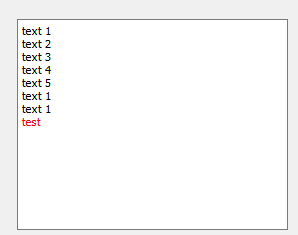
      yes you can but you have to manipulate the structure and not the palette as that is used for all text so
      its a no go. (also stylesheet)

          QTextCharFormat tf = ui->plainTextEdit->currentCharFormat();
          tf.setForeground(QBrush(Qt::red));
          ui->plainTextEdit->setCurrentCharFormat(tf);
          ui->plainTextEdit->appendPlainText("test");
      

      alt text

      I think you can also use HTML.
      https://stackoverflow.com/questions/52074120/qplaintextedit-with-multiple-colours-on-a-line

      1 Reply Last reply
      2

      • Login

      • Login or register to search.
      • First post
        Last post
      0
      • Categories
      • Recent
      • Tags
      • Popular
      • Users
      • Groups
      • Search
      • Get Qt Extensions
      • Unsolved