Skip to content
  • Categories
  • Recent
  • Tags
  • Popular
  • Users
  • Groups
  • Search
  • Get Qt Extensions
  • Unsolved
Collapse
Brand Logo
  1. Home
  2. Qt Development
  3. General and Desktop
  4. QTextStream can't separate lines by '\n' char

QTextStream can't separate lines by '\n' char

Scheduled Pinned Locked Moved Unsolved General and Desktop
12 Posts 6 Posters 1.2k Views 1 Watching
  • Oldest to Newest
  • Newest to Oldest
  • Most Votes
Reply
  • Reply as topic
Log in to reply
This topic has been deleted. Only users with topic management privileges can see it.
  • Please_Help_me_DP Offline
    Please_Help_me_DP Offline
    Please_Help_me_D
    wrote on last edited by
    #1

    Hi,

    I'm using QTextStream to read textual data line by line in QList<QString>. Here is the code:

        ReadTraceHeaderNames(){
            QFile qFile(":/MyFiles/additional/TraceHeaderNames.txt");
            if (!qFile.open(QFile::ReadOnly | QFile::Text)){
                QMessageBox::critical(nullptr, "Error", "Cannot open TraceHeaderNames.txt file!");
                return;
            }
    
            QTextStream in(&qFile);
            int k = 0;
            while (!in.atEnd())
            {
               traceHeaderNames.push_back(in.readLine());
            }
            qFile.close();
        }
    

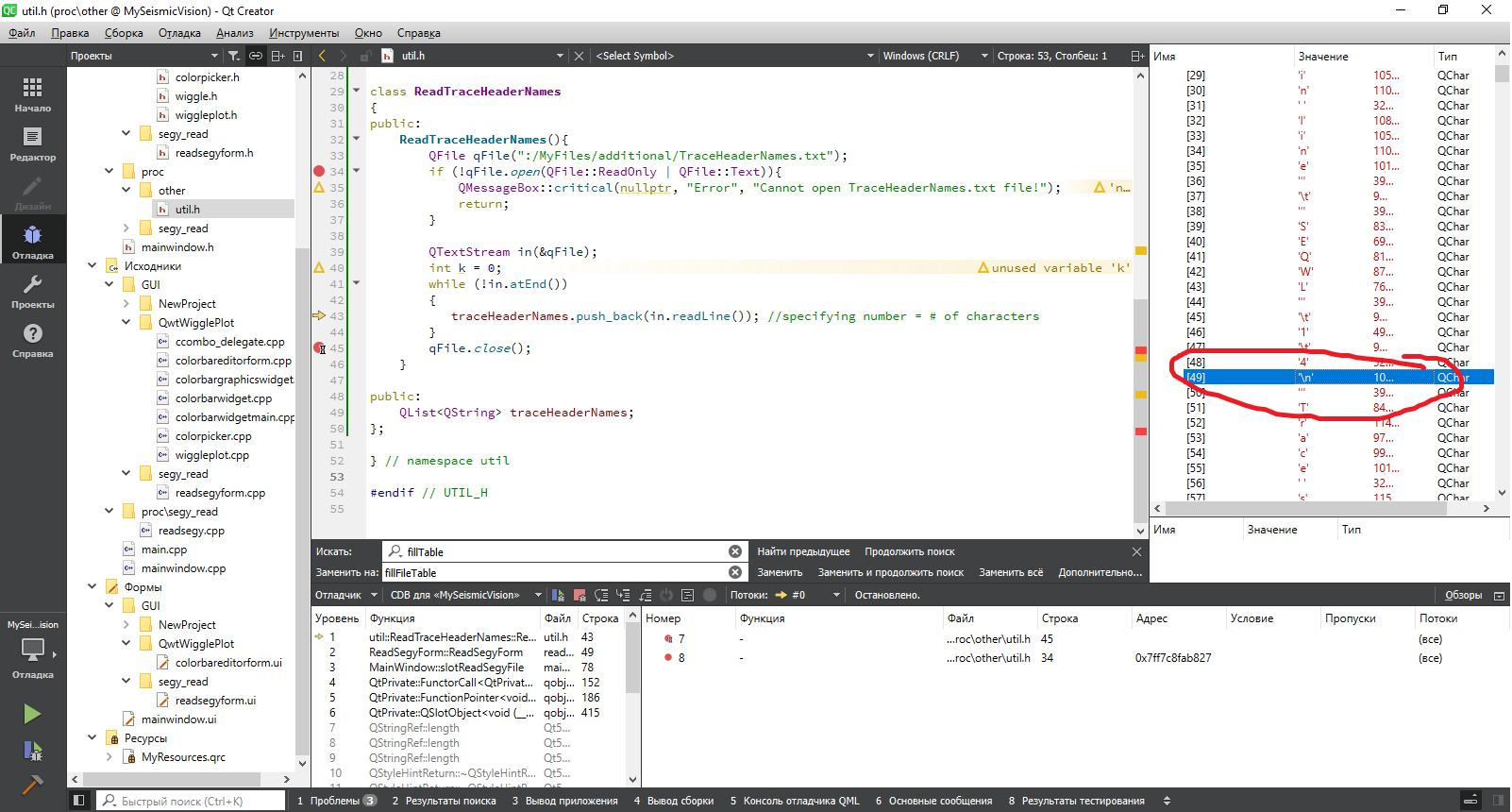
    But while loop workes only ones and reads the whole file in the traceHeaderNames. Lines are delimited by \n char (you can see this in the picture). Are lines supposed to be ended with \0 or other char?
    1.png

    aha_1980A J.HilkJ 2 Replies Last reply
    0
    • 6thC6 Offline
      6thC6 Offline
      6thC
      wrote on last edited by
      #2
      This post is deleted!
      1 Reply Last reply
      0
      • Please_Help_me_DP Please_Help_me_D

        Hi,

        I'm using QTextStream to read textual data line by line in QList<QString>. Here is the code:

            ReadTraceHeaderNames(){
                QFile qFile(":/MyFiles/additional/TraceHeaderNames.txt");
                if (!qFile.open(QFile::ReadOnly | QFile::Text)){
                    QMessageBox::critical(nullptr, "Error", "Cannot open TraceHeaderNames.txt file!");
                    return;
                }
        
                QTextStream in(&qFile);
                int k = 0;
                while (!in.atEnd())
                {
                   traceHeaderNames.push_back(in.readLine());
                }
                qFile.close();
            }
        

        But while loop workes only ones and reads the whole file in the traceHeaderNames. Lines are delimited by \n char (you can see this in the picture). Are lines supposed to be ended with \0 or other char?
        1.png

        aha_1980A Offline
        aha_1980A Offline
        aha_1980
        Lifetime Qt Champion
        wrote on last edited by aha_1980
        #3

        @Please_Help_me_D

        are you on Windows? Then text files have to end lines with "\r\n". '\n' alone is Unix format.

        Regards

        Qt has to stay free or it will die.

        Please_Help_me_DP 1 Reply Last reply
        1
        • aha_1980A aha_1980

          @Please_Help_me_D

          are you on Windows? Then text files have to end lines with "\r\n". '\n' alone is Unix format.

          Regards

          Please_Help_me_DP Offline
          Please_Help_me_DP Offline
          Please_Help_me_D
          wrote on last edited by
          #4

          @aha_1980 Yes i'm on Windows 10
          I just tried to change end of line character from '\r\n to \n but still traceHeaderNames.push_back(in.readLine()) reads the whole file.
          traceHeaderNames.push_back(in.readLine(10)) also reads the whole file. Can't understand how to read only one line?

          jsulmJ 1 Reply Last reply
          0
          • Please_Help_me_DP Please_Help_me_D

            @aha_1980 Yes i'm on Windows 10
            I just tried to change end of line character from '\r\n to \n but still traceHeaderNames.push_back(in.readLine()) reads the whole file.
            traceHeaderNames.push_back(in.readLine(10)) also reads the whole file. Can't understand how to read only one line?

            jsulmJ Offline
            jsulmJ Offline
            jsulm
            Lifetime Qt Champion
            wrote on last edited by
            #5

            @Please_Help_me_D said in QTextStream can't separate lines by '\n' char:

            I just tried to change end of line character from '\r\n to \n

            Why? On Windows \r\n is used, not \n as @aha_1980 wrote.

            https://forum.qt.io/topic/113070/qt-code-of-conduct

            Please_Help_me_DP 1 Reply Last reply
            0
            • jsulmJ jsulm

              @Please_Help_me_D said in QTextStream can't separate lines by '\n' char:

              I just tried to change end of line character from '\r\n to \n

              Why? On Windows \r\n is used, not \n as @aha_1980 wrote.

              Please_Help_me_DP Offline
              Please_Help_me_DP Offline
              Please_Help_me_D
              wrote on last edited by
              #6

              @jsulm I tried both end of line character but they don't work anyway.
              I add my text file via Qt resources. There should be a reason why I can't read my file line by line ...

              1 Reply Last reply
              0
              • Please_Help_me_DP Please_Help_me_D

                Hi,

                I'm using QTextStream to read textual data line by line in QList<QString>. Here is the code:

                    ReadTraceHeaderNames(){
                        QFile qFile(":/MyFiles/additional/TraceHeaderNames.txt");
                        if (!qFile.open(QFile::ReadOnly | QFile::Text)){
                            QMessageBox::critical(nullptr, "Error", "Cannot open TraceHeaderNames.txt file!");
                            return;
                        }
                
                        QTextStream in(&qFile);
                        int k = 0;
                        while (!in.atEnd())
                        {
                           traceHeaderNames.push_back(in.readLine());
                        }
                        qFile.close();
                    }
                

                But while loop workes only ones and reads the whole file in the traceHeaderNames. Lines are delimited by \n char (you can see this in the picture). Are lines supposed to be ended with \0 or other char?
                1.png

                J.HilkJ Offline
                J.HilkJ Offline
                J.Hilk
                Moderators
                wrote on last edited by J.Hilk
                #7

                @Please_Help_me_D I had this, or something similar in the past. Think it was a lifetime issue for me.
                I'm not 100% sure why as the returned QString refcounted should be increased, but it happens.

                So, do not inline the readLine().
                Store your readLine() result in a local (temporary) QString variable and push_back that one. Should work.

                while (!in.atEnd())
                        {
                           QString line = in.readLine();
                           traceHeaderNames.push_back(line);
                        }
                

                Be aware of the Qt Code of Conduct, when posting : https://forum.qt.io/topic/113070/qt-code-of-conduct


                Q: What's that?
                A: It's blue light.
                Q: What does it do?
                A: It turns blue.

                Please_Help_me_DP 1 Reply Last reply
                0
                • J.HilkJ J.Hilk

                  @Please_Help_me_D I had this, or something similar in the past. Think it was a lifetime issue for me.
                  I'm not 100% sure why as the returned QString refcounted should be increased, but it happens.

                  So, do not inline the readLine().
                  Store your readLine() result in a local (temporary) QString variable and push_back that one. Should work.

                  while (!in.atEnd())
                          {
                             QString line = in.readLine();
                             traceHeaderNames.push_back(line);
                          }
                  
                  Please_Help_me_DP Offline
                  Please_Help_me_DP Offline
                  Please_Help_me_D
                  wrote on last edited by
                  #8

                  @J-Hilk I just tried but this doesn't work neither :)
                  Moreover there is no QString line variable in debug at all.
                  I use this code in the namespace (.header file):

                  class ReadTraceHeaderNames
                  {
                  public:
                      ReadTraceHeaderNames(){
                          QFile qFile(":/MyFiles/additional/TraceHeaderNames.txt");
                          if (!qFile.open(QFile::ReadOnly | QFile::Text)){
                              QMessageBox::critical(nullptr, "Error", "Cannot open TraceHeaderNames.txt file!");
                              return;
                          }
                  
                          QTextStream in(&qFile);
                          QList<QString> traceHeaderNames;
                          while (!in.atEnd()){
                              QString line = in.readLine();
                              traceHeaderNames.push_back(line);
                          }
                          qFile.close();
                      }
                  };
                  

                  I added textual file via Qt Resources. I attach this textual file to the post here is the link
                  1.png

                  1 Reply Last reply
                  0
                  • Please_Help_me_DP Offline
                    Please_Help_me_DP Offline
                    Please_Help_me_D
                    wrote on last edited by Please_Help_me_D
                    #9

                    I think I found a problem!
                    Before now I used to call ReadTraceHeaderNames by typing:

                    util::ReadTraceHeaderNames();
                    

                    But after I assigned this to a variable:

                    util::ReadTraceHeaderNames a = util::ReadTraceHeaderNames();
                    

                    everithing works fine! I can read line-by-line my file and I can see all the variables in debug window.

                    So thank you for participating in discussion. Does anybody know why this works only when I assign class to a variable?

                    jsulmJ 1 Reply Last reply
                    0
                    • Please_Help_me_DP Please_Help_me_D

                      I think I found a problem!
                      Before now I used to call ReadTraceHeaderNames by typing:

                      util::ReadTraceHeaderNames();
                      

                      But after I assigned this to a variable:

                      util::ReadTraceHeaderNames a = util::ReadTraceHeaderNames();
                      

                      everithing works fine! I can read line-by-line my file and I can see all the variables in debug window.

                      So thank you for participating in discussion. Does anybody know why this works only when I assign class to a variable?

                      jsulmJ Offline
                      jsulmJ Offline
                      jsulm
                      Lifetime Qt Champion
                      wrote on last edited by
                      #10

                      @Please_Help_me_D said in QTextStream can't separate lines by '\n' char:

                      util::ReadTraceHeaderNames();

                      because this creates a new instance each time you call it

                      https://forum.qt.io/topic/113070/qt-code-of-conduct

                      1 Reply Last reply
                      2
                      • mrjjM Offline
                        mrjjM Offline
                        mrjj
                        Lifetime Qt Champion
                        wrote on last edited by
                        #11

                        Just as a note.
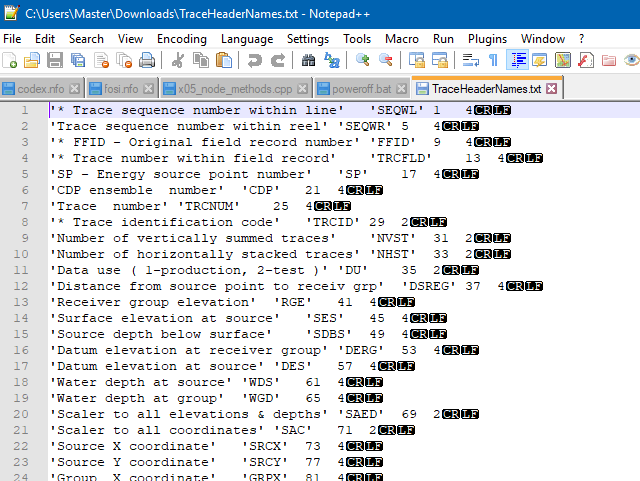
                        Your file was fine :)

                        alt text

                        Please_Help_me_DP 1 Reply Last reply
                        2
                        • mrjjM mrjj

                          Just as a note.
                          Your file was fine :)

                          alt text

                          Please_Help_me_DP Offline
                          Please_Help_me_DP Offline
                          Please_Help_me_D
                          wrote on last edited by
                          #12

                          @mrjj yes, thank you
                          I've just found a way to show end of file character in notepad :)

                          1 Reply Last reply
                          0

                          • Login

                          • Login or register to search.
                          • First post
                            Last post
                          0
                          • Categories
                          • Recent
                          • Tags
                          • Popular
                          • Users
                          • Groups
                          • Search
                          • Get Qt Extensions
                          • Unsolved