Skip to content
  • Categories
  • Recent
  • Tags
  • Popular
  • Users
  • Groups
  • Search
  • Get Qt Extensions
  • Unsolved
Collapse
Brand Logo
  1. Home
  2. Qt Development
  3. General and Desktop
  4. How do I update header file with .ui update?

How do I update header file with .ui update?

Scheduled Pinned Locked Moved Unsolved General and Desktop
3 Posts 3 Posters 1.3k Views 2 Watching
  • Oldest to Newest
  • Newest to Oldest
  • Most Votes
Reply
  • Reply as topic
Log in to reply
This topic has been deleted. Only users with topic management privileges can see it.
  • G Offline
    G Offline
    GriffinKnox
    Banned
    wrote on last edited by VRonin
    #1

    How do I update the header file after saving the .ui file?

    I've disabled shadow copying, and can see that it generated a ui_projectname.h file but it does not change the main header file.
    What I am trying to do is import a .ui from a PyQt5 project that I've made, and want to convert to C++. I am unable to access any members such as lineEdit->setText("Hello World"); in the main.cpp after Widget w;

    Any help with this would be unfathomably wonderful. I've been googling for hours, and my unfamiliarity with C++ .

    Edit: [VRonin] removed links

    Pl45m4P 1 Reply Last reply
    0
    • G GriffinKnox

      How do I update the header file after saving the .ui file?

      I've disabled shadow copying, and can see that it generated a ui_projectname.h file but it does not change the main header file.
      What I am trying to do is import a .ui from a PyQt5 project that I've made, and want to convert to C++. I am unable to access any members such as lineEdit->setText("Hello World"); in the main.cpp after Widget w;

      Any help with this would be unfathomably wonderful. I've been googling for hours, and my unfamiliarity with C++ .

      Edit: [VRonin] removed links

      Pl45m4P Online
      Pl45m4P Online
      Pl45m4
      wrote on last edited by Pl45m4
      #2

      @GriffinKnox said in How do I update header file with .ui update?:

      What I am trying to do is import a .ui from a PyQt5 project that I've made, and want to convert to C++.

      "Import" in which way? At runtime or do you basically just want to re-use your .ui you've created for a PyQt project in a C++ project?

      @GriffinKnox said in How do I update header file with .ui update?:

      want to convert to C++

      Did you include your new ui file in your *.pro file?

      @GriffinKnox said in How do I update header file with .ui update?:

      it generated a ui_projectname.h file but it does not change the main header file

      Do your classes include the new ui-header?

      Edit:

      If you want to add your former Python UI to your (existing) C++ project (create a new widget from .ui), you can use QUiLoader
      https://doc.qt.io/qt-5/quiloader.html#details

      // MyWidget = your new widget class that uses the ui file
      MyWidget::MyWidget(QWidget *parent)
          : QWidget(parent)
      {
          QUiLoader loader;
          QFile file(":/forms/myform.ui");
          file.open(QFile::ReadOnly);
          QWidget *myWidget = loader.load(&file, this);
          file.close();
      
          QVBoxLayout *layout = new QVBoxLayout;
          layout->addWidget(myWidget);
          setLayout(layout);
      }
      

      If debugging is the process of removing software bugs, then programming must be the process of putting them in.

      ~E. W. Dijkstra

      1 Reply Last reply
      1
      • mrjjM Offline
        mrjjM Offline
        mrjj
        Lifetime Qt Champion
        wrote on last edited by
        #3

        Hi

        • Any help with this would be unfathomably wonderful. I've been googling for hours, and my unfamiliarity with C++ .

        What i would do it to create a new empty UI form with .h and .cpp (and add it to the project)
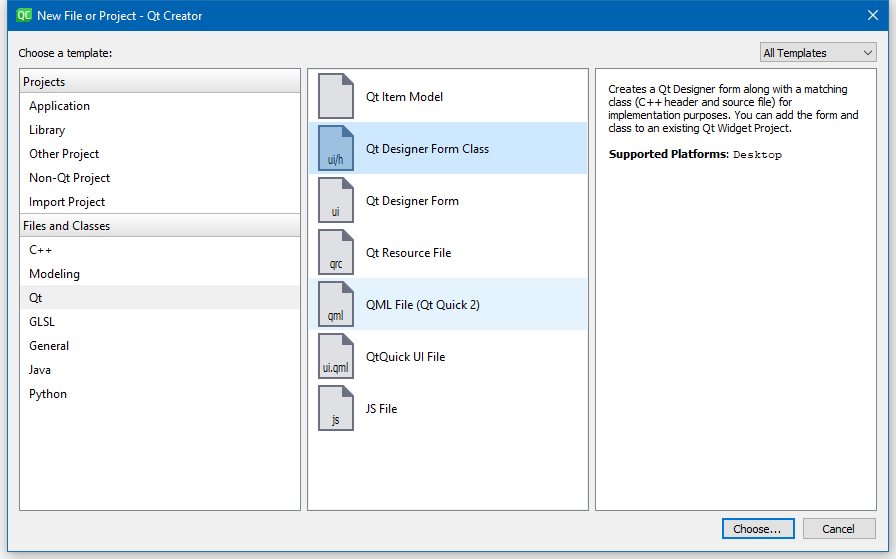
        alt text

        And then copy the UI file over the new empty one. (creator closed )
        Open Creator
        Then clean all, rebuild all and it should generate the ui_xxx automatically and
        in your .cpp you have access to all via UI as normal in c++.

        QUiLoader also works great but no access via UI->

        1 Reply Last reply
        1

        • Login

        • Login or register to search.
        • First post
          Last post
        0
        • Categories
        • Recent
        • Tags
        • Popular
        • Users
        • Groups
        • Search
        • Get Qt Extensions
        • Unsolved