Skip to content
  • Categories
  • Recent
  • Tags
  • Popular
  • Users
  • Groups
  • Search
  • Get Qt Extensions
  • Unsolved
Collapse
Brand Logo
  1. Home
  2. Qt Development
  3. General and Desktop
  4. How to remove a gray area in my 3d Surface graph.

How to remove a gray area in my 3d Surface graph.

Scheduled Pinned Locked Moved Unsolved General and Desktop
8 Posts 2 Posters 762 Views 1 Watching
  • Oldest to Newest
  • Newest to Oldest
  • Most Votes
Reply
  • Reply as topic
Log in to reply
This topic has been deleted. Only users with topic management privileges can see it.
  • D Offline
    D Offline
    donotme
    wrote on last edited by
    #1

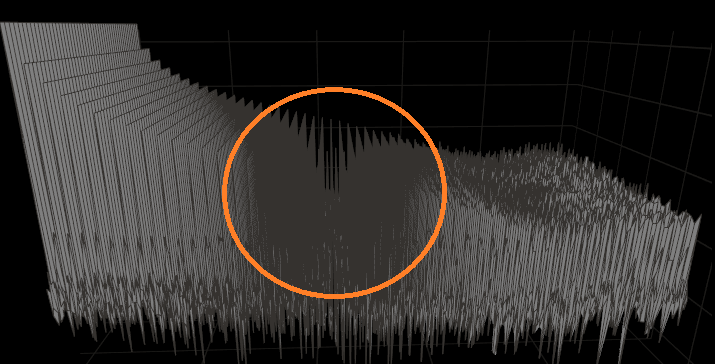
    There is a gray area in thi middle of my 3D surface graph,how to disable it. Thanks!
    123456.PNG

    Pl45m4P D 2 Replies Last reply
    0
    • D donotme

      There is a gray area in thi middle of my 3D surface graph,how to disable it. Thanks!
      123456.PNG

      Pl45m4P Offline
      Pl45m4P Offline
      Pl45m4
      wrote on last edited by
      #2

      @donotme

       Surface3D {
                  // your surface
                  // [...]
                  theme: Theme3D {
                      backgroundEnabled: false
                      gridEnabled: false
                   }
          }
      

      If debugging is the process of removing software bugs, then programming must be the process of putting them in.

      ~E. W. Dijkstra

      D 1 Reply Last reply
      0
      • Pl45m4P Pl45m4

        @donotme

         Surface3D {
                    // your surface
                    // [...]
                    theme: Theme3D {
                        backgroundEnabled: false
                        gridEnabled: false
                     }
            }
        
        D Offline
        D Offline
        donotme
        wrote on last edited by
        #3

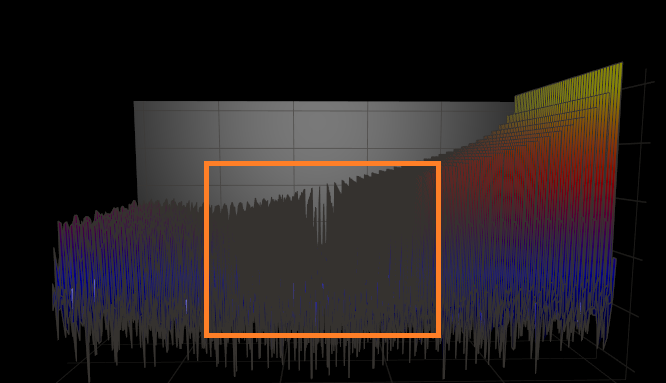
        @Pl45m4 thank you ver much, sorry for my expressing ambiguity. I means the shaded area in the orange rectangle.
        f340bb24-78ea-4402-8e13-3cf77da3f937.png

        Pl45m4P 1 Reply Last reply
        0
        • D donotme

          There is a gray area in thi middle of my 3D surface graph,how to disable it. Thanks!
          123456.PNG

          D Offline
          D Offline
          donotme
          wrote on last edited by
          #4

          append another picture
          123.PNG

          1 Reply Last reply
          0
          • D donotme

            @Pl45m4 thank you ver much, sorry for my expressing ambiguity. I means the shaded area in the orange rectangle.
            f340bb24-78ea-4402-8e13-3cf77da3f937.png

            Pl45m4P Offline
            Pl45m4P Offline
            Pl45m4
            wrote on last edited by
            #5

            @donotme

            These are the edges of your graph (I think so).

            Does this area change, when moving the camera?


            If debugging is the process of removing software bugs, then programming must be the process of putting them in.

            ~E. W. Dijkstra

            D 1 Reply Last reply
            0
            • Pl45m4P Pl45m4

              @donotme

              These are the edges of your graph (I think so).

              Does this area change, when moving the camera?

              D Offline
              D Offline
              donotme
              wrote on last edited by
              #6

              @Pl45m4 Yes,when change the camera,the gray area is changing simultaneously. The graph has many sharp edges.

              Pl45m4P 1 Reply Last reply
              0
              • D donotme

                @Pl45m4 Yes,when change the camera,the gray area is changing simultaneously. The graph has many sharp edges.

                Pl45m4P Offline
                Pl45m4P Offline
                Pl45m4
                wrote on last edited by
                #7

                @donotme

                It's a render thing. I guess you can't change that (at least I dont know how)


                If debugging is the process of removing software bugs, then programming must be the process of putting them in.

                ~E. W. Dijkstra

                D 1 Reply Last reply
                0
                • Pl45m4P Pl45m4

                  @donotme

                  It's a render thing. I guess you can't change that (at least I dont know how)

                  D Offline
                  D Offline
                  donotme
                  wrote on last edited by
                  #8

                  @Pl45m4 yes, i try many apis in Q3DSurface, such as Q3DLight, Q3DCamera,scene and have no use. Anyway, thank you!

                  1 Reply Last reply
                  0

                  • Login

                  • Login or register to search.
                  • First post
                    Last post
                  0
                  • Categories
                  • Recent
                  • Tags
                  • Popular
                  • Users
                  • Groups
                  • Search
                  • Get Qt Extensions
                  • Unsolved