Skip to content
  • Categories
  • Recent
  • Tags
  • Popular
  • Users
  • Groups
  • Search
  • Get Qt Extensions
  • Unsolved
Collapse
Brand Logo
  1. Home
  2. Qt Development
  3. General and Desktop
  4. Detecting peak value on realtime data stream
Forum Updated to NodeBB v4.3 + New Features

Detecting peak value on realtime data stream

Scheduled Pinned Locked Moved Unsolved General and Desktop
3 Posts 2 Posters 619 Views 2 Watching
  • Oldest to Newest
  • Newest to Oldest
  • Most Votes
Reply
  • Reply as topic
Log in to reply
This topic has been deleted. Only users with topic management privileges can see it.
  • V Offline
    V Offline
    viniltc
    wrote on last edited by
    #1

    Hi all,

    This is a bit off topic question! but hope I get some feedback from this forum.

    I'm using QCustomPlot to display realtime value from an IMU.

    This is how I set the realtimeDataSlot:

    void Settings::realtimeDataSlot(double x_acceleration_g, double y_acceleration_g, double z_acceleration_g, double z_acceleration_gnew)
    {
        static QTime time(QTime::currentTime());
        // calculate two new data points:
        double key = time.elapsed()/1000.0; // time elapsed since start of demo, in seconds
        static double lastPointKey = 0;
        if (key-lastPointKey > 0.02) // at most add point every 20 ms
        {
          // add data to lines:
            ui->customPlot->graph(0)->addData(key, x_acceleration_g); // X axis
            ui->customPlot->graph(1)->addData(key, y_acceleration_g); // Y axis
            ui->customPlot->graph(2)->addData(key, z_acceleration_g); // Z axis
            ui->customPlot->graph(3)->addData(key, z_acceleration_gnew);
    
          lastPointKey = key;
        }
        // make key axis range scroll with the data (at a constant range size of 8):
        ui->customPlot->xAxis->setRange(key, 8, Qt::AlignRight);
        ui->customPlot->replot();
    
        // calculate frames per second:
        static double lastFpsKey;
        static int frameCount;
        ++frameCount;
        if (key-lastFpsKey >2) // average fps over 2 seconds
        {
          ui->statusbar->showMessage(
                QString("%1 FPS, Total Data points: %2")
                .arg(frameCount/(key-lastFpsKey), 0, 'f', 0)
                .arg(ui->customPlot->graph(0)->data()->size()+ui->customPlot->graph(1)->data()->size())
                , 0);
          lastFpsKey = key;
          frameCount = 0;
        }
    }
    

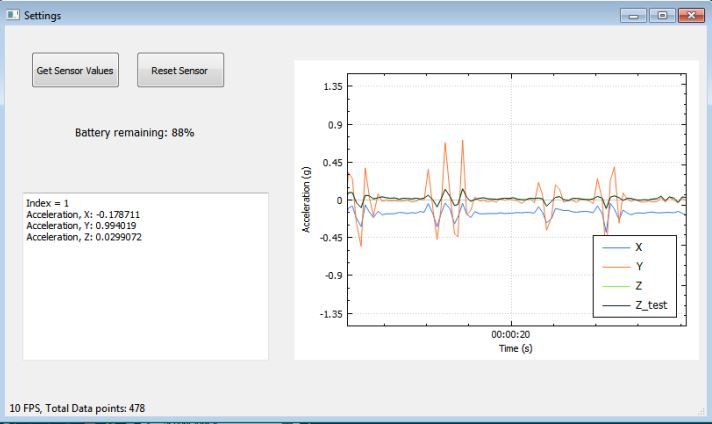
    which shows me as follows:

    IMU.JPG

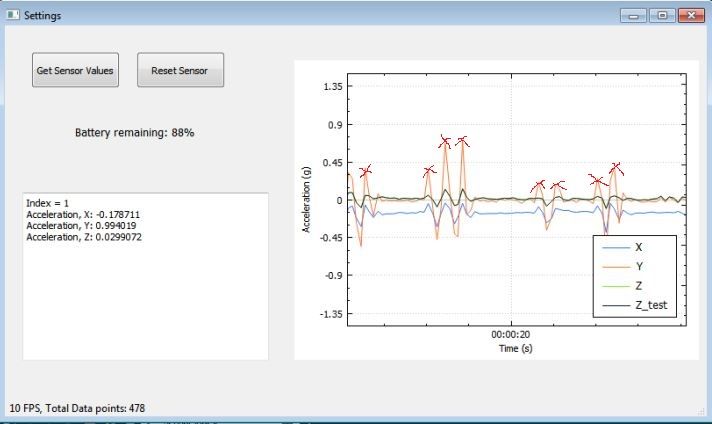
    As a next step, I need to detect the peaks (I define peak as that value (positive values) more than 0.25 g at high rate.) in any axis, say for example in the above figure in the Y axis there are peak values which I need to detect and count. Can somebody show me a way to do this?

    I need to mark peaks as follows:
    IMU.JPG

    JKSHJ 1 Reply Last reply
    0
    • V viniltc

      Hi all,

      This is a bit off topic question! but hope I get some feedback from this forum.

      I'm using QCustomPlot to display realtime value from an IMU.

      This is how I set the realtimeDataSlot:

      void Settings::realtimeDataSlot(double x_acceleration_g, double y_acceleration_g, double z_acceleration_g, double z_acceleration_gnew)
      {
          static QTime time(QTime::currentTime());
          // calculate two new data points:
          double key = time.elapsed()/1000.0; // time elapsed since start of demo, in seconds
          static double lastPointKey = 0;
          if (key-lastPointKey > 0.02) // at most add point every 20 ms
          {
            // add data to lines:
              ui->customPlot->graph(0)->addData(key, x_acceleration_g); // X axis
              ui->customPlot->graph(1)->addData(key, y_acceleration_g); // Y axis
              ui->customPlot->graph(2)->addData(key, z_acceleration_g); // Z axis
              ui->customPlot->graph(3)->addData(key, z_acceleration_gnew);
      
            lastPointKey = key;
          }
          // make key axis range scroll with the data (at a constant range size of 8):
          ui->customPlot->xAxis->setRange(key, 8, Qt::AlignRight);
          ui->customPlot->replot();
      
          // calculate frames per second:
          static double lastFpsKey;
          static int frameCount;
          ++frameCount;
          if (key-lastFpsKey >2) // average fps over 2 seconds
          {
            ui->statusbar->showMessage(
                  QString("%1 FPS, Total Data points: %2")
                  .arg(frameCount/(key-lastFpsKey), 0, 'f', 0)
                  .arg(ui->customPlot->graph(0)->data()->size()+ui->customPlot->graph(1)->data()->size())
                  , 0);
            lastFpsKey = key;
            frameCount = 0;
          }
      }
      

      which shows me as follows:

      IMU.JPG

      As a next step, I need to detect the peaks (I define peak as that value (positive values) more than 0.25 g at high rate.) in any axis, say for example in the above figure in the Y axis there are peak values which I need to detect and count. Can somebody show me a way to do this?

      I need to mark peaks as follows:

      IMU.JPG

      JKSHJ Offline
      JKSHJ Offline
      JKSH
      Moderators
      wrote on last edited by
      #2

      @viniltc said in Detecting peak value on realtime data stream:

      I need to detect the peaks (I define peak as that value (positive values) more than 0.25 g at high rate.) in any axis, say for example in the above figure in the Y axis there are peak values which I need to detect and count. Can somebody show me a way to do this?

      "Peak detection" is quite a big field.

      You can start by reading up on peak detection algorithms, or using a peak detection library in your application: https://www.google.com/search?q=peak+detection+library+c%2B%2B

      Qt Doc Search for browsers: forum.qt.io/topic/35616/web-browser-extension-for-improved-doc-searches

      1 Reply Last reply
      5
      • JKSHJ Offline
        JKSHJ Offline
        JKSH
        Moderators
        wrote on last edited by
        #3

        Please inform readers if you cross-post to other forums: https://stackoverflow.com/questions/60543683/detecting-peak-value-on-realtime-data-stream

        This is to make sure people don't spend time answering if you already found a solution.

        Qt Doc Search for browsers: forum.qt.io/topic/35616/web-browser-extension-for-improved-doc-searches

        1 Reply Last reply
        4

        • Login

        • Login or register to search.
        • First post
          Last post
        0
        • Categories
        • Recent
        • Tags
        • Popular
        • Users
        • Groups
        • Search
        • Get Qt Extensions
        • Unsolved