Skip to content
  • Categories
  • Recent
  • Tags
  • Popular
  • Users
  • Groups
  • Search
  • Get Qt Extensions
  • Unsolved
Collapse
Brand Logo
  1. Home
  2. Qt Development
  3. Installation and Deployment
  4. QMYSQL driver not loaded on MACos

QMYSQL driver not loaded on MACos

Scheduled Pinned Locked Moved Unsolved Installation and Deployment
3 Posts 2 Posters 473 Views
  • Oldest to Newest
  • Newest to Oldest
  • Most Votes
Reply
  • Reply as topic
Log in to reply
This topic has been deleted. Only users with topic management privileges can see it.
  • E Offline
    E Offline
    edwinxxxx
    wrote on last edited by
    #1

    Platform:
    Macos 10.14
    Mysql 8.0.17
    Qt 5.9.8

    Hi guys, when i run the code in qt creator it warns that

    0_1564715424624_屏幕快照 2019-08-02 11.10.13.png

    I followed the directions provided in the forum , but it still didn't work.
    when i run "-otool -L libqsqlmysql.dylib" , it shows

    /Applications/Xcode.app/Contents/Developer/Toolchains/XcodeDefault.xctoolchain/usr/bin/objdump: 'libqsqlmysql.dylib': No such file or directory
    

    actually i found that in the folder "/Users/edwinxxxx/Qt5.9.8/5.9.8/plugins/sqldrivers" there exists the file "libqsqlmysql.dylib" absolutely.

    and in "user/local/mysql/" i can find the file "libmysqlclient.21.lib"
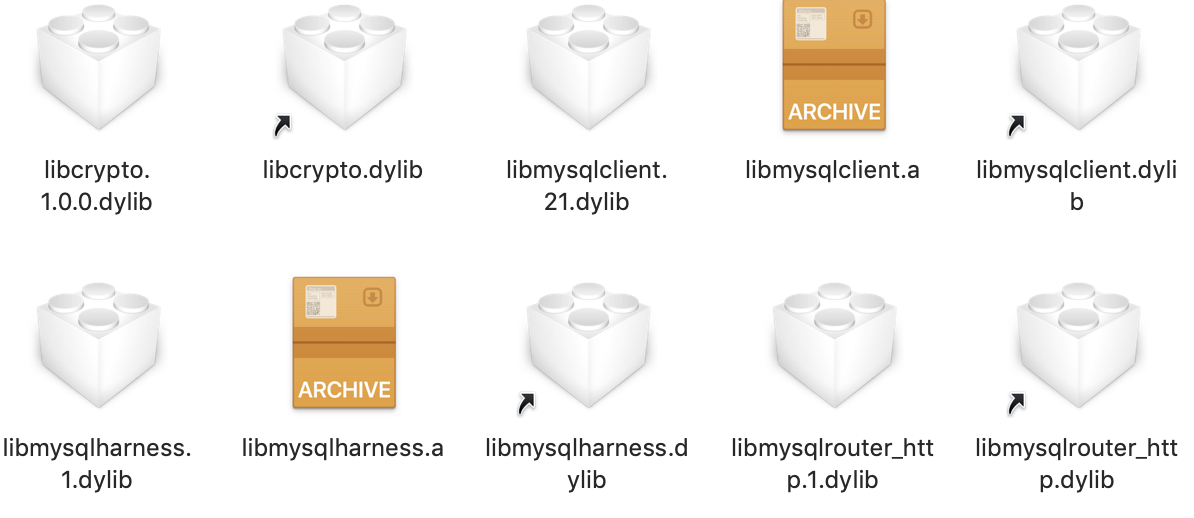
    0_1564716134880_屏幕快照 2019-08-02 11.22.03.png

    so why i cant find any folder or file like "/opt/local/mysql55..." and "libmysqlclient.18.lib"?
    how can i run "install_name_tool" to make it connect?
    i have been upset for a long time.looking forward to your help.really big thx:)

    jsulmJ 1 Reply Last reply
    0
    • E edwinxxxx

      Platform:
      Macos 10.14
      Mysql 8.0.17
      Qt 5.9.8

      Hi guys, when i run the code in qt creator it warns that

      0_1564715424624_屏幕快照 2019-08-02 11.10.13.png

      I followed the directions provided in the forum , but it still didn't work.
      when i run "-otool -L libqsqlmysql.dylib" , it shows

      /Applications/Xcode.app/Contents/Developer/Toolchains/XcodeDefault.xctoolchain/usr/bin/objdump: 'libqsqlmysql.dylib': No such file or directory
      

      actually i found that in the folder "/Users/edwinxxxx/Qt5.9.8/5.9.8/plugins/sqldrivers" there exists the file "libqsqlmysql.dylib" absolutely.

      and in "user/local/mysql/" i can find the file "libmysqlclient.21.lib"
      0_1564716134880_屏幕快照 2019-08-02 11.22.03.png

      so why i cant find any folder or file like "/opt/local/mysql55..." and "libmysqlclient.18.lib"?
      how can i run "install_name_tool" to make it connect?
      i have been upset for a long time.looking forward to your help.really big thx:)

      jsulmJ Offline
      jsulmJ Offline
      jsulm
      Lifetime Qt Champion
      wrote on last edited by jsulm
      #2

      @edwinxxxx Use absolute path to libqsqlmysql.dylib

      otool -L /Users/edwinxxxx/Qt5.9.8/5.9.8/plugins/sqldrivers/libqsqlmysql.dylib
      

      If the driver can't be loaded then most probably MySQL client library is missing.
      What does

      ldd /Users/edwinxxxx/Qt5.9.8/5.9.8/plugins/sqldrivers/libqsqlmysql.dylib
      

      output?

      https://forum.qt.io/topic/113070/qt-code-of-conduct

      E 1 Reply Last reply
      0
      • jsulmJ jsulm

        @edwinxxxx Use absolute path to libqsqlmysql.dylib

        otool -L /Users/edwinxxxx/Qt5.9.8/5.9.8/plugins/sqldrivers/libqsqlmysql.dylib
        

        If the driver can't be loaded then most probably MySQL client library is missing.
        What does

        ldd /Users/edwinxxxx/Qt5.9.8/5.9.8/plugins/sqldrivers/libqsqlmysql.dylib
        

        output?

        E Offline
        E Offline
        edwinxxxx
        wrote on last edited by
        #3

        @jsulm wow! i use the absolute path, so it works?

        0_1564722174289_屏幕快照 2019-08-02 13.02.08.png

        1 Reply Last reply
        0

        • Login

        • Login or register to search.
        • First post
          Last post
        0
        • Categories
        • Recent
        • Tags
        • Popular
        • Users
        • Groups
        • Search
        • Get Qt Extensions
        • Unsolved