Solved Unexpected bar/line at bottom of TextArea
-
Hi all!
I have a TextArea attached to a ScrollView like this:
ScrollView {
        id: sv
        anchors.right: parent.right
        anchors.top: parent.top
        anchors.bottom: parent.bottom
        anchors.rightMargin: 5
        anchors.topMargin: 5
        anchors.bottomMargin: 300
        width: 250

        TextArea {
            id: ta
            readOnly: true
            width: parent.width
            height: parent.height
            font.pointSize: 8
            cursorPosition: ta.length

            Connections {
                property int cnt
                target: esp32Backend
                onSerDataAvail: {
                    ta.append(esp32Backend.getSerialMessage());
                    cnt++
                    if (cnt == 250) {
                        cnt = 0;
                        ta.clear();
                    }
                }
            }
        }
    }
The purpose is to have a little scrollable serial console that just appends every message it receives at the end of the TextArea.
Once the application is started there is a big grey bar at the bottom of the TextArea:
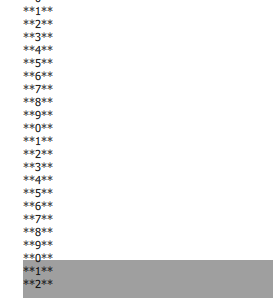
Once I click in the TextArea the bar changes into a thin line:

Where does this bar and line come from and any ideas on how to get rid of them?
Material Theme Light and accent Red is applied.
QT 5.12.4 / Windows 10Thanks!
-
Probably it is an
backgroundproperty ofTextArea, but I cannot reproduce behavior such as at 1st screenshot, using Qt 5.12.3. If you want to get rid of it, you can setbackground: null(or any another component as you wish) property for your TextArea. -
Setting
background: nullindeed did the trick for both the bar and the line!
Thank you very much!
