Solved Beginner: Q's about Qt Maintenance Tool on Mac OSX High Sierra
-
I have installed Qt Creator 4.8.0 and Qt 5.12.0 on a Macbook Air running High Sierra, using the Qt Creator installer.
After quite a bit of searching and googling I found the Qt Maintenance Tool in /Users/user/Qt5.12.0 and have managed to get it to recognize its repository at http://download.qt-project.org/online/qtsdkrepository/mac_x64/desktop/tools_qtcreator/ (haven't quite figured out yet what other repositories I'll need.
My questions are...
-
If I use the Maintenance Tool to uninstall everything, will it uninstall both Qt and Qt Creator, or only one or the other? Will I end up just as though I had never installed Qt?
-
Should I use the Maintenance Tool to upgrade to QT Creator 4.9.2? I ask because I looked at the list of modules to upgrade, as presented to me by Maintenance Tool from the tools_qtcreator repository, and saw nothing that needed upgrading (i.e. it showed Qt with Installed Version the same as New Version), and didn't show Qt Creator at all).
-
Does the new 4.9.2 release of Qt Creator affect only Creator, or does it upgrade Qt (5.12.0) to a later version?
Thanks...
-
-
Expanding just a bit on question 1 above... I'm mainly asking if I do the upgrade and mess something up (who, me?? never...), can I use the Maintenance Tool to delete the whole installation and start over, and depend on there not being any artifacts left over to get in the way?
Thanks...
-
@eric-rkt
Hi
1:
The Maintenance Tool is almost like a clean install, (if you deselect all)
however, it does remember
settings/prefs from Creator so there are elements left.
However, it can be used to install new Qt version and/or remove versions.
Well it removes what you uncheck. Including Creator if you wish.
2: Yes. You should use it. It sounds like you changed the repository
so im not 100% sure what you see.
3:
Its a new Creator. Normally it wont give you new Qt version too.yes if u mess up - you can use the maintenance tool. However, it might also
uninstall that if you remove all Qt versions and in that case the online installer can be used to start over.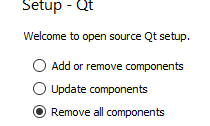
-
Thanks, mrjj. That's what I needed.

