Skip to content
  • Categories
  • Recent
  • Tags
  • Popular
  • Users
  • Groups
  • Search
  • Get Qt Extensions
  • Unsolved
Collapse
Brand Logo
  1. Home
  2. Qt Development
  3. QML and Qt Quick
  4. OSM plugin is no longer available?

OSM plugin is no longer available?

Scheduled Pinned Locked Moved Solved QML and Qt Quick
5 Posts 2 Posters 689 Views 2 Watching
  • Oldest to Newest
  • Newest to Oldest
  • Most Votes
Reply
  • Reply as topic
Log in to reply
This topic has been deleted. Only users with topic management privileges can see it.
  • S Offline
    S Offline
    Samuel Ives
    wrote on last edited by
    #1

    0_1556895073223_Sem título.png
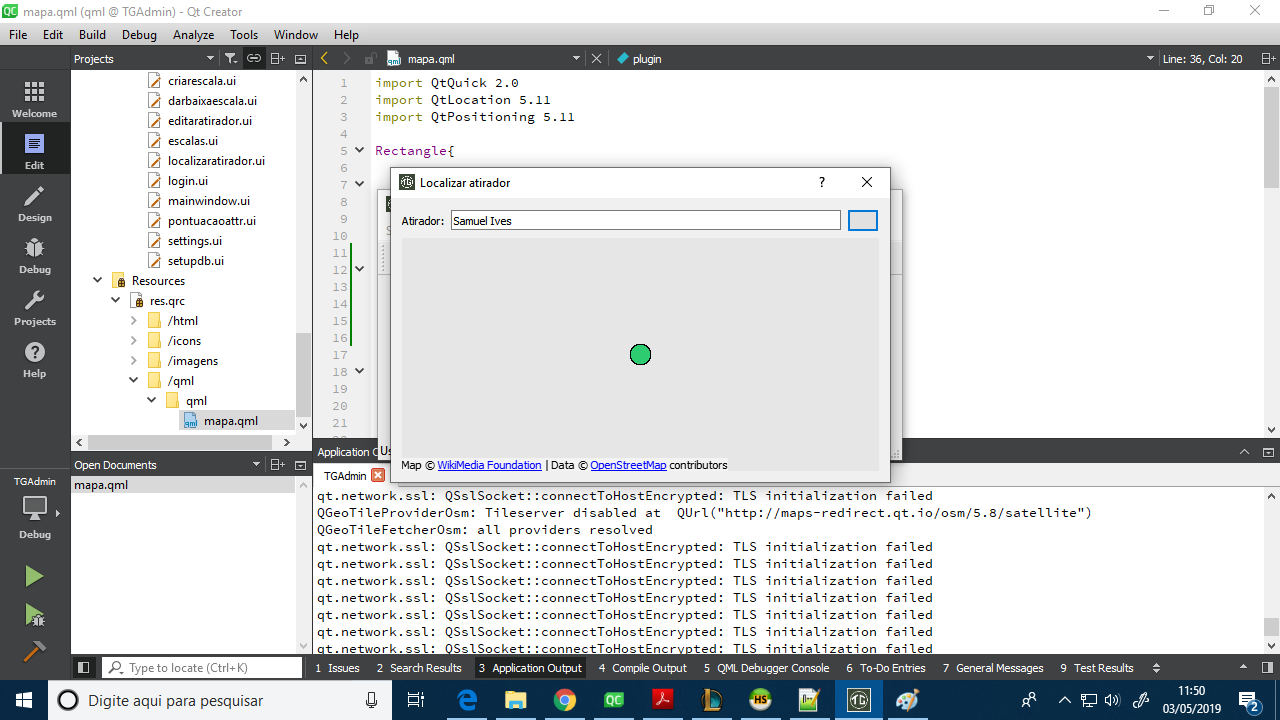
    last year I used the osm plugin without problems, however this time I always come across these errors, other plugins like esri and mapbox are working normally

    raven-worxR 1 Reply Last reply
    0
    • S Samuel Ives

      0_1556895073223_Sem título.png
      last year I used the osm plugin without problems, however this time I always come across these errors, other plugins like esri and mapbox are working normally

      raven-worxR Offline
      raven-worxR Offline
      raven-worx
      Moderators
      wrote on last edited by
      #2

      @Samuel-Ives
      seeing those warnings in the background you should provide OpenSSL libs to your application (or at least in the PATH variable)
      Probably osm switched to https:// urls

      --- SUPPORT REQUESTS VIA CHAT WILL BE IGNORED ---
      If you have a question please use the forum so others can benefit from the solution in the future

      1 Reply Last reply
      2
      • S Offline
        S Offline
        Samuel Ives
        wrote on last edited by
        #3

        Just to ensure I put the OpenSSL dlls together with the application, but continued, I added network in my .pro file but it did not work, I think this is some problem with the plugin because the page does not warn about having to acquire the OpenSSL libraries

        raven-worxR 1 Reply Last reply
        0
        • S Samuel Ives

          Just to ensure I put the OpenSSL dlls together with the application, but continued, I added network in my .pro file but it did not work, I think this is some problem with the plugin because the page does not warn about having to acquire the OpenSSL libraries

          raven-worxR Offline
          raven-worxR Offline
          raven-worx
          Moderators
          wrote on last edited by
          #4

          @Samuel-Ives
          so the ssl errors are gone now?

          Regarding the second warning about the disabled tile server:
          https://blog.qt.io/blog/2017/03/09/provisioning-openstreetmap-providers-in-qtlocation/

          --- SUPPORT REQUESTS VIA CHAT WILL BE IGNORED ---
          If you have a question please use the forum so others can benefit from the solution in the future

          1 Reply Last reply
          2
          • S Offline
            S Offline
            Samuel Ives
            wrote on last edited by
            #5

            0_1556972615419_Sem título.png

            Plugin{
                    id: osm
                    name: "osm"
                    PluginParameter{name: "osm.useragent"; value: "TGAdmin"}
                    PluginParameter{name: "osm.mapping.custom.host"; value: "https://tile.openstreetmap.org"}
                    PluginParameter{name: "osm.mapping.providersrepository.disabled"; value: true}
                }
            

            Solved, just to ensure I also setted the tile host as OSM itself as indicated here:
            https://wiki.openstreetmap.org/wiki/Domain_names

            1 Reply Last reply
            2

            • Login

            • Login or register to search.
            • First post
              Last post
            0
            • Categories
            • Recent
            • Tags
            • Popular
            • Users
            • Groups
            • Search
            • Get Qt Extensions
            • Unsolved