Skip to content
  • Categories
  • Recent
  • Tags
  • Popular
  • Users
  • Groups
  • Search
  • Get Qt Extensions
  • Unsolved
Collapse
Brand Logo
  1. Home
  2. Qt Development
  3. General and Desktop
  4. Dynamically rotate QTextEdit

Dynamically rotate QTextEdit

Scheduled Pinned Locked Moved Unsolved General and Desktop
6 Posts 2 Posters 1.2k Views 1 Watching
  • Oldest to Newest
  • Newest to Oldest
  • Most Votes
Reply
  • Reply as topic
Log in to reply
This topic has been deleted. Only users with topic management privileges can see it.
  • K Offline
    K Offline
    Kaznachei
    wrote on last edited by
    #1

    I've got idea. When QTextEdit contains position of mouse i can rotate it by moving of mouse. I tried to rotate only text and resize QTextEdit but there are some problems. ```

    setFixedSize(1000,1000);
    QRect idealRect(0,0,document()->idealWidth(), fontMetrics().height()*toPlainText().split("\n").size());
    
    QTransform t;
    t.translate(idealRect.width()/2, idealRect.height()/2).rotate(-45).translate(-idealRect.width()/2, -idealRect.height()/2);
    
    idealRect = t.mapRect(idealRect);
    
    
    setFixedSize(idealRect.width(),idealRect.height());
    painter->begin(viewport());
    painter->setTransform(t);
    painter->drawText(0,idealRect.height()/2, toPlainText());
    painter->end();
    

    ``` ``

    Often shape larger then it should be or not all text inside QTextEdit. I wrote class TextEdit which inherits QTextEdit and overrided paintEvent. Maybe i must use another class to make rotation of widget&

    1 Reply Last reply
    0
    • mrjjM Offline
      mrjjM Offline
      mrjj
      Lifetime Qt Champion
      wrote on last edited by mrjj
      #2

      Hi and welcome to the forums.
      It would help if you first told us what the goal is.

      You want to draw some rotated text ?

      Or you want to make a widget that can rotate text with the mouse, like in a drawing program?

      And where will you use this text or widget ?

      1 Reply Last reply
      0
      • K Offline
        K Offline
        Kaznachei
        wrote on last edited by
        #3

        Thank you. I want to make opportunity to rotate text. If i could rotate widget i would like to rotate widget else rotate text. I do not want to rotate text by widget i want to rotate widget which contains string (QTextEdit). Can i do it?

        mrjjM 1 Reply Last reply
        0
        • K Kaznachei

          Thank you. I want to make opportunity to rotate text. If i could rotate widget i would like to rotate widget else rotate text. I do not want to rotate text by widget i want to rotate widget which contains string (QTextEdit). Can i do it?

          mrjjM Offline
          mrjjM Offline
          mrjj
          Lifetime Qt Champion
          wrote on last edited by
          #4

          @Kaznachei
          you mean so its still possible to type text into it ?
          While rotated ?

          1 Reply Last reply
          0
          • K Offline
            K Offline
            Kaznachei
            wrote on last edited by
            #5

            Yes. I can print something if it 82 degrees for example

            mrjjM 1 Reply Last reply
            0
            • K Kaznachei

              Yes. I can print something if it 82 degrees for example

              mrjjM Offline
              mrjjM Offline
              mrjj
              Lifetime Qt Champion
              wrote on last edited by
              #6

              @Kaznachei

              Hi
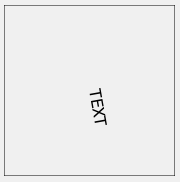
              Rotating the actual TextEdit is hard to do, but drawing the text rotated is possible.
              I found using a QPainterPath, gave the best results. (at least on windows)

               virtual void paintEvent(QPaintEvent *event) override
                  {
                      QPainter painter(this);
                      painter.setRenderHint( QPainter::Antialiasing, true );
                      painter.drawRect(rect());
                      QFont font;
              
                      font.setPointSize( 12 );
                      font.setStyleStrategy( QFont::StyleStrategy::PreferAntialias );
                      painter.setFont( font );
              
                      QRect m_window = QRect(- width() / 2, - height() / 2, width(), height());
                      painter.setWindow( m_window );
                      QRect m_viewport = QRect(0, 0, width(), height());
                      painter.setViewport( m_viewport );
                      // rotate
                      painter.rotate( 80 );
                      //draw text
                      QPainterPath glyphPath;
                      glyphPath.addText( 0, 0, painter.font(), "TEXT" );
                      painter.fillPath( glyphPath, painter.pen().color() );
              
                  }
              

              alt text

              1 Reply Last reply
              1

              • Login

              • Login or register to search.
              • First post
                Last post
              0
              • Categories
              • Recent
              • Tags
              • Popular
              • Users
              • Groups
              • Search
              • Get Qt Extensions
              • Unsolved