Skip to content
  • Categories
  • Recent
  • Tags
  • Popular
  • Users
  • Groups
  • Search
  • Get Qt Extensions
  • Unsolved
Collapse
Brand Logo
  1. Home
  2. Qt Development
  3. General and Desktop
  4. Issue building static Qt version

Issue building static Qt version

Scheduled Pinned Locked Moved Unsolved General and Desktop
8 Posts 3 Posters 1.2k Views 2 Watching
  • Oldest to Newest
  • Newest to Oldest
  • Most Votes
Reply
  • Reply as topic
Log in to reply
This topic has been deleted. Only users with topic management privileges can see it.
  • P Offline
    P Offline
    psyfl
    wrote on last edited by
    #1

    Hi. I'm using a Windows 10 64-bit computer and I'm using Qt to develop a Qt Widgets Application. I would like to deploy the application for usage on other Windows computers. The application is a 32-bit application which I am compiling with the MSVC2017 32-bit compiler. I would like to compile the executable with static linking, so I am trying to build a static version of qt.

    I have a normal version of Qt 5.12.2 installed. I downloaded Qt 5.12.1 everywhere source and extracted it to C:/qt/static. I then opened the x64 Native Tools Command Prompt for VS 2017 and ran configure -release -static -prefix "c:/qt/static" -nomake tools -nomake tests -nomake examples -skip webengine. I have python/ruby/perl installed and all in PATH.

    Then I ran nmake. However, the building process is still going on after around 2 hours. I have an i7 4790k @ 4.0GHz and I am using an SSD drive. I have no idea as to why this is taking so long and I'm wondering if I have missed out any steps/if I might get caught up in some form of infinite loop. Any help would be appreciated.

    1 Reply Last reply
    0
    • mrjjM Offline
      mrjjM Offline
      mrjj
      Lifetime Qt Champion
      wrote on last edited by
      #2

      Hi
      Did you check it uses all cores for compilation ?
      else it will take like a day :)

      1 Reply Last reply
      0
      • P Offline
        P Offline
        psyfl
        wrote on last edited by
        #3

        Where exactly can I check that?

        1 Reply Last reply
        1
        • mrjjM Offline
          mrjjM Offline
          mrjj
          Lifetime Qt Champion
          wrote on last edited by mrjj
          #4

          hi
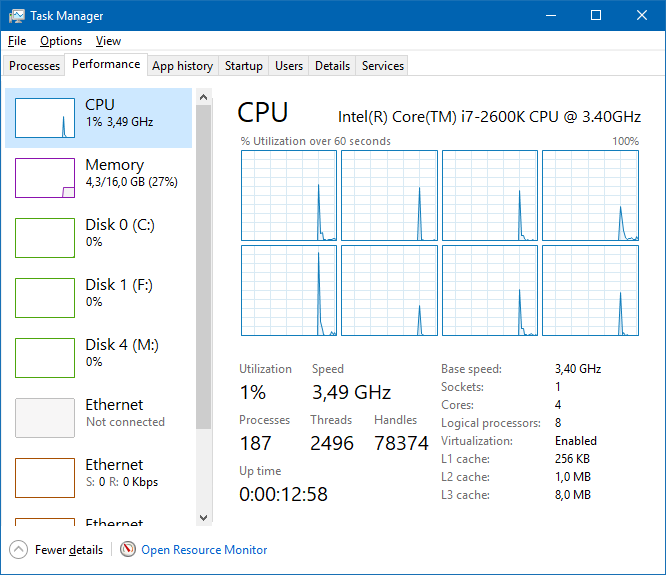
          Open task manager and see if cpu usage goes to around 100%
          alt text

          1 Reply Last reply
          1
          • SGaistS Offline
            SGaistS Offline
            SGaist
            Lifetime Qt Champion
            wrote on last edited by
            #5

            Hi,

            In addition to @mrjj, use jom for the compilation rather than nmake, it will parallelise things better.

            Interested in AI ? www.idiap.ch
            Please read the Qt Code of Conduct - https://forum.qt.io/topic/113070/qt-code-of-conduct

            1 Reply Last reply
            1
            • P Offline
              P Offline
              psyfl
              wrote on last edited by
              #6

              With no other processes running, right now it is at about 15% and sometimes going up to around 25%. I'm not sure how I can increase CPU utilisation. By the way, sorry for slow responses but I can only post once per 10 minutes.

              1 Reply Last reply
              0
              • P Offline
                P Offline
                psyfl
                wrote on last edited by
                #7

                I'm now using jom instead of nmake and my CPU utilisation is much higher. Hopefully it will go much faster now. Thanks everyone for the help.

                mrjjM 1 Reply Last reply
                1
                • P psyfl

                  I'm now using jom instead of nmake and my CPU utilisation is much higher. Hopefully it will go much faster now. Thanks everyone for the help.

                  mrjjM Offline
                  mrjjM Offline
                  mrjj
                  Lifetime Qt Champion
                  wrote on last edited by
                  #8

                  @psyfl
                  Oh, it will by large. unless you have single core or dual core cpu :)

                  1 Reply Last reply
                  0

                  • Login

                  • Login or register to search.
                  • First post
                    Last post
                  0
                  • Categories
                  • Recent
                  • Tags
                  • Popular
                  • Users
                  • Groups
                  • Search
                  • Get Qt Extensions
                  • Unsolved