Solved Doing a mockup of a physical panel
-
I'm in a new project that hasn't gotten so far that there's any kind of hardware done yet, but to get a feel of the UX I'm trying to do a mockup of the control panel. The controls will be physical buttons around a display (without touch) that reports back the system status, and I've built my UI on the image of the panel from the UX-designer and made certain areas clickable and so on. Works like a charm.
What DOESN'T work like a charm is the display. Right now I'm simply drawing icons etc over the scanned image and while this works it means that I can't really simulate the final result but has to cludge around to get things drawn with an offset. What I would like to have would be a QWidget or similar that simply "floated" on top of the picture of the physical panel with the correct offset, something like this:

This so I can develop code that is as close as possible to the end result while the HW-guys are creating the actual hardware.
Best would be if QWidget was transparent, but I'll settle with a square box on top of the panel too. After all it's just a mockup and we'll just have to live with the rounded corners not being rounded.
Is this possible to do? How?
-
Hi
Do mean if its possible to overlay widgets over some image ?
Like
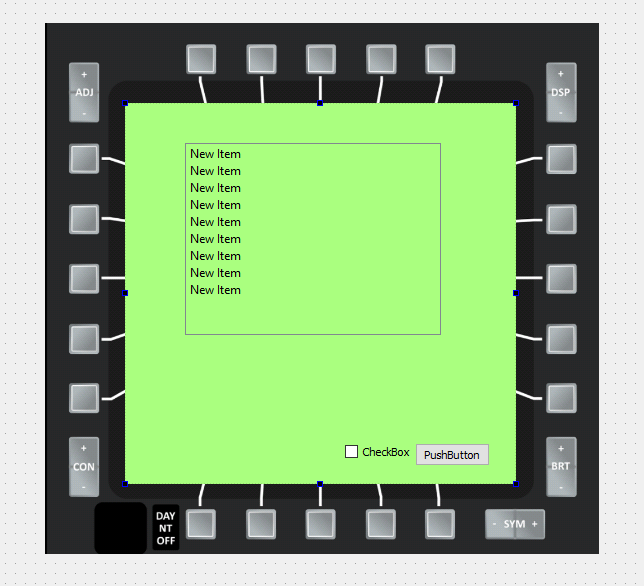
If yes, you can just display the image in a QLabel and then place a widget over that.
-
@mrjj Doh. Sometimes things are easier than you think and you're just thick! Thank you, worked like a charm.
Code included in case someone else has the same problem in the future and is searching for an answer (replace QTextEdit with the widget of your preference):
class TestWindow : public QMainWindow
{
  public:
    TestWindow(QWidget *parent = nullptr) : QMainWindow(parent)
    {
        display = new QTextEdit(this);
        display->setText("Testing");
        display->resize(800, 480);
        display->move(955, 97);
    }

    virtual void paintEvent(QPaintEvent *)
    {
        QPainter painter(this);
        painter.drawImage(0, 0, QImage(":/mockup/panels/Panel.png"));
    }

  private:
    QTextEdit *display;
};

int main(int argc, char *argv[])
{
    QApplication app(argc, argv);

    TestWindow testWindow;
    testWindow.show();

    return app.exec();
}
