
Problems encountered when the project moved from Mingw to MSVC 2017
-
@kgsbt said in Problems encountered when the project moved from Mingw to MSVC 2017:
error: C2872: “clog”: ambiguous symbol
Google:
error: C2872: “clog”: ambiguous symbol
https://stackoverflow.com/questions/54972981/how-can-i-resolve-the-occuring-ambiguity-when-using-clog-for-computing-the-natur ?I haven't been able to reproduce this with gcc 7.3 without
using namespace stdbut in general all functions from C headers reside in the global namespace. Therefore you should be able to resolve the ambiguity by prefixing clog with:::Agreed, you must have a
using namesapce stdelsewhere - maybe in an included header?This solved it, thanks. Yes, in one header I'm including it was used.
Can this apply to you?
I only include
complex.hhere:Once again, this is not enough to show you will not have the problem. You show a header/include file,
AcBoardWorkspace.h. That goes#include <complex.h>. But that does not tell us the whole story. It will#included somewhere, and that may be preceded by other#includes and/orusing namespacestatements, etc. You cannot keep looking atcomplex.hin isolation, you must look at it in the context of where it is being included.@JonB
I searched "clog" in my project.
It's no found in my project:

so I can't use this way,I don't kown where to add "::" .
@JonB said in Problems encountered when the project moved from Mingw to MSVC 2017:Therefore you should be able to resolve the ambiguity by prefixing clog with ::
-
@JonB thanks. I resolved this problem!
I put#include <complex.h>in The first line of AcBoardWorkspace.h. And put#include “AcBoardWorkspace.h”on the first line of the file that needs it.And it works!@kgsbt
You were not supposed to be able to findclogin your own code --- it's incomplex.h. And you were not supposed to deploy the solution to prefix it with::as that would be in that file which you do not want to change.I put #include <complex.h> in The first line of AcBoardWorkspace.h. And put #include “AcBoardWorkspace.h” on the first line of the file that needs it.And it works!
This is right. Something you have now moved it before in your
#includefiles will haveusing namespace std. That will have madeclog(without the::) go wrong whencomplex.hgot included. Nowcomplex.hwill be included before thatstdstatement, and will allow it to work.As a general guide: this does not always avoid any problems, but I arrange my
#includes as far as possible:- First any "system" includes, which have nothing to do with Qt.
- Next any third-party includes, which have nothing to do with Qt.
- Qt's includes.
- My own project's includes.
In my experience this hopefully leads to the least interference between them.
-
@kgsbt
You were not supposed to be able to findclogin your own code --- it's incomplex.h. And you were not supposed to deploy the solution to prefix it with::as that would be in that file which you do not want to change.I put #include <complex.h> in The first line of AcBoardWorkspace.h. And put #include “AcBoardWorkspace.h” on the first line of the file that needs it.And it works!
This is right. Something you have now moved it before in your
#includefiles will haveusing namespace std. That will have madeclog(without the::) go wrong whencomplex.hgot included. Nowcomplex.hwill be included before thatstdstatement, and will allow it to work.As a general guide: this does not always avoid any problems, but I arrange my
#includes as far as possible:- First any "system" includes, which have nothing to do with Qt.
- Next any third-party includes, which have nothing to do with Qt.
- Qt's includes.
- My own project's includes.
In my experience this hopefully leads to the least interference between them.
@JonB said in Problems encountered when the project moved from Mingw to MSVC 2017:
As a general guide: this does not always avoid any problems, but I arrange my #includes as far as possible:
First any "system" includes, which have nothing to do with Qt.
Next any third-party includes, which have nothing to do with Qt.
Qt's includes.
My own project's includes.This is a very useful guide!
-
@kgsbt
You were not supposed to be able to findclogin your own code --- it's incomplex.h. And you were not supposed to deploy the solution to prefix it with::as that would be in that file which you do not want to change.I put #include <complex.h> in The first line of AcBoardWorkspace.h. And put #include “AcBoardWorkspace.h” on the first line of the file that needs it.And it works!
This is right. Something you have now moved it before in your
#includefiles will haveusing namespace std. That will have madeclog(without the::) go wrong whencomplex.hgot included. Nowcomplex.hwill be included before thatstdstatement, and will allow it to work.As a general guide: this does not always avoid any problems, but I arrange my
#includes as far as possible:- First any "system" includes, which have nothing to do with Qt.
- Next any third-party includes, which have nothing to do with Qt.
- Qt's includes.
- My own project's includes.
In my experience this hopefully leads to the least interference between them.
@JonB I have a new problem:
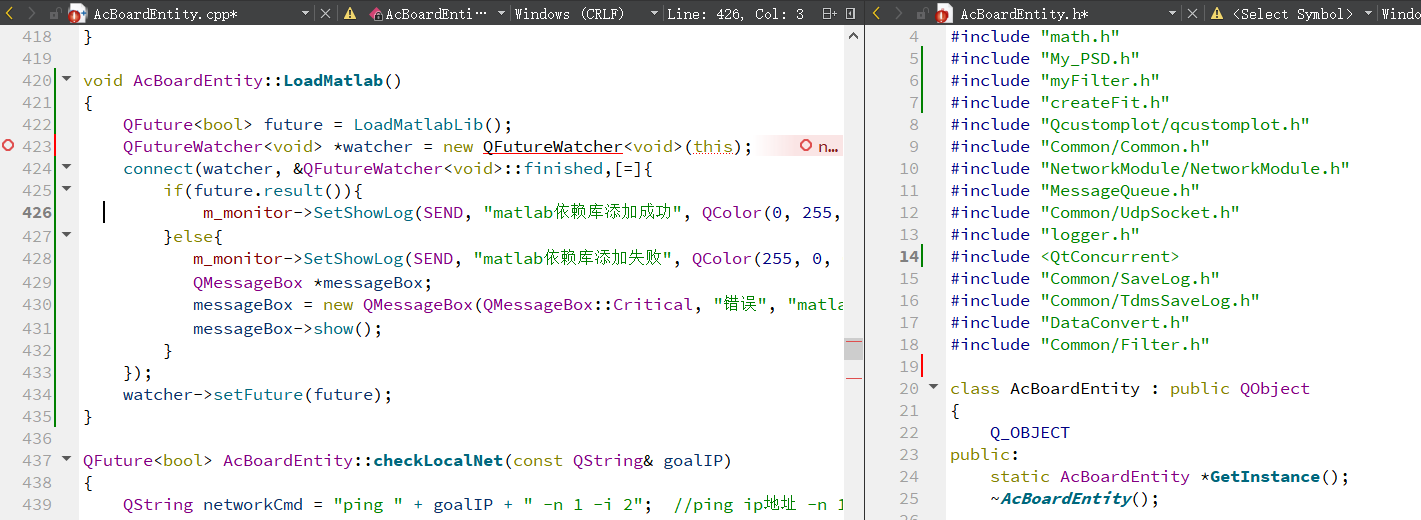
I useQFutureWatcher<void> *watcher = new QFutureWatcher<void>(this);as usual.
AcBoardEntity does inherit from QObject.But it get an error:- AcBoardEntity.cpp:423:41: error: no matching constructor for initialization of 'QFutureWatcher<void>'
qfuturewatcher.h:184:7: note: candidate constructor (the implicit copy constructor) not viable: no known conversion from 'AcBoardEntity *' to 'const QFutureWatcher<void>' for 1st argument
qfuturewatcher.h:187:14: note: candidate constructor not viable: no known conversion from 'AcBoardEntity *' to 'QObject *' for 1st argument
I also used
QFutureWatcher<void> *watcher = new QFutureWatcher<void>(this);in another file:
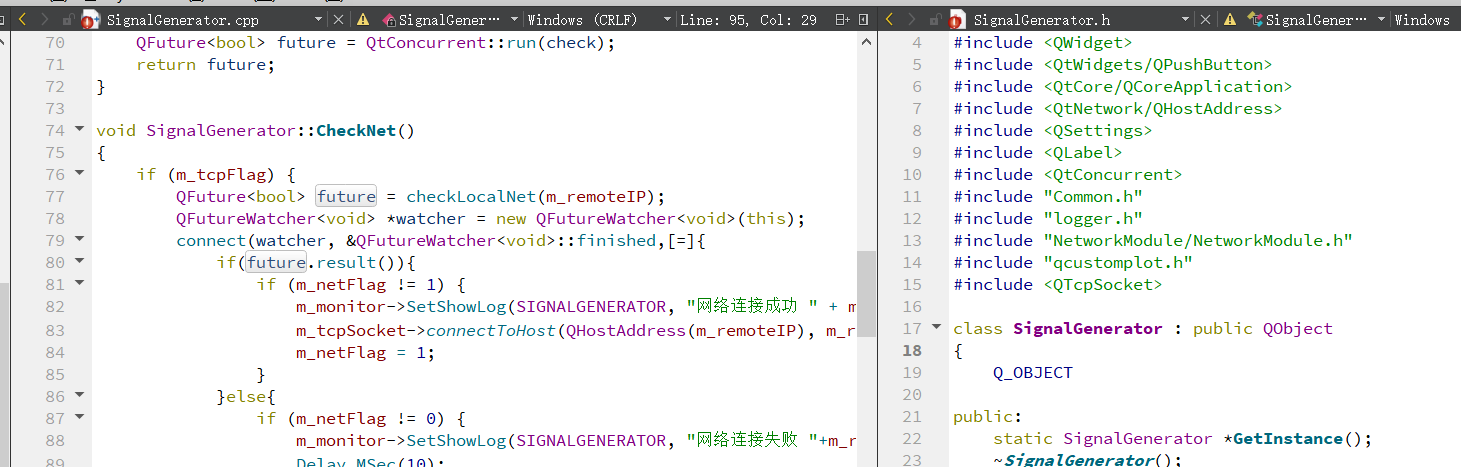
and it works as usual.
I don't kown what's wrong. -
@JonB I have a new problem:
I useQFutureWatcher<void> *watcher = new QFutureWatcher<void>(this);as usual.
AcBoardEntity does inherit from QObject.But it get an error:- AcBoardEntity.cpp:423:41: error: no matching constructor for initialization of 'QFutureWatcher<void>'
qfuturewatcher.h:184:7: note: candidate constructor (the implicit copy constructor) not viable: no known conversion from 'AcBoardEntity *' to 'const QFutureWatcher<void>' for 1st argument
qfuturewatcher.h:187:14: note: candidate constructor not viable: no known conversion from 'AcBoardEntity *' to 'QObject *' for 1st argument
I also used
QFutureWatcher<void> *watcher = new QFutureWatcher<void>(this);in another file:
and it works as usual.
I don't kown what's wrong.@kgsbt
I don't see where the difference is too. Start by deleting all your intermediate generated file and re-run a build from scratch, to make sure everything is correctly up-to-date (no artefacts left over from a previous compile).Yes, note something "odd" in your screenshot:
class SignalGeneratorhasSignalGeneratorwritten in bold & purple --- just likeQObjectis written in purple. But yourclass AcBoardEntityis not written that way. This implies to me it is not recognising something about theAcBoardEntityclass which it is recognising forSignalGenerator....You show a "vertical red line warning symbol" at line #19 of
AcBoardEntity.h. This may be affecting the interpretation of the subsequentclass AcBoardEntity. What is that about, can that be resolved first? - AcBoardEntity.cpp:423:41: error: no matching constructor for initialization of 'QFutureWatcher<void>'
-
@kgsbt
I don't see where the difference is too. Start by deleting all your intermediate generated file and re-run a build from scratch, to make sure everything is correctly up-to-date (no artefacts left over from a previous compile).Yes, note something "odd" in your screenshot:
class SignalGeneratorhasSignalGeneratorwritten in bold & purple --- just likeQObjectis written in purple. But yourclass AcBoardEntityis not written that way. This implies to me it is not recognising something about theAcBoardEntityclass which it is recognising forSignalGenerator....You show a "vertical red line warning symbol" at line #19 of
AcBoardEntity.h. This may be affecting the interpretation of the subsequentclass AcBoardEntity. What is that about, can that be resolved first?@JonB said in Problems encountered when the project moved from Mingw to MSVC 2017:
You show a "vertical red line warning symbol" at line #19 of AcBoardEntity.h
it's just because I don't save the file.And red line tells me which changed.
@JonB said in Problems encountered when the project moved from Mingw to MSVC 2017:
Yes, note something "odd" in your screenshot: class SignalGenerator has SignalGenerator written in bold & purple --- just like QObject is written in purple. But your class AcBoardEntity is not written that way
Yes! you're right.I note it.I looked up in Intertnet and found that:
- "In Qt Creator, when you enter a class name, it should turn purple. This means that Qt Creator has recognized the class and that it is correctly included in the project.
If you see that the class name is still black, this may mean that Qt Creator does not recognize the class or that the class is not properly included in the project. This problem usually results in compilation errors and other problems."
I checked my code and found:
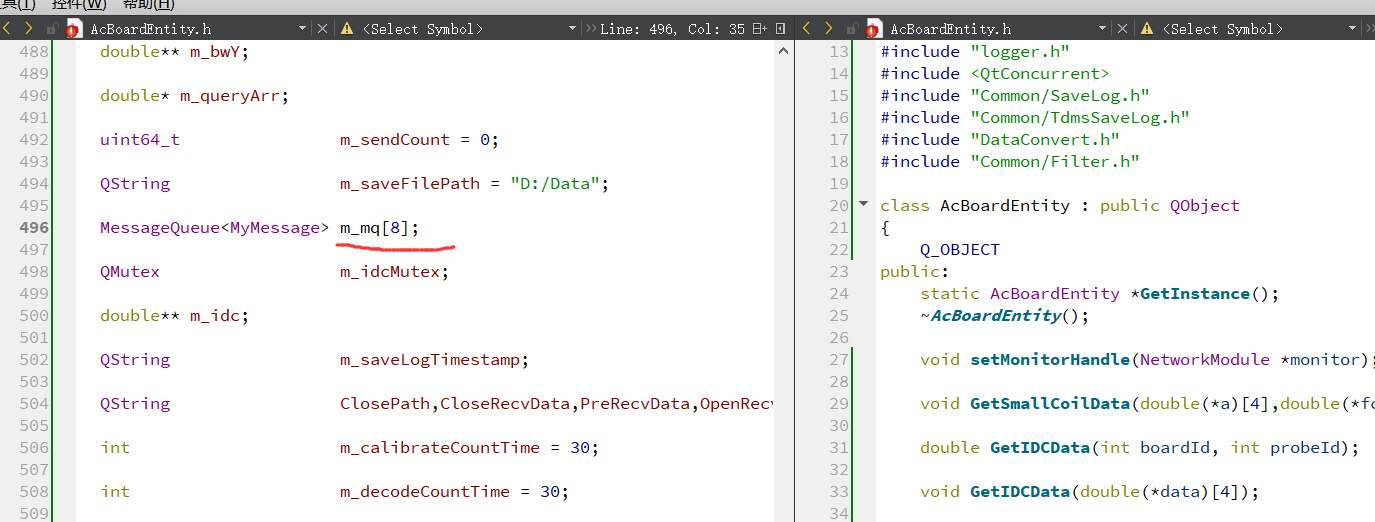
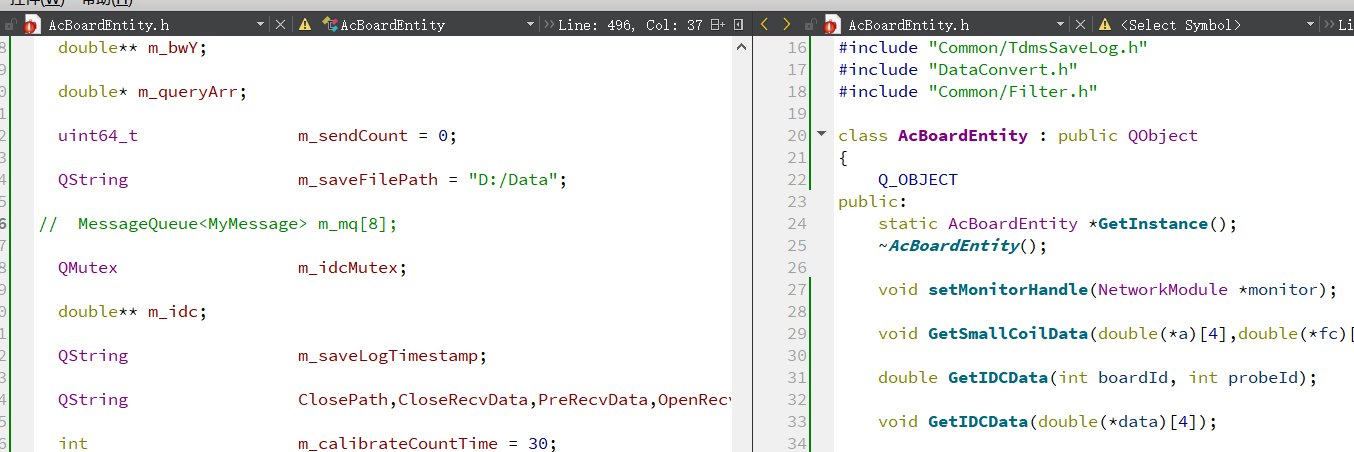
them_mq[8]is black,too. When I commentedm_mq[8]out,class AcBoardEntitybecome bold & purple.
I think there is a problem inm_mq[8].
here is the code about MessageQueue and MyMessage://MessageQueue.h #ifndef MESSAGE_QUEUE_H #define MESSAGE_QUEUE_H #include <mutex> #include <condition_variable> #include <queue> template<class T> class MessageQueue { public: void push(const T& msg) { std::unique_lock<std::mutex>lck(m_mtx); m_queue.push(msg); m_cv.notify_one(); } void wait(T& msg) { std::unique_lock<std::mutex>lck(m_mtx); while (!m_queue.size()) { m_cv.wait(lck); } msg = m_queue.front(); m_queue.pop(); } size_t size() { std::unique_lock<std::mutex>lck(m_mtx); return m_queue.size(); } private: std::queue<T> m_queue; std::mutex m_mtx; std::condition_variable m_cv; }; #endif // MESSAGE_QUEUE_H\\MyMessage class MyMessage { public: uint8_t id; uint32_t len; unsigned char *buf; };can you find some problem?
- "In Qt Creator, when you enter a class name, it should turn purple. This means that Qt Creator has recognized the class and that it is correctly included in the project.
-
@JonB said in Problems encountered when the project moved from Mingw to MSVC 2017:
You show a "vertical red line warning symbol" at line #19 of AcBoardEntity.h
it's just because I don't save the file.And red line tells me which changed.
@JonB said in Problems encountered when the project moved from Mingw to MSVC 2017:
Yes, note something "odd" in your screenshot: class SignalGenerator has SignalGenerator written in bold & purple --- just like QObject is written in purple. But your class AcBoardEntity is not written that way
Yes! you're right.I note it.I looked up in Intertnet and found that:
- "In Qt Creator, when you enter a class name, it should turn purple. This means that Qt Creator has recognized the class and that it is correctly included in the project.
If you see that the class name is still black, this may mean that Qt Creator does not recognize the class or that the class is not properly included in the project. This problem usually results in compilation errors and other problems."
I checked my code and found:
them_mq[8]is black,too. When I commentedm_mq[8]out,class AcBoardEntitybecome bold & purple.
I think there is a problem inm_mq[8].
here is the code about MessageQueue and MyMessage://MessageQueue.h #ifndef MESSAGE_QUEUE_H #define MESSAGE_QUEUE_H #include <mutex> #include <condition_variable> #include <queue> template<class T> class MessageQueue { public: void push(const T& msg) { std::unique_lock<std::mutex>lck(m_mtx); m_queue.push(msg); m_cv.notify_one(); } void wait(T& msg) { std::unique_lock<std::mutex>lck(m_mtx); while (!m_queue.size()) { m_cv.wait(lck); } msg = m_queue.front(); m_queue.pop(); } size_t size() { std::unique_lock<std::mutex>lck(m_mtx); return m_queue.size(); } private: std::queue<T> m_queue; std::mutex m_mtx; std::condition_variable m_cv; }; #endif // MESSAGE_QUEUE_H\\MyMessage class MyMessage { public: uint8_t id; uint32_t len; unsigned char *buf; };can you find some problem?
@kgsbt Are we talking about real build issues (when you build your project) or about warnings/errors QtCreator is shown in editor?
- "In Qt Creator, when you enter a class name, it should turn purple. This means that Qt Creator has recognized the class and that it is correctly included in the project.
-
@kgsbt Are we talking about real build issues (when you build your project) or about warnings/errors QtCreator is shown in editor?
@jsulm
OP claims it's actual build error, he wrote earlierAcBoardEntity does inherit from QObject.But it get an error:
AcBoardEntity.cpp:423:41: error: no matching constructor for initialization of 'QFutureWatcher<void>'
qfuturewatcher.h:184:7: note: candidate constructor (the implicit copy constructor) not viable: no known conversion from 'AcBoardEntity *' to 'const QFutureWatcher<void>' for 1st argument
qfuturewatcher.h:187:14: note: candidate constructor not viable: no known conversion from 'AcBoardEntity *' to 'QObject *' for 1st argument
I think you only get those (and with line numbers) on real compilation?
-
@kgsbt Are we talking about real build issues (when you build your project) or about warnings/errors QtCreator is shown in editor?
@jsulm @JonB I think it's warnings/errors QtCreator is shown in editor.
the error is showing when I open the AcBoardEntity.cpp and don't build the project:
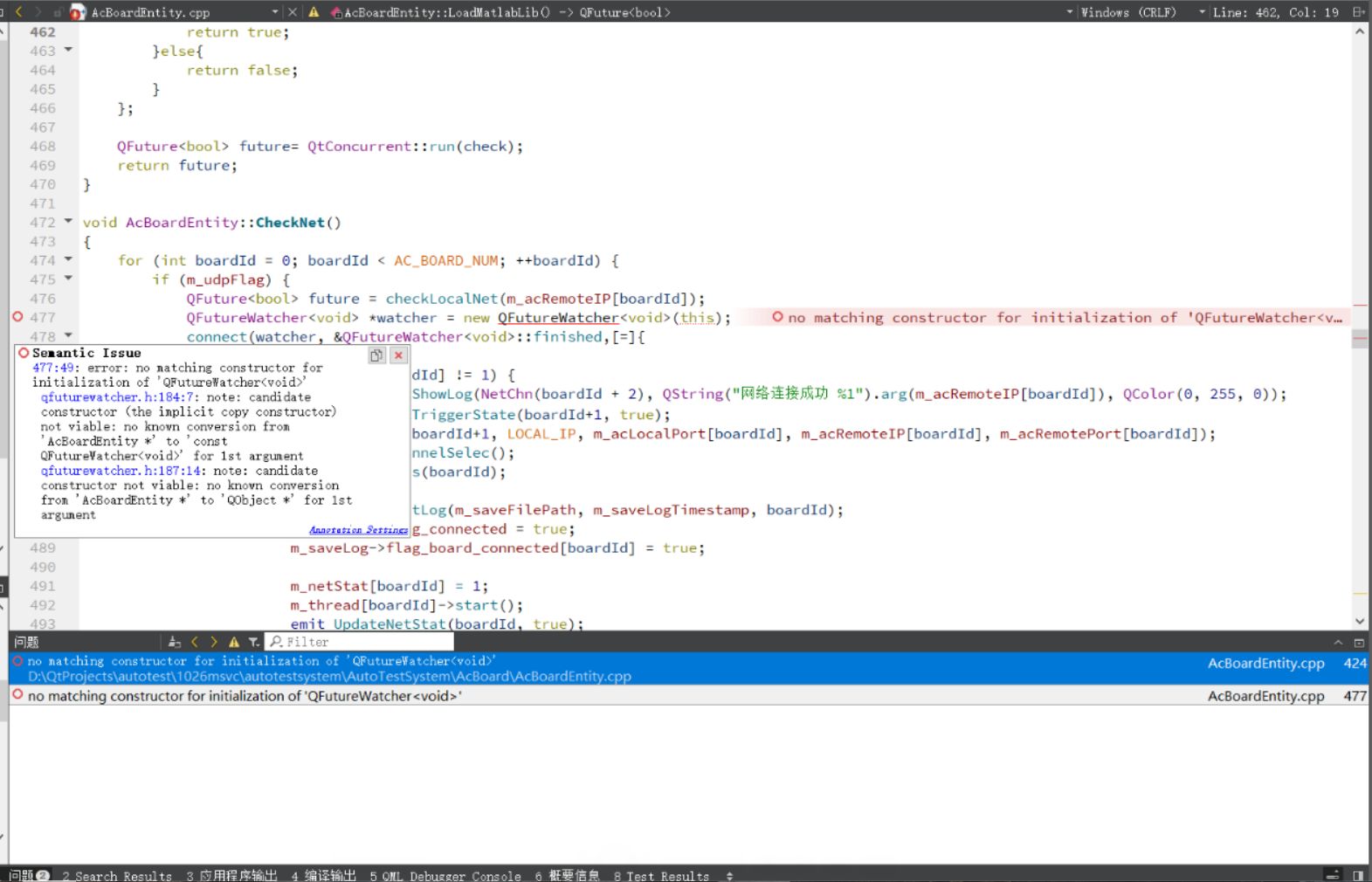
*D:\QtProjects\autotest\1026msvc\autotestsystem\AutoTestSystem\AcBoard\AcBoardEntity.cpp:424: error: no matching constructor for initialization of 'QFutureWatcher<void>'
when I build,only get this error information in compile output:... ... cl -c -nologo -Zc:wchar_t -FS -Zc:rvalueCast -Zc:inline -Zc:strictStrings -Zc:throwingNew -Zc:referenceBinding -Zc:__cplusplus -O2 -MD -W3 -w34100 -w34189 -w44996 -w44456 -w44457 -w44458 -wd4577 -wd4467 -EHsc -DUNICODE -D_UNICODE -DWIN32 -D_ENABLE_EXTENDED_ALIGNED_STORAGE -DWIN64 -DXLSX_NO_LIB -DQT_DEPRECATED_WARNINGS -D__MW_STDINT_H__ -DNDEBUG -DQT_NO_DEBUG -DQT_PRINTSUPPORT_LIB -DQT_WIDGETS_LIB -DQT_GUI_LIB -DQT_NETWORK_LIB -DQT_CONCURRENT_LIB -DQT_CORE_LIB -I..\AutoTestSystem -I. -I..\AutoTestSystem -I..\AutoTestSystem\Tools -I..\AutoTestSystem\Tools -I..\AutoTestSystem\Log4Qt-master\src -I..\AutoTestSystem\Log4Qt-master\src\log4qt -I..\AutoTestSystem\Log4Qt-master\include -I..\AutoTestSystem\Log4Qt-master\include\log4qt -I..\AutoTestSystem\my_include -I..\AutoTestSystem\Common -I..\AutoTestSystem\Common -I..\AutoTestSystem\Common -ID:\Qt5.14.2\5.14.2\msvc2017_64\include\QtGui\5.14.2 -ID:\Qt5.14.2\5.14.2\msvc2017_64\include\QtGui\5.14.2\QtGui -ID:\Qt5.14.2\5.14.2\msvc2017_64\include -ID:\Qt5.14.2\5.14.2\msvc2017_64\include\QtPrintSupport -ID:\Qt5.14.2\5.14.2\msvc2017_64\include\QtWidgets -ID:\Qt5.14.2\5.14.2\msvc2017_64\include\QtGui -ID:\Qt5.14.2\5.14.2\msvc2017_64\include\QtANGLE -ID:\Qt5.14.2\5.14.2\msvc2017_64\include\QtCore\5.14.2 -ID:\Qt5.14.2\5.14.2\msvc2017_64\include\QtCore\5.14.2\QtCore -ID:\Qt5.14.2\5.14.2\msvc2017_64\include\QtNetwork -ID:\Qt5.14.2\5.14.2\msvc2017_64\include\QtConcurrent -ID:\Qt5.14.2\5.14.2\msvc2017_64\include\QtCore -Irelease -I. -I/include -ID:\Qt5.14.2\5.14.2\msvc2017_64\mkspecs\win32-msvc -Forelease\AcBoardEntity.obj ..\AutoTestSystem\AcBoard\AcBoardEntity.cpp AcBoardEntity.cpp Internal compiler error in "D: Program Files (x86) Microsoft Visual Studio 2022 buildtools VC tools MSVC 14.16.27023 bin Hostx64 x64 cl.exe" Please Select Visual C + + Support Command on the help menu, or open the support help file for details ... ... jom: D:\QtProjects\autotest\1026msvc\autotestsystem\build-AutoTestSystem-Desktop_Qt_5_14_2_MSVC2017_64bit-Release\Makefile.Release [release\AcBoardEntity.obj] Error 2 jom: D:\QtProjects\autotest\1026msvc\autotestsystem\build-AutoTestSystem-Desktop_Qt_5_14_2_MSVC2017_64bit-Release\Makefile [release] Error 2 08:59:32: process“D: Qt5.14.2 tools qtcreator bin Jom.exe” exits, exit code 2. Error while building/deploying project AutoTestSystem (kit: Desktop Qt 5.14.2 MSVC2017 64bit) When executing step "Make" -
@Jsulm I asked chatGPT for this question. It replied that :
- "If your Qt Creator can not resolve the Messagequeue < Mymessage > type correctly, try updating to the latest version of Qt Creator or try editing and compiling with another editor.Also, even if your editor can not parse the Messagequeue < Mymessage > type correctly, your code is still valid as long as the compiler compiles the code correctly. You can write, build, and test code without relying on the editor."
It means that the warnings/errors QtCreator is shown in editor. can be ignored.But without this problem, as I said before, it would not compile:
... ... cl -c -nologo -Zc:wchar_t -FS -Zc:rvalueCast -Zc:inline -Zc:strictStrings -Zc:throwingNew -Zc:referenceBinding -Zc:__cplusplus -O2 -MD -W3 -w34100 -w34189 -w44996 -w44456 -w44457 -w44458 -wd4577 -wd4467 -EHsc -DUNICODE -D_UNICODE -DWIN32 -D_ENABLE_EXTENDED_ALIGNED_STORAGE -DWIN64 -DXLSX_NO_LIB -DQT_DEPRECATED_WARNINGS -D__MW_STDINT_H__ -DNDEBUG -DQT_NO_DEBUG -DQT_PRINTSUPPORT_LIB -DQT_WIDGETS_LIB -DQT_GUI_LIB -DQT_NETWORK_LIB -DQT_CONCURRENT_LIB -DQT_CORE_LIB -I..\AutoTestSystem -I. -I..\AutoTestSystem -I..\AutoTestSystem\Tools -I..\AutoTestSystem\Tools -I..\AutoTestSystem\Log4Qt-master\src -I..\AutoTestSystem\Log4Qt-master\src\log4qt -I..\AutoTestSystem\Log4Qt-master\include -I..\AutoTestSystem\Log4Qt-master\include\log4qt -I..\AutoTestSystem\my_include -I..\AutoTestSystem\Common -I..\AutoTestSystem\Common -I..\AutoTestSystem\Common -ID:\Qt5.14.2\5.14.2\msvc2017_64\include\QtGui\5.14.2 -ID:\Qt5.14.2\5.14.2\msvc2017_64\include\QtGui\5.14.2\QtGui -ID:\Qt5.14.2\5.14.2\msvc2017_64\include -ID:\Qt5.14.2\5.14.2\msvc2017_64\include\QtPrintSupport -ID:\Qt5.14.2\5.14.2\msvc2017_64\include\QtWidgets -ID:\Qt5.14.2\5.14.2\msvc2017_64\include\QtGui -ID:\Qt5.14.2\5.14.2\msvc2017_64\include\QtANGLE -ID:\Qt5.14.2\5.14.2\msvc2017_64\include\QtCore\5.14.2 -ID:\Qt5.14.2\5.14.2\msvc2017_64\include\QtCore\5.14.2\QtCore -ID:\Qt5.14.2\5.14.2\msvc2017_64\include\QtNetwork -ID:\Qt5.14.2\5.14.2\msvc2017_64\include\QtConcurrent -ID:\Qt5.14.2\5.14.2\msvc2017_64\include\QtCore -Irelease -I. -I/include -ID:\Qt5.14.2\5.14.2\msvc2017_64\mkspecs\win32-msvc -Forelease\AcBoardEntity.obj ..\AutoTestSystem\AcBoard\AcBoardEntity.cpp AcBoardEntity.cpp Internal compiler error in "D: Program Files (x86) Microsoft Visual Studio 2022 buildtools VC tools MSVC 14.16.27023 bin Hostx64 x64 cl.exe" Please Select Visual C + + Support Command on the help menu, or open the support help file for details ... ... jom: D:\QtProjects\autotest\1026msvc\autotestsystem\build-AutoTestSystem-Desktop_Qt_5_14_2_MSVC2017_64bit-Release\Makefile.Release [release\AcBoardEntity.obj] Error 2 jom: D:\QtProjects\autotest\1026msvc\autotestsystem\build-AutoTestSystem-Desktop_Qt_5_14_2_MSVC2017_64bit-Release\Makefile [release] Error 2 08:59:32: process“D: Qt5.14.2 tools qtcreator bin Jom.exe” exits, exit code 2. Error while building/deploying project AutoTestSystem (kit: Desktop Qt 5.14.2 MSVC2017 64bit) When executing step "Make"I guess there should be other issue.I recall, in ACBOARDENTITY. The most recent major change in the CPP file was: the error C1060 heap overrun due to the large array defined in the H file,so I replaced the array with a pointer and defined it in the CPP file.I thought maybe my pointer was written wrong, so I changed it back to the original array:
//.h
double m_sinForK[AC_BOARD_NUM*AC_PROBE_NUM][3840][125];

//.cpp
memset(m_sinForK, 0, sizeof(m_sinForK));
And it works!
-
K kgsbt has marked this topic as solved on

