Skip to content
  • Categories
  • Recent
  • Tags
  • Popular
  • Users
  • Groups
  • Search
  • Get Qt Extensions
  • Unsolved
Collapse
Brand Logo
  1. Home
  2. Qt Development
  3. General and Desktop
  4. In need of Help - Qtcreator.exe not running
Forum Updated to NodeBB v4.3 + New Features

In need of Help - Qtcreator.exe not running

Scheduled Pinned Locked Moved Unsolved General and Desktop
11 Posts 4 Posters 2.9k Views 2 Watching
  • Oldest to Newest
  • Newest to Oldest
  • Most Votes
Reply
  • Reply as topic
Log in to reply
This topic has been deleted. Only users with topic management privileges can see it.
  • Z Offline
    Z Offline
    ZacharyRose
    wrote on last edited by ZacharyRose
    #1

    Hello, and thank you for taking the time check out my forum post. I am not sure where I am supposed to post this, but thank you nonetheless, and I would be happy to redirect my thread elsewhere. I have tried just about everything, I have no idea why but when I double click my Qtcreator.exe, my cursor shows that something is loading however nothing happens afterward. I have downloaded the 64 bit installer from the website and I have chosen to download version 5.9.2 as well as every option under the tools checkbox. I have tried installing the program to my SSD, and my HDD in hopes that maybe it had to do with my execution path, but no luck. I have been downloading different versions and different tools but there is still nothing happening when I run the .exe. I should also note that the Assistant, Designer, and Linguist programs work however.

    I installed Qt to my E drive, which is
    E:\Qt
    However if I check the location of my Qt community launcher it takes me to the following:
    C:\Users\Zachary\AppData\Roaming\Microsoft\Windows\Start Menu\Programs\Qt

    Any help would be greatly appreciated, I am pretty much out of ideas and options. I would be happy to answer any installation/setup questions as well.

    Thankyou

    1 Reply Last reply
    0
    • hskoglundH Offline
      hskoglundH Offline
      hskoglund
      wrote on last edited by
      #2

      Hi, try disabling your antivirus program. Also you can try launching Qt Creator manually, by opening a CMD window and type:
      E:\Qt\Tools\QtCreator\bin\qtcreator.exe

      1 Reply Last reply
      1
      • Z Offline
        Z Offline
        ZacharyRose
        wrote on last edited by
        #3

        Hi Kskoglund, thank you for the quick reply. I have tried disabling windows defender and also tried to launch Manually into the CMD window, and nothing noticeable seems to happen.

        mrjjM 1 Reply Last reply
        0
        • Z ZacharyRose

          Hi Kskoglund, thank you for the quick reply. I have tried disabling windows defender and also tried to launch Manually into the CMD window, and nothing noticeable seems to happen.

          mrjjM Offline
          mrjjM Offline
          mrjj
          Lifetime Qt Champion
          wrote on last edited by
          #4

          @ZacharyRose

          Hi can you try from CMD with
          qtcreator -noload Welcome -noload QmlDesigner -noload QmlProfiler

          1 Reply Last reply
          2
          • Z Offline
            Z Offline
            ZacharyRose
            wrote on last edited by
            #5

            @mrjj said in In need of Help - Qtcreator.exe not running:

            qtcreator -noload Welcome -noload QmlDesigner -noload QmlProfiler

            Hi MrJJ, thank you for the response. I have tried all three options and no luck. I have noticed that in my task manger Details header, the Qtcreator.exe appears for about 1 second before dissapearing whenever I try to run the program.

            mrjjM 1 Reply Last reply
            0
            • Z ZacharyRose

              @mrjj said in In need of Help - Qtcreator.exe not running:

              qtcreator -noload Welcome -noload QmlDesigner -noload QmlProfiler

              Hi MrJJ, thank you for the response. I have tried all three options and no luck. I have noticed that in my task manger Details header, the Qtcreator.exe appears for about 1 second before dissapearing whenever I try to run the program.

              mrjjM Offline
              mrjjM Offline
              mrjj
              Lifetime Qt Champion
              wrote on last edited by
              #6

              @ZacharyRose
              Ok, this was to test screen driver / openGL support.
              The welcome screen is QML and demands good opengl but it was not that since it made no difference.

              Could try to run this
              "C:\Qt\5.9.1\msvc2015_64\bin\qtdiag.exe"
              (if using mingw, its in that folder instead of the vs2015 one)

              qtdiag.exe > info.txt

              and post here?

              I think you are experiencing something not often seen as you tried multiple installs and still not starting.

              Z 1 Reply Last reply
              0
              • SGaistS Offline
                SGaistS Offline
                SGaist
                Lifetime Qt Champion
                wrote on last edited by
                #7

                Hi and welcome to devnet,

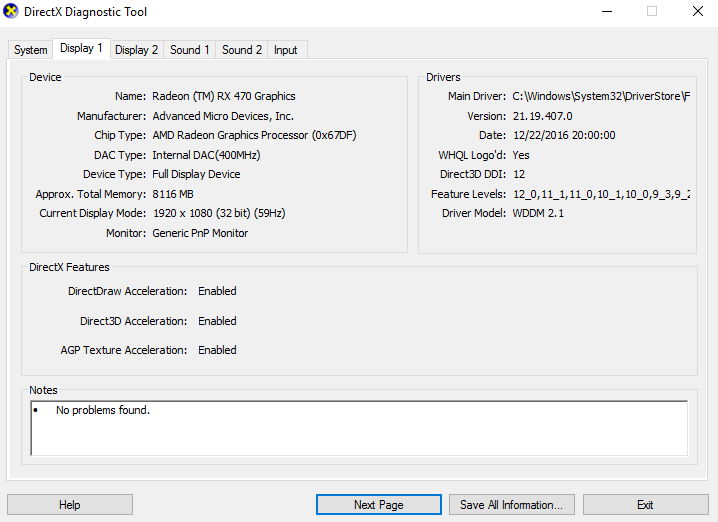
                What version of Windows are you running ?
                What is your graphic stack ?
                What processor are you using ?

                Interested in AI ? www.idiap.ch
                Please read the Qt Code of Conduct - https://forum.qt.io/topic/113070/qt-code-of-conduct

                Z 1 Reply Last reply
                0
                • mrjjM mrjj

                  @ZacharyRose
                  Ok, this was to test screen driver / openGL support.
                  The welcome screen is QML and demands good opengl but it was not that since it made no difference.

                  Could try to run this
                  "C:\Qt\5.9.1\msvc2015_64\bin\qtdiag.exe"
                  (if using mingw, its in that folder instead of the vs2015 one)

                  qtdiag.exe > info.txt

                  and post here?

                  I think you are experiencing something not often seen as you tried multiple installs and still not starting.

                  Z Offline
                  Z Offline
                  ZacharyRose
                  wrote on last edited by
                  #8

                  @mrjj

                  Thanks for the response. I had run the program however a black box appears for about 1 second before closing itself. I can take a screen shot in the few frames that it is there before it goes away:

                  0_1508875090140_e9b9f29a-b5ba-4aff-a385-536b7b3adfff-image.png

                  mrjjM 1 Reply Last reply
                  0
                  • Z ZacharyRose

                    @mrjj

                    Thanks for the response. I had run the program however a black box appears for about 1 second before closing itself. I can take a screen shot in the few frames that it is there before it goes away:

                    0_1508875090140_e9b9f29a-b5ba-4aff-a385-536b7b3adfff-image.png

                    mrjjM Offline
                    mrjjM Offline
                    mrjj
                    Lifetime Qt Champion
                    wrote on last edited by
                    #9

                    @ZacharyRose
                    Hi
                    You should first open a cmd
                    then type
                    \fullpath\qtdiag.exe > info.txt

                    Then you have the info in the file info.txt

                    1 Reply Last reply
                    0
                    • SGaistS SGaist

                      Hi and welcome to devnet,

                      What version of Windows are you running ?
                      What is your graphic stack ?
                      What processor are you using ?

                      Z Offline
                      Z Offline
                      ZacharyRose
                      wrote on last edited by
                      #10

                      @SGaist

                      0_1508875478978_1a176f76-1c99-4115-afc8-6af3e3da0f3c-image.png

                      0_1508875507426_2cebffa8-5a48-4b76-ab67-71939165d54d-image.png

                      1 Reply Last reply
                      0
                      • SGaistS Offline
                        SGaistS Offline
                        SGaist
                        Lifetime Qt Champion
                        wrote on last edited by
                        #11

                        Did you try updating the Graphic Card driver ?

                        Interested in AI ? www.idiap.ch
                        Please read the Qt Code of Conduct - https://forum.qt.io/topic/113070/qt-code-of-conduct

                        1 Reply Last reply
                        0

                        • Login

                        • Login or register to search.
                        • First post
                          Last post
                        0
                        • Categories
                        • Recent
                        • Tags
                        • Popular
                        • Users
                        • Groups
                        • Search
                        • Get Qt Extensions
                        • Unsolved