
Skip to content
  • Categories
  • Recent
  • Tags
  • Popular
  • Users
  • Groups
  • Search
  • Get Qt Extensions
  • Unsolved
Collapse
Brand Logo
  1. Home
  2. Qt Development
  3. General and Desktop
  4. Mainwindow layout problem with QDockWidget.
Qt 6.11 is out! See what's new in the release blog

Mainwindow layout problem with QDockWidget.

Scheduled Pinned Locked Moved General and Desktop
18 Posts 8 Posters 23.7k Views 2 Watching
  • Oldest to Newest
  • Newest to Oldest
  • Most Votes
Reply
  • Reply as topic
Log in to reply
This topic has been deleted. Only users with topic management privileges can see it.
  • T Offline
    T Offline
    tobias.hunger
    wrote on last edited by
    #9

    Do you really want 11 dockwindow areas? As a user I would get terribly confused by that!

    1 Reply Last reply
    0
    • E Offline
      E Offline
      entuland
      wrote on last edited by
      #10

      @pastispast: you're welcome, I'm glad to help when I can.

      Unfortunately I cannot help you further with the issues of your layout, I can only suggest you to put something different as a central widget, not a dockwidget, so that your users are well aware of what is the main content of your program and where the docks can be put - also, practice a bit more with the interface, your constraint 3 does not stand: it's you who decide how much space the central widget takes, you can put a lot of stuff in the central widget yet make it completely disappear (that is, 0x0 size) by just resizing the docking areas, assuming you use appropriate settings for the size restrictions.

      @Tobias Hunger: it all depends on the type of the program and on the intended audience, I feel comfortable with lots of docks as long as I'm able to move, resize and hide them at will - just like you would feel comfortable with, I think - but if I was Average User, I think I could get confused too... only the OP can decide whether such an amount of docks is appropriate or not, since we don't know the context of the program at hand.

      1 Reply Last reply
      0
      • D Offline
        D Offline
        dangelog
        wrote on last edited by
        #11

        Actually, I'm missing something like Adobe Premiere dockings in Qt :-)

        Software Engineer
        KDAB (UK) Ltd., a KDAB Group company

        1 Reply Last reply
        0
        • E Offline
          E Offline
          entuland
          wrote on last edited by
          #12

          Unfortunately I never used Adobe Premiere... could you describe the features you're thinking about, peppe?

          1 Reply Last reply
          0
          • D Offline
            D Offline
            dangelog
            wrote on last edited by
            #13

            See f.i. http://filmmakingcentral.com/fmc2/wp-content/uploads/2008/12/premui1.jpg , basically there are ONLY docked widgets with an unique look and feel, and quick menus everywhere to switch their layouts and add/remove them on the fly (with many presets available).

            Software Engineer
            KDAB (UK) Ltd., a KDAB Group company

            1 Reply Last reply
            0
            • E Offline
              E Offline
              entuland
              wrote on last edited by
              #14

              Looks quite interesting... well maybe we could subclass QDockWidget and add some functionality... it may become an interesting spare time project :-)

              1 Reply Last reply
              0
              • osirisgothraO Offline
                osirisgothraO Offline
                osirisgothra
                wrote on last edited by
                #15

                heads up, please use fixed width fonts when trying to convey design layouts to others, or put it in an image, because variable-width fonts hardly ever line up as they do for you on the other end (even if it does go ok in fixed width, but not everyone sees it this way). Maybe someone can fix this problem on the 'code view' either that or i'm the only one, if I am, just smack me.

                I'm truly glad you r/offmychess t finally, but please don't go too far, because you r/beyondvoxels and that implies that u r/donewithlife. Oh well time to git back to the lab, because azure sea here, I have a lot of work to do...

                1 Reply Last reply
                0
                • 1 Offline
                  1 Offline
                  10QT
                  wrote on last edited by
                  #16

                  Any update on this? Is there a way to have only dockable windows like the adobe example?

                  1 Reply Last reply
                  0
                  • Chris KawaC Online
                    Chris KawaC Online
                    Chris Kawa
                    Lifetime Qt Champion
                    wrote on last edited by
                    #17

                    @10QT said:

                    Is there a way to have only dockable windows like the adobe example?

                    To some degree - yes. The key is creating a dummy 0 size central widget and enabling nested docks dockable to only single dock area (e.g. top). Here's an example:

                    #include <QMainWindow>
                    #include <QDockWidget>
                    #include <QApplication>
                    
                    int main(int argc, char *argv[])
                    {
                        QApplication a(argc, argv);
                    
                        QMainWindow w;
                        w.setDockOptions(QMainWindow::AllowNestedDocks | QMainWindow::AllowTabbedDocks);
                    
                        w.setCentralWidget(new QWidget());//just a dummy
                        w.centralWidget()->setMaximumSize(0,0);
                    
                        auto d1 = new QDockWidget("Foo");
                        d1->setAllowedAreas(Qt::TopDockWidgetArea);
                        w.addDockWidget(Qt::TopDockWidgetArea, d1);
                    
                        auto d2 = new QDockWidget("Bar");
                        d2->setAllowedAreas(Qt::TopDockWidgetArea);
                        w.addDockWidget(Qt::TopDockWidgetArea, d2);
                    
                        auto d3 = new QDockWidget("Bazz");
                        d3->setAllowedAreas(Qt::TopDockWidgetArea);
                        w.addDockWidget(Qt::TopDockWidgetArea, d3);
                    
                        auto d4 = new QDockWidget("Hello");
                        d4->setAllowedAreas(Qt::TopDockWidgetArea);
                        w.addDockWidget(Qt::TopDockWidgetArea, d4);
                    
                        auto d5 = new QDockWidget("Bye");
                        d5->setAllowedAreas(Qt::TopDockWidgetArea);
                        w.addDockWidget(Qt::TopDockWidgetArea, d5);
                    
                        auto d6 = new QDockWidget("Hi there");
                        d6->setAllowedAreas(Qt::TopDockWidgetArea);
                        w.addDockWidget(Qt::TopDockWidgetArea, d6);
                    
                        w.splitDockWidget(d1, d2, Qt::Vertical);
                        w.splitDockWidget(d3, d4, Qt::Vertical);
                        w.splitDockWidget(d3, d5, Qt::Horizontal);
                        w.tabifyDockWidget(d1, d6);
                    
                        w.show();
                        return a.exec();
                    }
                    

                    This results in:
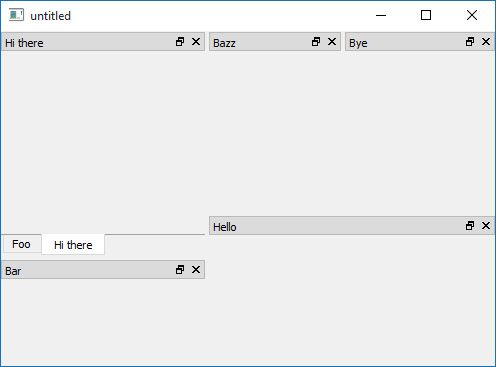
                    Nested docks layout

                    Presets and buttons for switching docks positions you can get by subclassing QDockWidget and customizing it.

                    1 Reply Last reply
                    1
                    • 1 Offline
                      1 Offline
                      10QT
                      wrote on last edited by
                      #18

                      Thanks for the quick reply, I'll give this a try

                      1 Reply Last reply
                      0

                      • Login

                      • Login or register to search.
                      • First post
                        Last post
                      0
                      • Categories
                      • Recent
                      • Tags
                      • Popular
                      • Users
                      • Groups
                      • Search
                      • Get Qt Extensions
                      • Unsolved